Fixture Menu
29
Fixture Menu
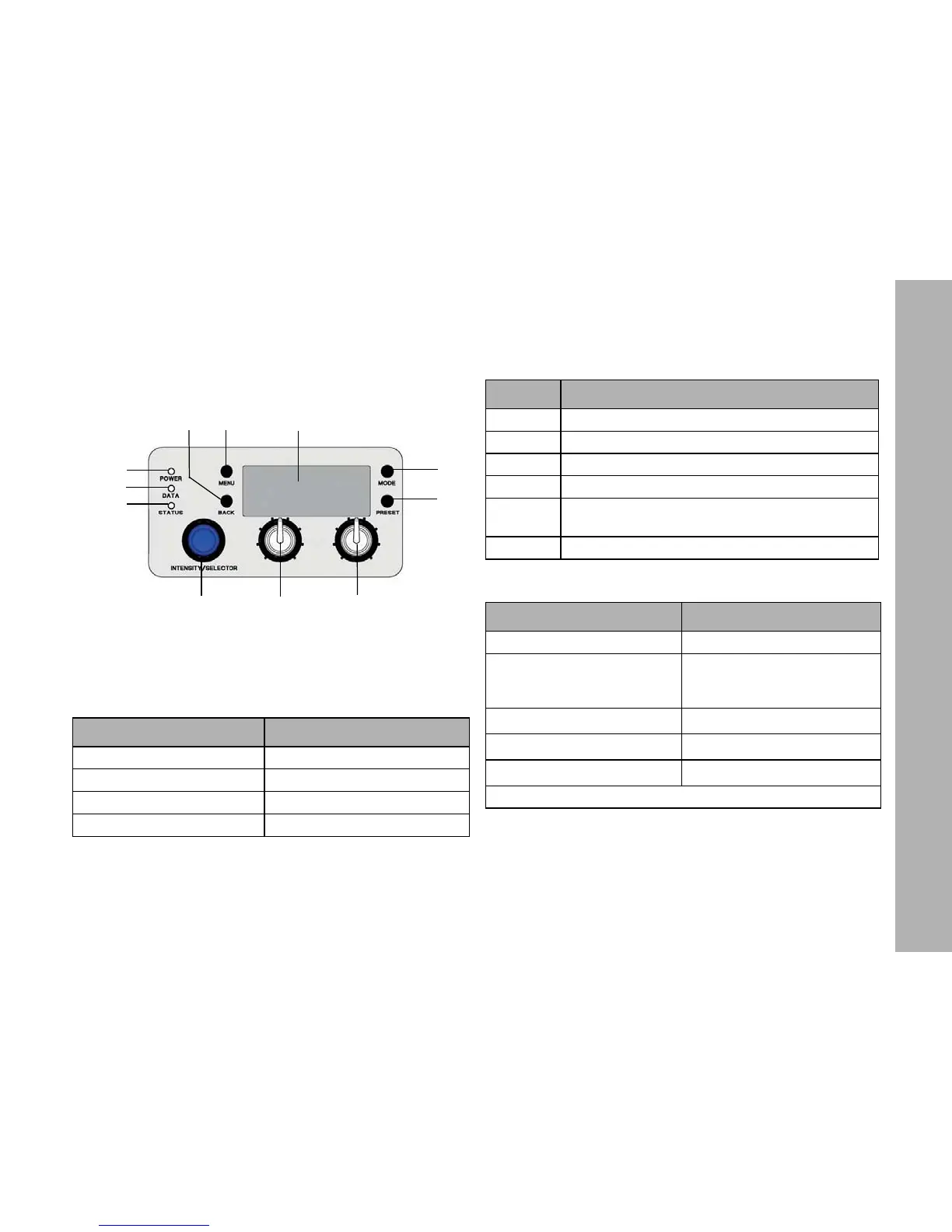
Overview
Features of the Fixture Menu
POWER-LED (1):
DATA-LED (2):
STATUS-LED (3):
Color Indication
Green Fixture switched on. No error.
Blue Fixture powered by battery pack
Red Battery pack low voltage
No color Fixture switched off.
1
2
3
4
5
6
7
8
9
10
11
Figure 10: Fixture menu
Color Indication
Blue The fixture receives a valid DMX signal.
Purple Master mode active
White Receiving valid Art-Net signal, Gateway active
Green Receiving valid Art-Net signal, Gateway not active
Red
No communication between fixture menu and
controller board.
No light The fixture receives no valid control signal.
Color Indication
Green No error. Normal temperature.
Red flashing (0,5s rhythm)*
Warning fixture over tempera-
ture (only with fan modes LOW
and High Speed).
Red
*
Fixture over temperature.
Change from red to green
*
Fixture normal temperature.
Red flashing (0,25s Rhythm)
*
Calibration data no loaded.
*Display lights up red when STATUS-LED is lit red



 To Next Page