22 Getting started
8 Getting started
8.1 Preparation
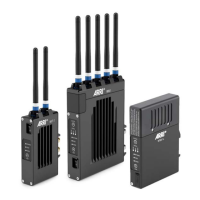
WVT-1
1. Screw two antennas on top of WVT-1 to the antenna
connectors.
2. Connect WVT-1 (connector: PWR IN) to a power source, for
example a camera, via power cable.
3. Connect the camera via a BNC cable with WVT-1 for a video
signal.
4. Turn on WVT-1 and pair it to an ARRI WVS receiver.
WVR-1
WVR-1 must be set up depending on its intended use.
1. Screw five antennas on top of WVR-1 to the antenna
connectors.
2. Attach a battery adapter plate and a battery or connect the
Receiver Power Supply RPS-1 to the 3-Pin Fischer power-in
connector.
3. Turn on WVR-1 and pair it to an ARRI WVS transmitter.
WVR-1s
WVR-1 must be set up depending on its intended use.
1. Attach a battery adapter plate and a battery.
2. Turn on WVR-1s and pair it to an ARRI WVS transmitter.
NOTICE
It is not recommended to use the WVT-1 or WVR-1 without
antennas.


 To Next Page