Arrow International, Inc.
9
2.1 Set up
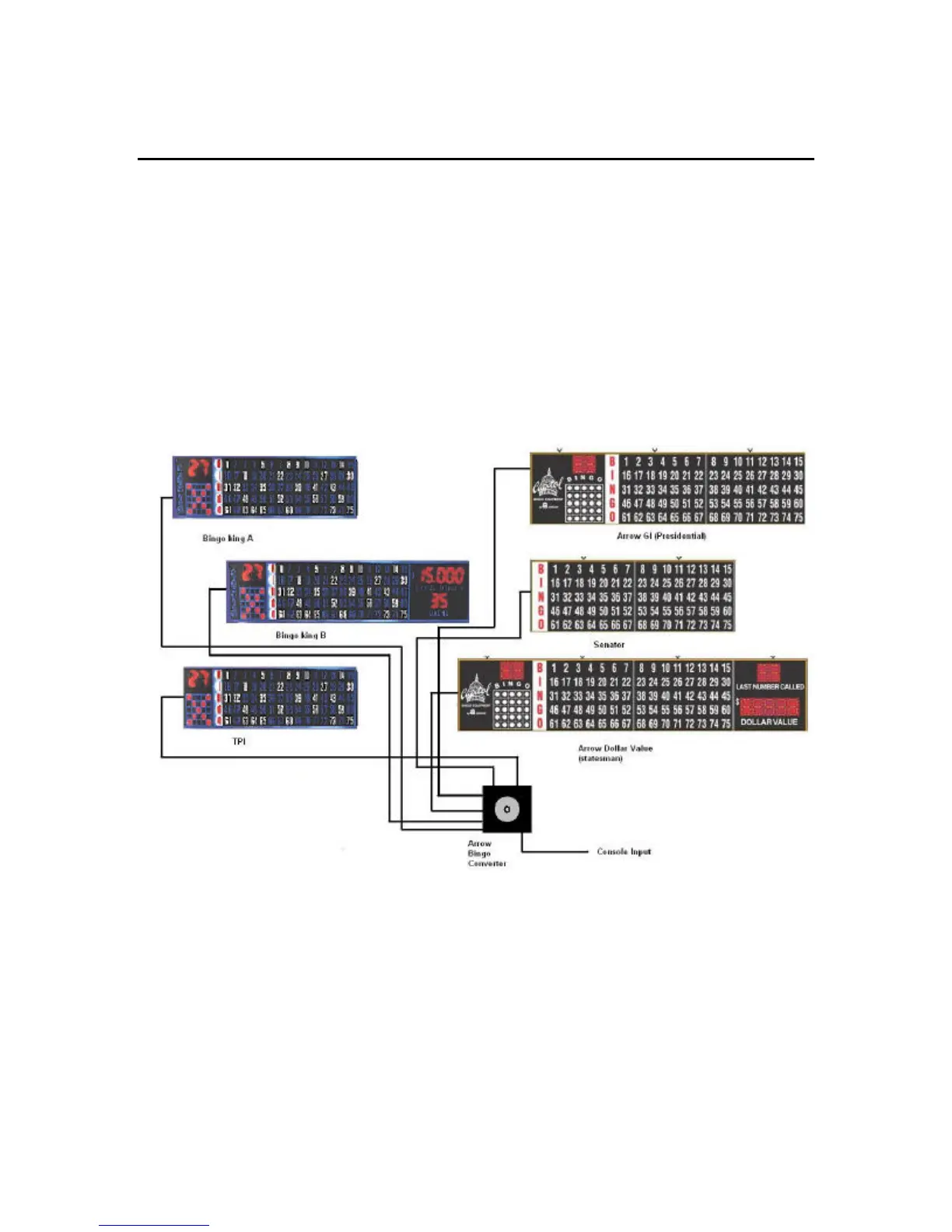
To set up the Arrow Bingo Converter for use, Follow the procedure below and refer to figure 2.2.
1. Plug in the external power supply
2. Press the reset button on the Arrow Bingo Converter
3. Set the selector knob to the type of input you have
4. Connect input cable between the bingo output of the console and the console input of
the converter
5. Connect the flashboard cable to the appropriate output on the converter
The Arrow Bingo Converter only requires that the console input be selected in order to drive all of
the supported flashboard types. This means that a single console can drive all the supported
flashboards simultaneously!
Figure 2.2
To use the Arrow Bingo Converter as a test unit, select either of the test patterns. The test
function does not require a console input. The unit can act as a standalone flashboard tester
using either the external power supply or the (optional) battery pack. To test the console output,
connect the console bingo output to the Arrow Bingo Converter input. Refer to the input status
indicator chart on page 7.


 To Next Page