EasyManua.ls Logo

Arrow CT50 - User Manual

Arrow CT50
19 pages
Print Icon
To Next Page IconTo Next Page
Loading...
CT50
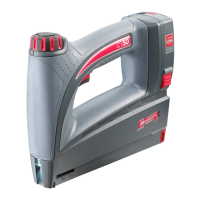
CORDLESS STAPLE GUN
1
GENERAL SAFETY RULES................................................................................ P 2
SPECIFIC SAFETY RULES................................................................................. P 3
SAFETY RULES FOR CHARGER.......................................................................... P 4
DEFINITION OF SYMBOLS USED ON TOOL........................................................ P 5
FUNCTIONAL DESCRIPTION................................................................................ P 5
ASSEMBLY & OPERATION ................................................................................... P 6
BATTERIES............................................................................................................. P 7
MAINTENANCE & ACCESSORIES........................................................................ P 7
REGLAS GENERALES DE SEGURIDAD.............................................................. P 8
REGLAS ESPECIFICAS DE SEGURIDAD.............................................................. P 9
REGLAS DE SEGURIDAD PARA EL CARGADOR................................................ P 10
DEFINICIÓN DE LOS SÍMBOLOS UTILIZADOZ.................................................... P 11
DESCRIPCIÓN FUNCIONAL................................................................................ P 11
ENSAMBLAJE Y OPERACIÓN .............................................................................. P 12
BATERÍAS............................................................................................................. P 13
MANTENIMIENTOY ACCESORIOS........................................................................ P 13
CONSIGNES GÉNÉRALES DE SÉCURITÉ............................................................ P 14
CONSIGNES PARTICULIÈRES DE SÉCURITÉ..................................................... P 15
CONSIGNES DE SÉCURITÉ POUR LE CHARGEUR........................................... P 16
DEFINITION DES SYMBOLES UTILISES SUR L'OUTIL ...................................... P 17
DESCRIPTION FONCTIONNELLE......................................................................... P 17
MONTAGE ET FONCTIONNEMENT ....................................................................... P 18
PILES........................................................................................................................ P 19
ENTRETIEN ET ACCESSOIRESS..................................................................... P 19
Click Button
to go to page
Pulse el botón
para ir a la página
Bouton-poussoir
pour aller à la page
ENGLISH
FRANÇAIS
ESPAÑOL
OM-0036 REV110
Question and Answer IconNeed help?

Do you have a question about the Arrow CT50 and is the answer not in the manual?

Summary

GENERAL SAFETY RULES

Work Area Safety

Keep work area clean and well lit, avoid explosive atmospheres.

Electrical Safety

Use grounded outlets, avoid body contact with grounded surfaces.

Personal Safety Precautions

Stay alert, dress properly, avoid accidental starting, use safety equipment.

Tool Use and Care

Secure workpiece, use correct tool, maintain tools, use proper accessories.

Tool Service Guidelines

Tool service by qualified personnel, use identical replacement parts.

SPECIFIC SAFETY RULES

Hidden Wiring Hazard

Hold tool by insulated surfaces to avoid shock from hidden wiring.

Know Your Power Tool

Read manual, learn limitations and hazards.

Eye Protection

Always wear safety glasses with side shields.

Lung Protection

Wear face or dust mask if operation is dusty.

Hearing Protection

Wear hearing protection for extended operation.

Battery Tool Operation Awareness

Be aware of hazards when not using or changing accessories.

Battery and Heat Hazard

Do not place batteries near fire or heat to prevent explosion.

Damaged Battery Warning

Do not use dropped or damaged batteries due to explosion risk.

Wet Location Charging Restriction

Do not charge battery tool in damp or wet locations.

Charging Temperature Guidelines

Charge between 50°F and 100°F, do not store in vehicles.

Battery Leakage Handling

Handle battery leakage promptly with water and medical attention if needed.

SAFETY RULES FOR CHARGER

Charger Instruction Review

Read all instructions and cautionary markings before charging.

Charger Usage and Environment

Charge only designated Lithium-Ion batteries, avoid wet conditions.

Attachment Compatibility

Use only manufacturer-recommended attachments for safety.

Charger Cord and Plug Care

Do not abuse cord, pull plug from receptacle, replace damaged cords.

Cord Placement Safety

Ensure cord is not stepped on, tripped over, or damaged.

Heat Protection for Charger

Keep cord and charger from heat to prevent damage.

Chemical Contact Warning

Keep chemicals like gasoline away from plastic parts.

Extension Cord Usage Guidelines

Use extension cord only if necessary, ensure proper rating and condition.

Damaged Charger Operation

Do not operate with damaged cord/plug, have it serviced if damaged.

Charger Disassembly Prohibition

Do not disassemble charger; seek authorized service for repairs.

Cleaning Precautions

Unplug charger before cleaning or maintenance.

Disconnect When Not In Use

Disconnect charger from power supply when not in use.

Connector Terminal Safety

Do not touch uninsulated output connector or battery terminal.

Save and Share Instructions

Save and refer to instructions frequently, provide to others.

DEFINITION OF SYMBOLS USED ON TOOL

Electrical Symbols

Defines symbols for Volts, Amperes, Hertz, DC, and AC.

Safety Symbols

Defines symbols for Alert, Eye Protection, and Hearing Protection.

FUNCTIONAL DESCRIPTION

Depth of Drive Dial

Adjusts staple depth.

Battery Power Meter

Indicates remaining battery charge.

10.8 V Lithium-Ion Battery

Power source for the tool.

Battery Release

Mechanism to detach the battery.

Trigger

Activates staple firing mechanism.

Staple Chamber Release

Opens the staple chamber for loading.

Staple Chamber

Holds staples for firing.

Staple Supply Window

Shows remaining staple count.

Staple Exit

Point where staples are driven.

LED Guide Light

Illuminates work area.

ASSEMBLY

Read Safety Instructions First

Crucial first step before assembly.

Battery Charging Procedure

Fully charge the battery before first use.

Battery Meter Check

Check battery charge level using the meter.

Battery Installation

Slide battery onto the tool until it locks.

OPERATION

Loading Staples

Remove battery, insert staples, slide pusher, re-install battery.

Staple Firing Adjustment

Use depth adjustment dial for material types.

Using the Guide Light

Use trigger and safety switch for LED light assistance.

BATTERIES AND MAINTENANCE

Battery Pack Recycling

Recycle or dispose of batteries properly, cover terminals.

Maintenance Requirements

Tool is maintenance-free, keep clean, no user serviceable parts.

Accessory Information

Information on purchasing additional accessories.

Arrow CT50 Specifications

General IconGeneral
BrandArrow
ModelCT50
CategoryStaple Gun
LanguageEnglish

Related product manuals