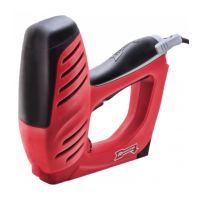
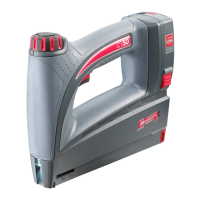
The device is a Cordless Electric Staple Gun designed for fastening applications. It is branded as "ARROW" with the tagline "HOW IT ALL COMES TOGETHER."
Function Description:
This cordless electric staple gun is used to drive staples into a work surface. It operates by pressing a power switch to the "ON" position, firmly pressing the tacker head against the work surface, and then squeezing the trigger to deliver a staple. For safety, the tool will only operate when both the tacker head and the trigger are pressed simultaneously. After a staple is delivered, the trigger should be released, the tool lifted off the work surface, and the power switch pressed to the "OFF" position.
Important Technical Specifications:
- Battery Voltage: 3.6V
- Battery Capacity: 1500 mAh
- Charging Time: Approximately 3 hours
- Magazine Capacity: Up to 100 staples
- Staple Type: Uses JT21® staples
- Staple Width (externally): 11.4 mm
- Staple Lengths: 6-10 mm
Usage Features:
- Cordless Operation: The device is battery-powered, offering freedom of movement without the need for an electrical outlet during operation.
- Easy Charging: The unit is charged by inserting the charging cord into the charging cord input and plugging it into a power outlet. The battery indicator LED illuminates red during charging and turns green when fully charged. The initial charge takes about 3 hours. The battery can be recharged at any time.
- Battery Indicator LED (5): This LED illuminates only when the trigger is pressed. A green light indicates sufficient battery power, while a red light indicates a low battery level.
- Refill Indicator Window (6): This window allows the user to view the amount of staples remaining in the tool, helping to prevent unexpected interruptions during work.
- Simple Staple Loading: Staples are loaded into the magazine channel after pressing the power switch to "OFF," holding the unit upside down, squeezing both sides of the magazine release, and sliding the magazine open. Once staples are inserted, the magazine is closed until it clicks into place.
- Safety Mechanism: The tool requires both the tacker head (7) to be depressed against the work surface and the trigger (3) to be squeezed simultaneously for operation, preventing accidental firing.
- Ergonomic Design: Features a handle (4) for a firm grip during operation.
Maintenance Features:
- Troubleshooting for No Power/Tool Not Firing:
- Ensure the battery is charged.
- Verify that both the trigger and the tacker head are being pressed at the same time.
- Check for staple jams.
- Cleaning Jams: To clear jams, the unit must be put in the "OFF" position, the magazine opened, and any obstructed staples removed. Caution is advised when removing jammed fasteners, as the mechanism may be under compression.
- General Power Tool Safety Warnings:
- Work Area Safety: Keep the work area clean, well-lit, and free of children and bystanders. Avoid operating in explosive atmospheres.
- Electrical Safety: Ensure power tool plugs match the outlet and are never modified. Avoid body contact with earthed surfaces. Do not expose power tools to rain or wet conditions. Protect the charging cord from heat, oil, sharp edges, or moving parts. Use an extension cord suitable for outdoor use when operating outdoors. If operating in a damp location, use a residual current device (RCD) protected supply.
- Personal Safety: Stay alert, wear eye protection, and use other personal protective equipment (dust mask, non-skid safety shoes, hard hat, hearing protection) as appropriate. Prevent unintentional starting by ensuring the switch is off before connecting to power or battery pack. Remove adjusting keys/wrenches before turning on the tool. Maintain proper footing and balance. Dress properly, keeping loose clothing, jewelry, and hair away from moving parts. Use dust extraction and collection facilities if provided.
- Power Tool Use and Care: Do not force the power tool; use the correct tool for the application. Do not use a tool if the switch does not turn it on/off. Disconnect the plug/battery pack before making adjustments, changing accessories, or storing. Store idle tools out of reach of children. Maintain power tools by checking for misalignment, binding, breakage, and other conditions. Keep cutting tools sharp and clean. Use the power tool, accessories, and tool bits according to instructions and working conditions.
- Battery Tool Use and Care: Recharge only with the specified charger. Use only designated battery packs. Keep battery packs away from other metal objects when not in use to prevent shorting. Avoid contact with liquid ejected from the battery under abusive conditions; flush with water and seek medical help if contact occurs.
- Service: Have the power tool serviced by a qualified repair person using identical replacement parts to maintain safety.
Safety Instructions for Stapler:
- Always assume the tool contains fasteners.
- Do not point the tool towards yourself or anyone nearby.
- Do not actuate the tool unless it is placed firmly against the workpiece.
- Disconnect the tool from the power source when fasteners jam.
- Use caution when removing jammed fasteners.
- Do not use this stapler for fastening electrical cables, as it is not designed for such use and may cause electric shock or fire hazards.
- Safety Symbols:
- Exclamation mark: Obey all safety messages to avoid injury or death.
- Ear protection symbol: Always wear ear protection.
- Safety glasses symbol: Always wear safety glasses.
- Instruction manual symbol: Read the instruction manual to reduce the risk of injury.

 Need help?
 General

 To Next Page