EasyManua.ls Logo

Art-Net DMX - User Manual

Art-Net DMX
7 pages
Print Icon
To Next Page IconTo Next Page
Loading...
Art-Net™ DMX Bidirectional Converter
Function introduction
Important: Read All Instructions Prior to Installation
Front side
3.5" LCD Screen for Configuration
25.5
49.0
100
73.5
148.5
38.0
Left side Right side
SD card slot
2 Ethernet ports
Port 1
Port 2
Port 3
Port 4
4 RJ45 DMX ports, can be all
DMX Out ports when work
under Art-Net™ to DMX
mode, port 1 can work as
DMX In port when work under
DMX to Art-Net™ mode and
1IN->3OUT mode
12/24VDC
power in
female connector
2 Ethernet ports with Ethernet switch function, 4 RJ45 DMX ports, it takes up to 4 Art-Net™ universes.
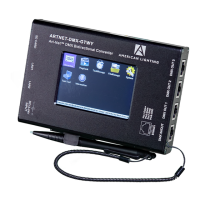
Art-Net™ DMX bidirectional converter, supports the latest Art-Net™ 4 protocol.
PlayBack function allows the device to play the recorded programs under standalone mode.
Recorder function allows the device to record programs such as color sequences and save them into SD card.
4 universes record simultaneously, high speed recording with 40FPS frame rate.
With 3.5" LCD screen and a touch control pen for easy & simple configuration.
TaskManage function allows the device to create up to 10 scheduled tasks to play the recorded programs.
Product Features
The Art-Net™ DMX Bidirectional Converter is an Ethernet to DMX adapter with integrated optical DMX splitter and
Ethernet switch capability. It has 4 RJ45 DMX Out ports, which are all optically isolated, compatible with the following
protocols: DMX512, DMX512-A and Art-Net™. The converter is designed with a 3.5" LCD screen and a touch control pen
which allow you to configure it easily and visibly. It is also can be remotely configured and monitored through Art-Net™
supported PC software including Sunlite, DMX workshop, Luminair, Madrix, etc.
It takes up to 4 Art-Net™ universes simultaneously. The 4 RJ45 DMX ports can be assigned to either of the DMX In port
or to one of the Art-Net™ universes. The two Ethernet links are 10/100BaseTx connections on RJ45 connector, located
on the unit. The 2 Ethernet ports are through ports that allow daisy chaining of the Art-Net™ DMX Bidirectional Converter
units.
Recorder function allows you to record programs such as color sequences that are programmed and played by a Art-Net
supported PC software or DMX console and save them into SD card. PlayBack function allows you to play the recorded
programs in the SD card with no controller required. TaskManage function allows you to create up to 10 scheduled tasks
which will play the selected recorded programs based on the frequency of day or week. Each scheduled task allows you
to choose up to 10 recorded programs. The play mode can be SinglePlay or LoopPlay. The converter provides a reliable,
highly customizable network infrastructure for complex control systems. The converter can be compatible with popular
Art-Net™ supported software including Sunlite, DMX workshop, Luminair, Madrix, etc.
Product Description
DO NOT install with power applied to device.
DO NOT expose the device to moisture.
Safety & Warnings
Product Specifications
DMX
4 x RJ45
Network
2 x RJ45
Connectivity
Supported Protocols
DMX512, DMX512-A
DMX Port Direction
Input or output (configurable)
DMX Port Isolation
Optic and galvanic isolation per port
DMX Features
Supported Protocols
Art-Net ™, sACN
Port Speed
10/100Mbps
Ethernet Features
Ethernet Port Connection
Power
LED indication
Link and Activity LED
Status Report
Power Input
Power Input
12/24 VDC
Power Consumption
Maximum 4W / 0.17A
DMX
LED indication
One ArtNet supported PC software is enough for multiple projects which will save much costs.
Compatible with popular Art-Net™ supported software including Madrix, Sunlite, Luminair, DMX workshop, etc.
TaskManage function works under standalone mode with no Art-Net™ supported PC software required.
The PC software can be just used for Recorder function, all projects can run programs under standalone mode.
Provides a reliable, highly customizable network infrastructure for complex control systems
Question and Answer IconNeed help?

Do you have a question about the Art-Net DMX and is the answer not in the manual?

Summary

Art-Net Bidirectional Converter Overview

Function Introduction

Provides a brief introduction to the converter's primary function and capabilities.

Product Description

Detailed description of the Art-Net DMX Bidirectional Converter's features and technology.

Safety and Product Specifications

Safety & Warnings

Essential safety precautions and warnings for the installation and use of the device.

Product Specifications

Technical specifications including connectivity, DMX features, and Ethernet capabilities.

Installation and Operation Guide

Environmental and Physical Specs

Details on storage temperature, working ambient temperature, relative humidity, and dimensions.

Installation Guide

Recommendations for placing the converter and planning the control network setup.

Signal and Network Connection

Explanation of signal flow and Art-Net™ connection protocols.

Application Modes

Describes different operating modes like ArtNet->DMX, DMX->ArtNet, and 1IN->3OUT.

LCD Operation

Instructions for configuring and operating the device using the 3.5-inch LCD screen.

System Configuration Details

System Configuration - ArtNet Settings

Configuring Net, IP address, subnet masks, and assigning Art-Net™ universes to DMX ports.

System Configuration - Clock Settings

Setting the internal clock for scheduled tasks and time-based operations.

Advanced System Configuration

System Configuration - System Settings

Setting work mode, backlight, DHCP, task function, and DMX hold parameters.

System Configuration - Code Rate & Break Time

Adjusting Art-Net code rate and DMX break time for refresh rate control.

System Configuration - Merge Mode

Configuring DMX signal merging logic (HTP/LTP) for multiple inputs.

System Configuration - Default Settings

Resetting the device to factory defaults and initiating a system restart.

LCD Menu Functions and Testing

Remote Monitoring and Testing

Using PC software like DMX workshop for remote monitoring and manual testing.

Test Tool

Utilizing the Test Tool function for DMX light diagnostics and effects.

Information Display

Accessing product information like model, manufacturer, and firmware details.

Recorder Functionality

Recording color sequences and programs from PC software or DMX console to SD card.

Recorder, Playback, and Task Management

Recorder Operation Details

Explains trigger methods, creating, starting, and stopping the recording process.

PlayBack Standalone Operation

How to play recorded programs from the SD card without PC software.

TaskManage Standalone Operation

Creating and managing scheduled tasks for standalone program playback.

Task Information and Creation

Details on task parameters, file selection, and creating new scheduled tasks.

Task Management Applications and File Operations

Task Management Application Notes

Notes on task enablement, priority, execution logic, and file deletion impact.

File Management

Managing recorded files by selecting and deleting them from the device.

Screen Calibration

Procedure for calibrating the touch screen for accurate input response.

General Usage Notes

Notes on standalone operation, cost savings with PC software, and recorder/task functions.

Art-Net DMX Specifications

General IconGeneral
BrandArt-Net
ModelDMX
CategoryMedia Converter
LanguageEnglish