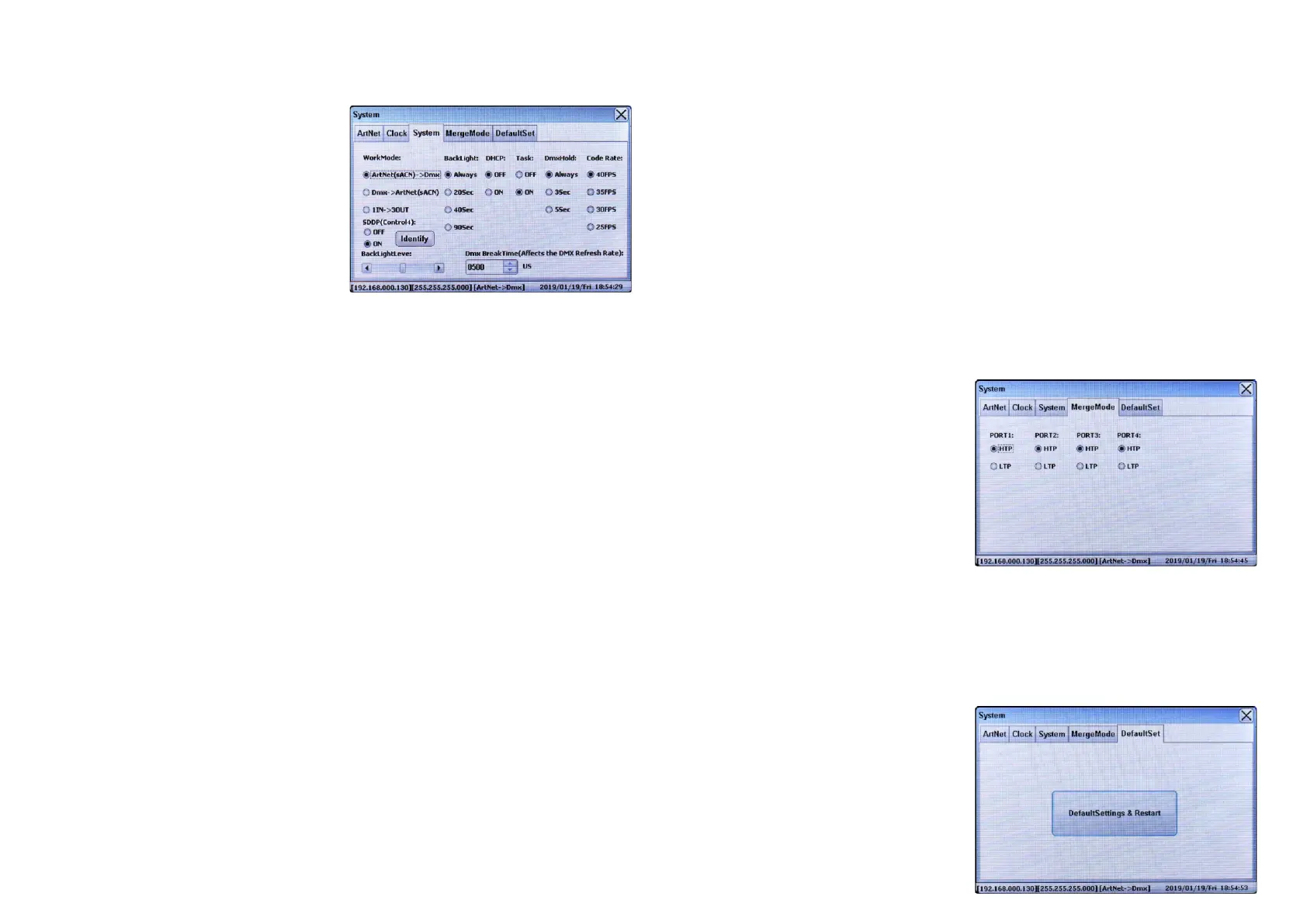
The 3rd tab on System configuration window is
“System”, which is to set Work Mode, BackLight, DHCP,
Task, and DMX Hold.
Set Work Mode
The converter supports 3 kinds of Work Mode:
ArtNet(sACN)->DMX, DMX->ArtNet(sACN), 1IN->3OUT.
Touch the Work Mode you would like to select it. Once set,
close the System configuration window to confirm and save
the setting.
ArtNet(sACN)->DMX: receives ArtNet (sACN) and sends
out DMX, when the device works under this mode, the
sACN protocol can work in singlecast, multicast, broadcast
mode.
DMX->ArtNet(sACN): receives DMX and sends out ArtNet
1IN->3OUT: DMX splitter mode, 1 DMX In port (Only the DMX Port 1 can work as DMX In), 3 DMX Out ports.
SDDP(Control4): this device supports Control4’s SDDP Simple Device Discovery Protocol, once this function is turned
on, this device can be integrated into and controlled through Control4 SDDP platform, for detailed operations, please
refer to the SDDP operation manual.
Always: the backlight will always stay on
40Sec: the backlight will stay on for 40 seconds then turn off
Set DHCP
The DHCP is to set whether DHCP is enabled or disabled. Touch to select “OFF” or “ON”. Once set, close the System
configuration window to confirm and save the setting.
90Sec: the backlight will stay on for 90 seconds then turn off
(sACN) (Only the DMX Port 1 can work as DMX In), when the device works under this mode, sACN protocol can only
work in multicast mode, data packet of each port will be sent to a designated multicast address, the multicast address
range is from 239.255.0.0 to 239.255.255.255.
Set BackLight
The Backlight is to set how long will the screen backlight stays on. Touch to select a time you would like. Once set, close
the System configuration window to confirm and save the setting.
20Sec: the backlight will stay on for 20 seconds then turn off
Set DmxHold
The Task is to set whether Task function is enabled or disabled. Touch to select “OFF” or “ON”. Once set, close the
System configuration window to confirm and save the setting.
Set Task
Note: if Task function is disabled, the Tasks configured in the part “Task Manage” will not be executed.
ON: DHCP is enabled
ON: Task function is enabled
OFF: Task function is disabled
OFF: DHCP is disabled
The DmxHold is to set how long will the signal output last without external DMX signal. Touch to select a time you would
like. Once set, close the System configuration window to confirm and save the setting.
The DMX Break Time is to set the DMX Break Time which will affect the DMX refresh rate. Touch the scroll up or down
menu to select a time from the available range: 100uS to 1000uS. Factory default setting is 500uS. Once set, close the
System configuration window to confirm and save the setting.
The Code Rate is to set the ArtNet code rate. Touch to select a rate you would like from the 4 available settings: 40FPS,
35FPS, 30FPS and 25FPS. Factory default setting is 40FPS. Once set, close the System configuration window to
confirm and save the setting.
Set Code Rate
Always: the signal will always keep output of the last frame DMX output.
The Backlight level is to set the brightness of the screen backlight. Slide the brightness slider leftward or rightward to
select a brightness you would like. Once set, close the System configuration window to confirm and save the setting.
Set Backlight Level
5Sec: the signal will keep output of the last frame DMX output for 5 seconds, then signal output will stop
3Sec: the signal will keep output of the last frame DMX output for 3 seconds, then signal output will stop
Set DMX Break Time
The 4th tab on System configuration window is
“MergeMode”, which is to set DMX Merge.
Set MergeMode
This device is capable of merging two signals from different
IP addresses of the same protocol into one using HTP
(Highest Takes Precedence), or LTP (Latest Takes
Precedence) logic. The MergeMode can be set for 4 DMX
ports separately. System will merge the data from two IP
addresses and send to corresponding DMX port according
to the set merge mode if two signals from two IP addresses
are detected. If there are no data from two different IP
addresses are detected any longer within 3 seconds,
system will quit MergeMode.
Touch to select a MergeMode you would like from the 2
available settings: HTP and LTP for each DMX port
separately. Factory default setting is HTP. Once set, close
the System configuration window to confirm and save the
setting.
The 5th tab on System configuration window is
“DefaultSet”, which is to reset the device to factory
default setting.
Set DefaultSet
Tap the button “DefaultSettings & Restart” to reset the
device to factory default setting and restart.


 To Next Page
 Loading...