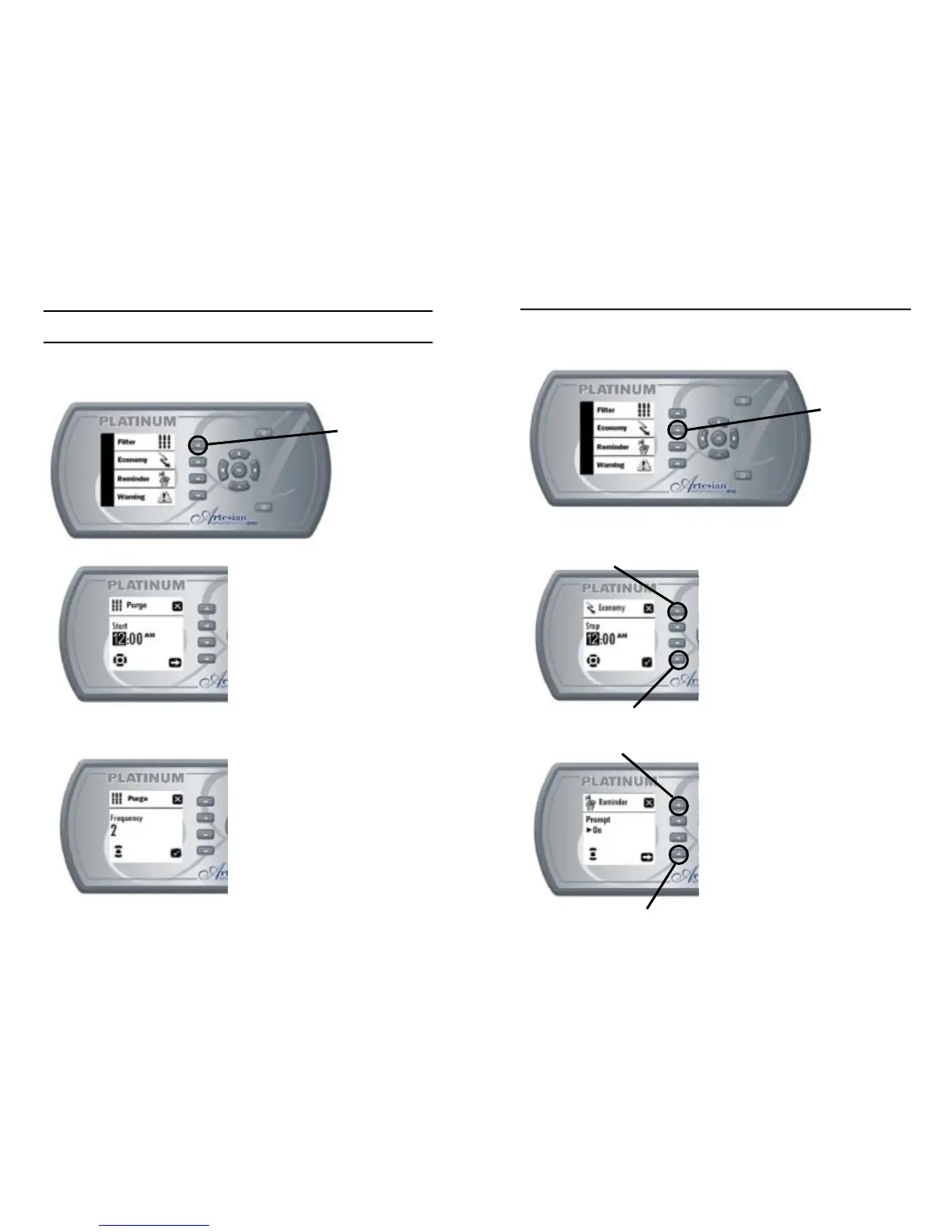
SETTING ECONOMY MODE
This menu allows the user to program Economy mode start time and
stop time.
Setting Economy Mode
Start Time
- Use “Plus” or “Minus” keys
to change purge start time.
- Use “Next” key to confi rm
and go to Economy Mode
stop time.
- Use “Ok” key to confi rm and
return to Spa Options Menu.
- Use “Exit” key to exit and
return to Spa Options Menu.
Setting Economy Mode
Stop Time
- Use “Plus” or “Minus” keys
to change Economy Mode
stop time.
- Use “Confi rm” or “Ok” key to
confi rm and return to Spa
Options Menu.
- Use “Exit” key to exit and
return to Spa Options Menu.
to change purge start time.
return to Spa Options Menu.
BASIC PROGRAMMING cont...
SETTING PURGE CYCLES
This menu allows the spa user to set the purge start time and stop
time.
Setting Purge Start Time
- Use “Plus” or “Minus” keys
to change purge start time.
- Use “Next” key to confi rm
and go to purge frequency.
- Use “Ok” key to confi rm and
return to Spa Options Menu.
- Use “Exit” key to exit and
return to Spa Options Menu.
Setting Purge Frequency
- Use “Plus” or “Minus” keys
to change purge frequency.
- Use “Confi rm” or “Ok” key to
confi rm and return to Spa
Options Menu.
- Use “Exit” key to exit and
return to Spa Options Menu.
2726
Filter Options
Key
to change purge start time.
and go to purge frequency.
return to Spa Options Menu.
return to Spa Options Menu.
to change purge frequency.
confi rm and return to Spa
return to Spa Options Menu.
confi rm and return to Spa
return to Spa Options Menu.
Confi rm Key
Next Key
Exit Key
Exit Key



 To Next Page