BASIC PROGRAMMING cont...
CHANGING SOUND OPTIONS
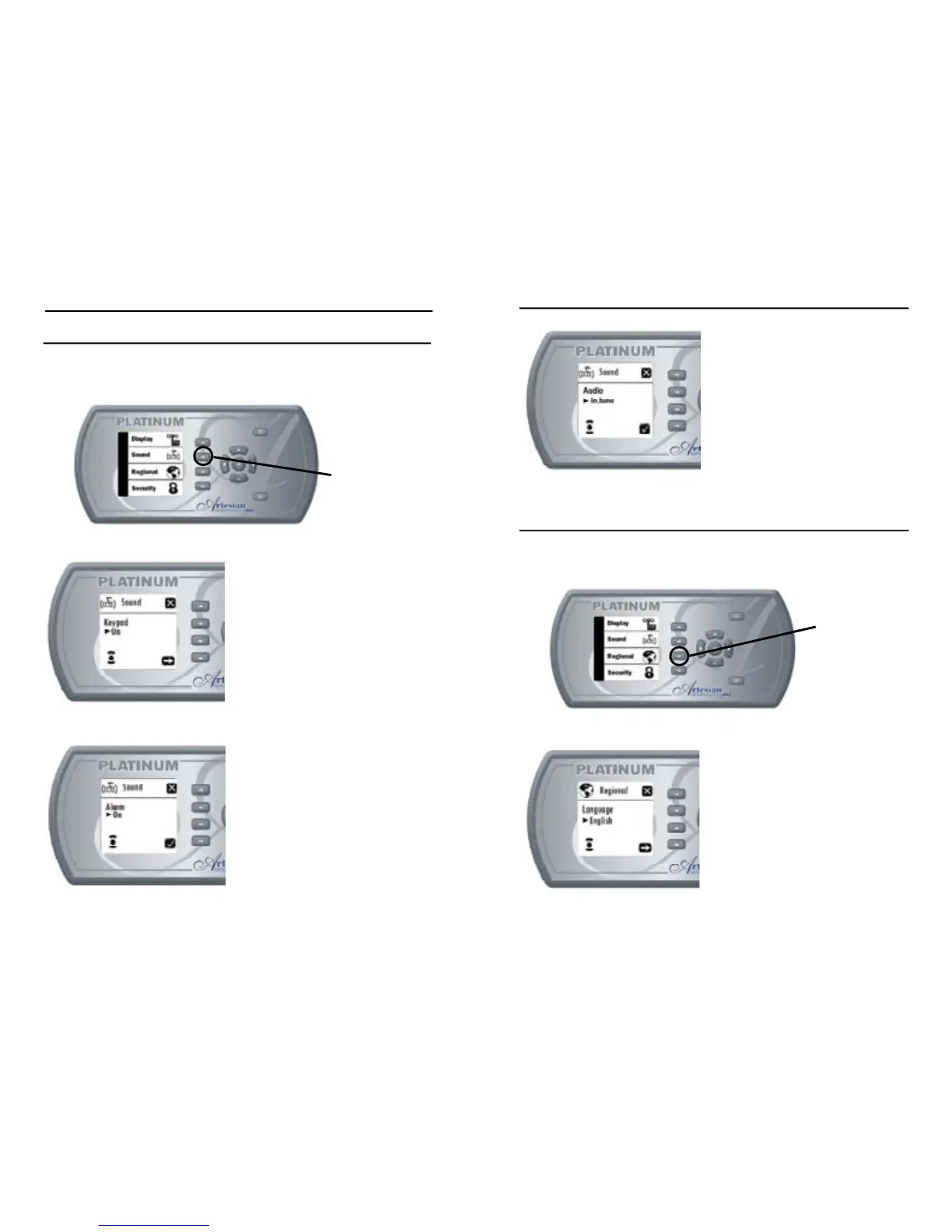
This menu allows the user to change sound settings: Keypad and
Alarm sound and Audio Type.
Setting Keypad Sound
- Use “Plus” or “Minus” keys to
turn keypad sound on or off.
- Use “Next” key to confi rm and
go to alarm sound settings.
- Use “Ok” key to confi rm and
return to Keypad Options Menu.
- Use “Exit” key to exit and return
to Keypad Options Menu.
Setting Alarm Sound
- Use “Plus” or “Minus” keys to
turn alarm sound on or off.
- Use “Next” key to confi rm and
go to alarm sound settings.
- Use “Ok” key to confi rm and
return to Keypad Options Menu.
- Use “Exit” key to exit and return
to Keypad Options Menu.
Sound
Options Key
turn keypad sound on or off.
go to alarm sound settings.
- Use “Ok” key to confi rm and
return to Keypad Options Menu.
- Use “Exit” key to exit and return
turn alarm sound on or off.
go to alarm sound settings.
- Use “Ok” key to confi rm and
return to Keypad Options Menu.
- Use “Exit” key to exit and return
CHANGING SOUND OPTIONS cont...
Setting Audio Type
- Use “Plus” or “Minus” keys to
set audio type to “in.tune” or
“in.pix”.
- Use “Confi rm” or “Ok” key to
confi rm and return to Keypad
Options Menu.
- Use “Exit” key to exit and return
to Keypad Options Menu.
CHANGING REGIONAL OPTIONS
This menu is used to change regional settings: Language and
Temperature Units, and Time Format.
Setting Languages
- Use “Plus” or “Minus” keys to
change language to French or
English
- Use “Next” key to confi rm and
go to Temperature Unit settings
- Use “Ok” key to confi rm and
return to Keypad Options Menu.
- Use “Exit” key to exit and return
to Keypad Options Menu
set audio type to “in.tune” or
- Use “Confi rm” or “Ok” key to
confi rm and return to Keypad
- Use “Exit” key to exit and return
change language to French or
go to Temperature Unit settings
- Use “Ok” key to confi rm and
return to Keypad Options Menu.
- Use “Exit” key to exit and return



 To Next Page