CHANGING SECURITY OPTIONS cont...
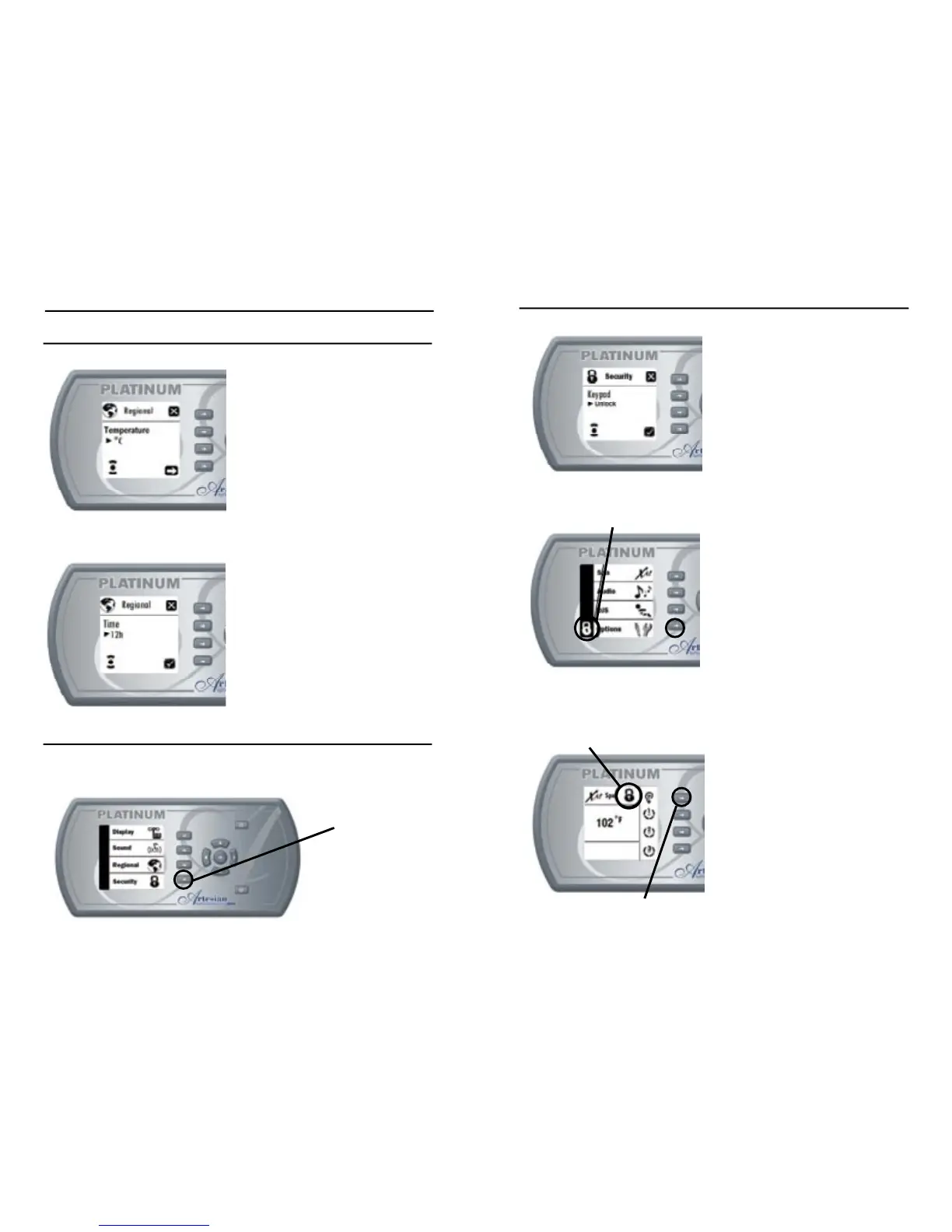
Setting Audio Type
- Use “Plus” or “Minus” keys to
lock (partial or full) or unlock
keypad.
- Use “Confi rm” or “Ok” key to
confi rm and return to Keypad
Options Menu.
- Use “Exit” key to exit and return
to Keypad Options Menu.
Notes:
- To exit Partial Lock, press
Options key for 5 seconds.
- To exit Full Lock, press Key 1
for 5 seconds.
BASIC PROGRAMMING cont...
CHANGING REGIONAL OPTIONS cont...
Setting Temperature Units
- Use “Plus” or “Minus” keys to
change temperature units to
“F” or “C”.
- Use “Next”, “Right”, or “Ok” key to
confi rm and go to Time Format
setting.
- Use “Ok” key to confi rm and
return to Keypad Options Menu.
- Use “Exit” key to exit and return
to Keypad Options Menu.
Setting Time Format
- Use “Plus” or “Minus” keys to
change Time Format to 12
hours or 24 hours.
- Use “Confi rm” or “Ok” key to
confi rm and return to Keypad
Options Menu.
- Use “Exit” key to exit and return
to Keypad Options Menu.
CHANGING SECURITY OPTIONS
This menu is used to change security settings: keypad unlock, partial
lock, or full lock



 To Next Page