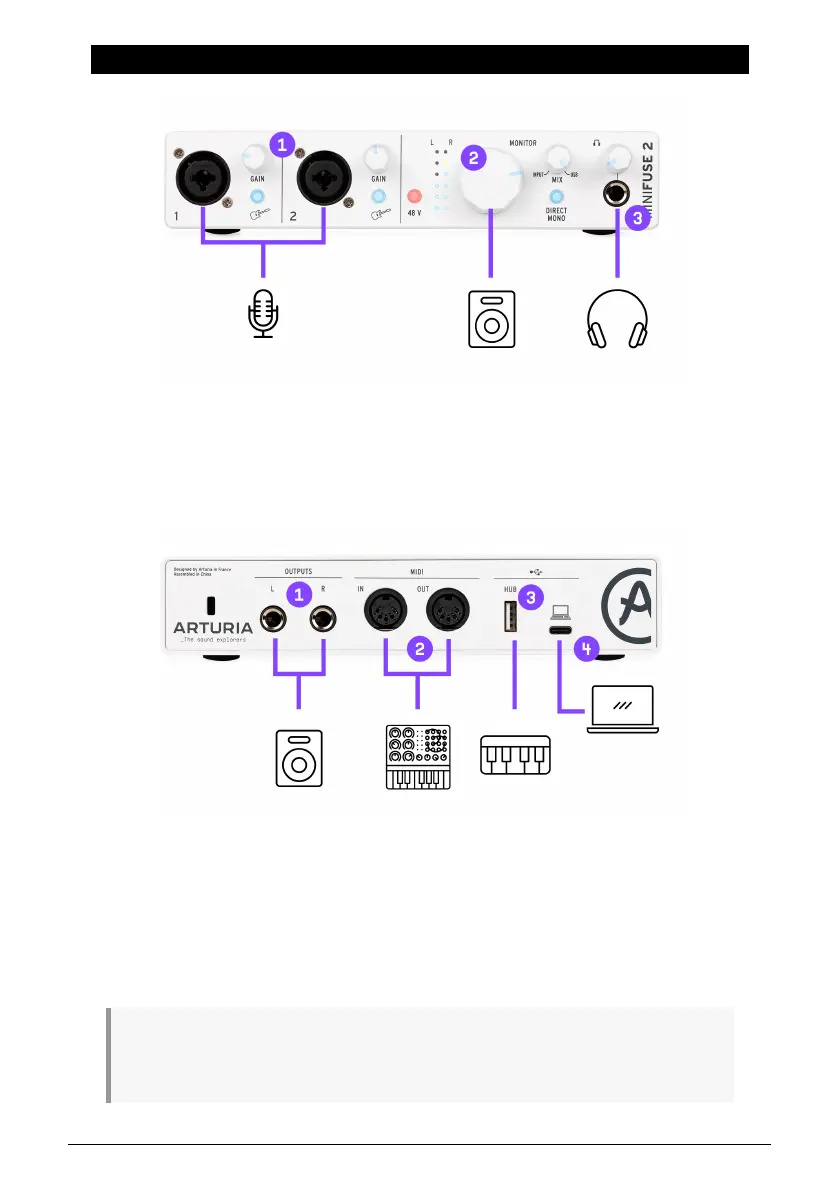
2. CONNECTION DIAGRAM
1 : XLR/TRS combo inputs for microphones, guitars/basses or other instruments
2 : Monitor Volume knob
3 : Headphones output
1 : TRS outputs to connect powered speakers or mixers/amplifiers
2 : MIDI input/output to control a synthesizer, drum machine or some other Midi device
3 : USB hub port allowing connection of thumb drives, controllers or other USB devices
requiring less than 250mA
4 : Connection to the computer
Note: We strongly recommend using the included cable with your interface when connecting your
device to a computer to avoid any connectivity issues. The included USB cable has been specially
designed for the Arturia MiniFuse 2.
Arturia - User Manual MiniFuse 2 - CONNECTION DIAGRAM 3


 To Next Page