Aruba 501 802.11ac Wireless Client Bridge Quick Start Guide 6 Initial configuration
network. Use one of the following methods to assign an IP address to the
Aruba 501:
• Preconfigure the DHCP server to assign a specific IP address to the
Aruba 501. To do this, you need to specify the Aruba 501 Ethernet MAC
address and a reserved IP address on the DHCP server. The Aruba 501
Ethernet MAC address is printed on the Aruba 501 label identified as MAC
ADDR, and listed on the management tool Home page as MAC address.
• Let the DHCP server automatically assign an IP address. By default, the
DHCP server assigns an IP address after the Aruba 501 connects to the
network. After the DHCP server assigns the Aruba 501 an IP address, you
can find the IP address of the Aruba 501 by looking for its Ethernet MAC
address in the DHCP server log.
• Assign a static IP address to the Aruba 501. The address must be on the
same subnet as the network to which the Aruba 501 connects.
1. Select Network > IP.
2. Under IPv4 Configuration, set Connection type to Static IP. Set Static
IP address to an address that is on the same subnet as the network to
which the Aruba 501 connects after installation. Set Subnet mask and
Default gateway.
3. Set DNS name servers to Manual, and specify at least one server
address.
4. Click Save. Connection to the management tool is lost. To reconnect
to the management tool, specify the new IP address.
E. Configure the wireless connection to the network
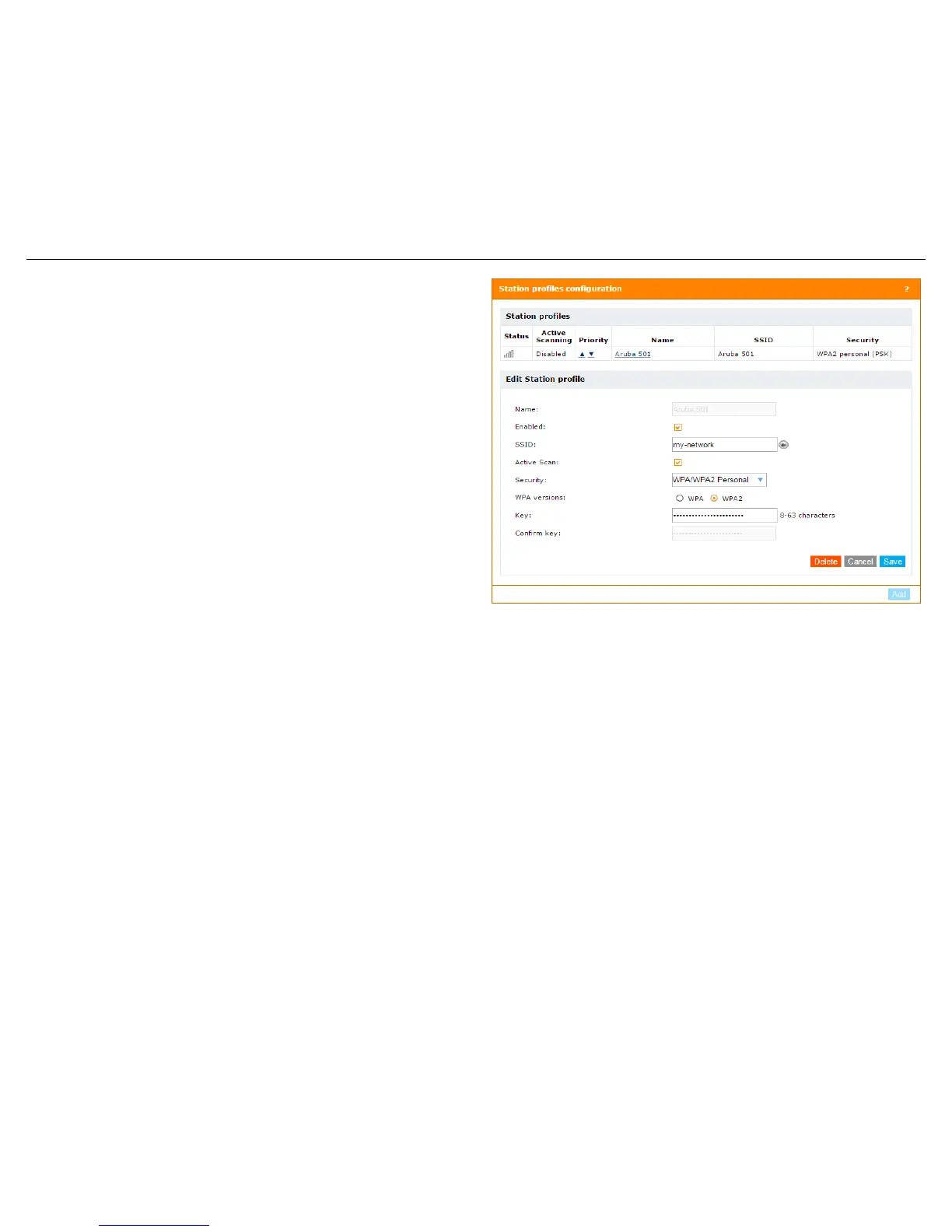
A station profile contains the settings that the Aruba 501 uses to establish a
connection with a wireless network. Configure the default station profile as
follows:
1. Select Wireless > Station Profiles.
2. Set SSID to the name of the wireless network to which you want the
Aruba 501 to connect. Click the arrow next to this field to select a nearby
network that has been detected by the Aruba 501.
3. Select the Active Scan checkbox to enable active scanning.
4. Set Security to match the settings on the wireless network. For example,
in this scenario, a setting of WPA/WPA2 Personal is used as an example
and presumes that the wireless network my-network is configured the
same way.
Settings for WPA versions, Key, and Confirm Key, are defined to match
the network as well.
For information on other wireless security settings, see the
Aruba 501
802.11ac Wireless Client Bridge Configuration and Administration
Guide
.
5. When all settings are complete, select Save. The Aruba 501
automatically attempts to establish a wireless connection to the network.
The Status column indicates whether the connection is Associated (blue
bars) or Disconnected (no bars).
Note:
Once the wireless connection is established, you will loose your
connection to the Aruba 501 if the DHCP addressing option was selected
in Step D.
When the wireless connection is established, the Aruba 501 is operational.
F. Test the wireless connection
For the purposes of this example, the network must have a DHCP server and an
Internet connection. Broadband routers typically include a DHCP server.
1. Disconnect your computer from the Aruba 501.
2. Power off the Aruba 501.


 To Next Page