2 Aruba 555 Access Point| Installation Guide
LEDs
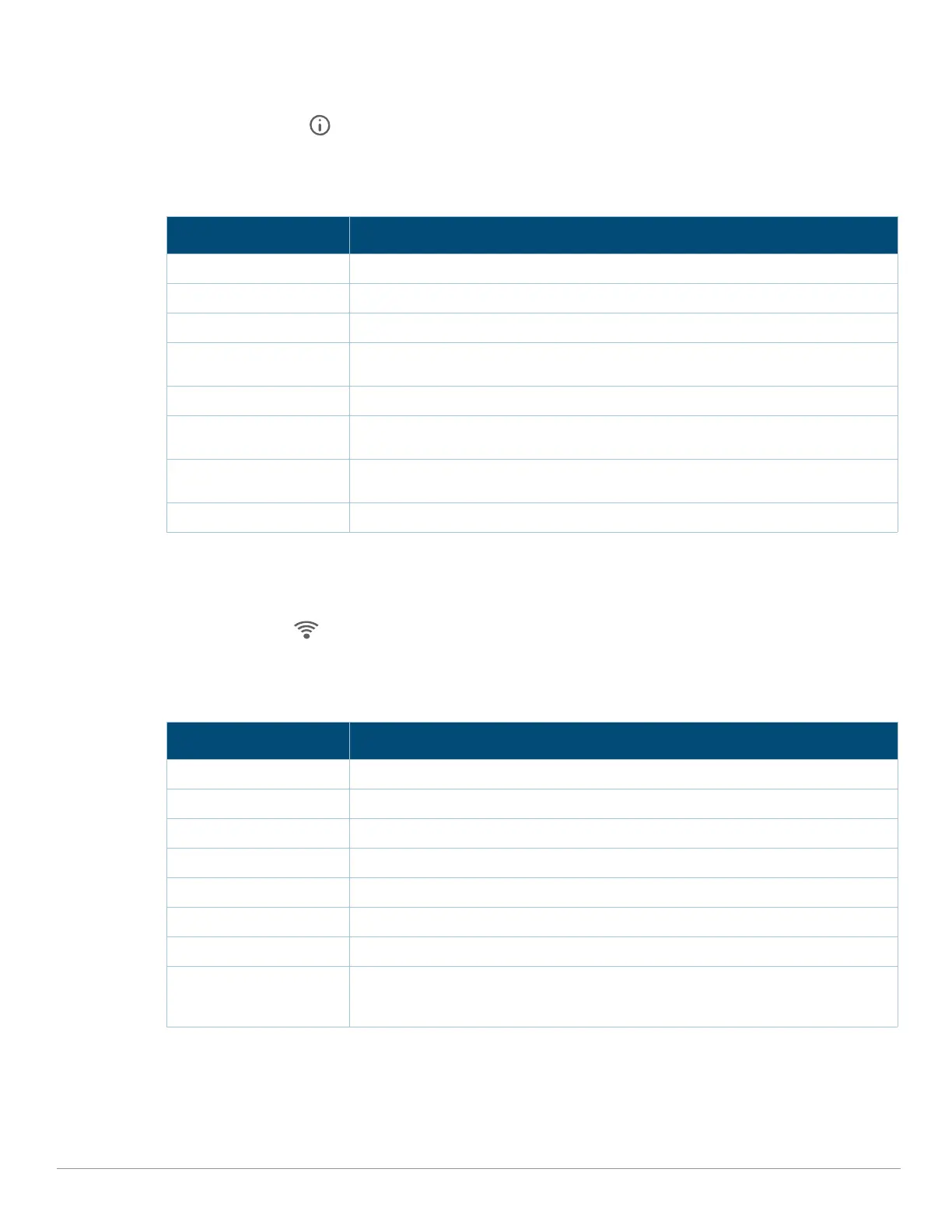
The LED displays located on the front panel of the access point indicate the following functions:
System Status
The System Status LED indicates the operating condition of the access point, see Table 1.
Table 1 System Status LEDs
1 Blinking: one second on/one second off, 2 second cycle.
2 Flashing Pattern 1: mostly on, briefly off, 2 second cycle.
3 Flashing Pattern 2: mostly off, briefly on, 2 second cycle.
Radio Status
The Radio Status LED indicates the operating mode of the access point’s radios. See Table 2.
Table 2 Radio Status LEDs
1 Blinking: one second on/one second off.
2 Alternating: one second each color, 2 second cycle.
LED Display Settings
The LEDs have three operating modes that can be selected in the system management software:
Color/State Meaning
Off Device powered off
Green- solid Device ready, fully functional, no network restrictions
Green- blinking
1
Device booting, not ready
Green- flashing pattern 1
2
Device ready, fully functional, either uplink negotiated in sub-optimal speed
(<1Gbps)
Green- flashing pattern 2
3
Deep sleep mode
Amber- solid Device ready, restricted power mode (limited PoE power available, or IPM
restrictions applied), no network restrictions
Amber- flashing pattern 1 Device ready, restricted power mode (limited PoE power available, or IPM
restrictions applied), uplink negotiated in sub-optimal speed (<1Gbps)
Red System error condition - Immediate attention required
Color/State Meaning
Off AP powered off, or both radios disabled
Green- solid Both radios enabled in access mode
Green- blinking
1
One radio enabled in access mode, other disabled
Amber- solid Both radios enabled in monitor mode
Amber- blinking One radio enabled in monitor mode, other disabled
Blue- solid All three radios enabled in access mode
Blue- blinking Two 5GHz radios in access mode, 2.4GHz radio disabled
Alternating
2
Green/Amber
Blue/Amber
Green: one radio in access mode
Amber: one radio in monitor mode
Blue: both 5GHz radios in access mode



 To Next Page