4 Aruba 510 Series Campus Access Points | Installation Guide
LED Display Settings
The LEDs have three operating modes that can be selected in the system management software:
Default mode: Refer to Table 1and Table 2
Off mode: LEDs are off
Blink mode: LEDs blink green (synchronized)
Force the LEDs into off mode and back to software defined mode by pressing the reset button for a short
duration.
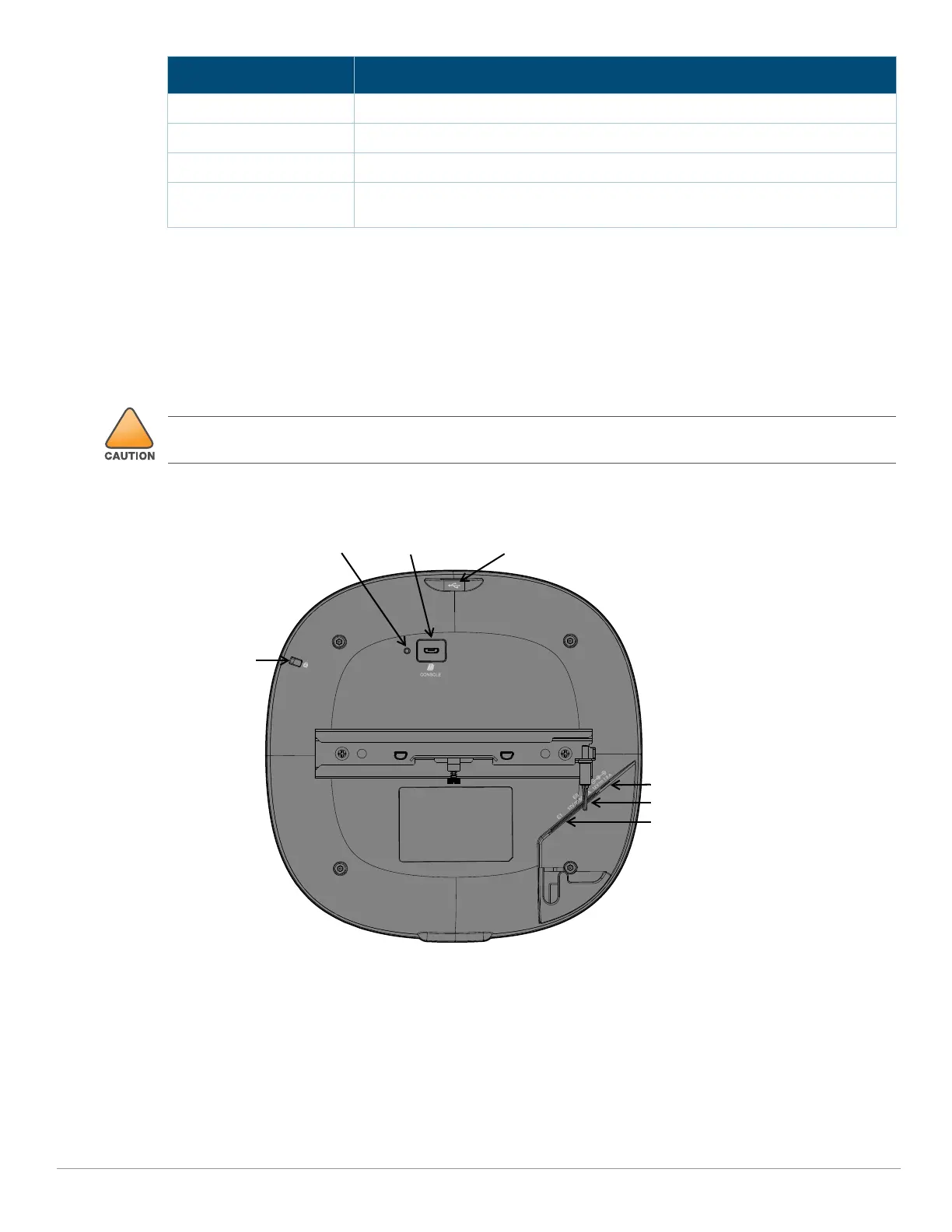
Figure 4 Rear View
Cable Guide
The cable guide on the rear of the access point is used to organize cables, as shown in Figure 5. The use of the
cable guide is optional and does not support all types of cables and plugs.
Green- blinking One radio enabled in access mode, other disabled
Amber- solid Both radios enabled in monitor mode
Amber- blinking One radio enabled in monitor mode, other disabled
Green/Amber-
alternating
1
Green: one radio in access mode
Amber: one radio in monitor mode
1. Alternating: one second each color, 2 seconds cycle.
Color/State Meaning
Pressing the reset button for longer than 10 seconds may cause the AP to reset and return to factory default
state.
Kensington
Lock Slot
ConsoleReset USB 2.0 Interface
E1
E0
DC Jack



 To Next Page