2 Aruba 630 Series Campus Access Points | Installation Guide
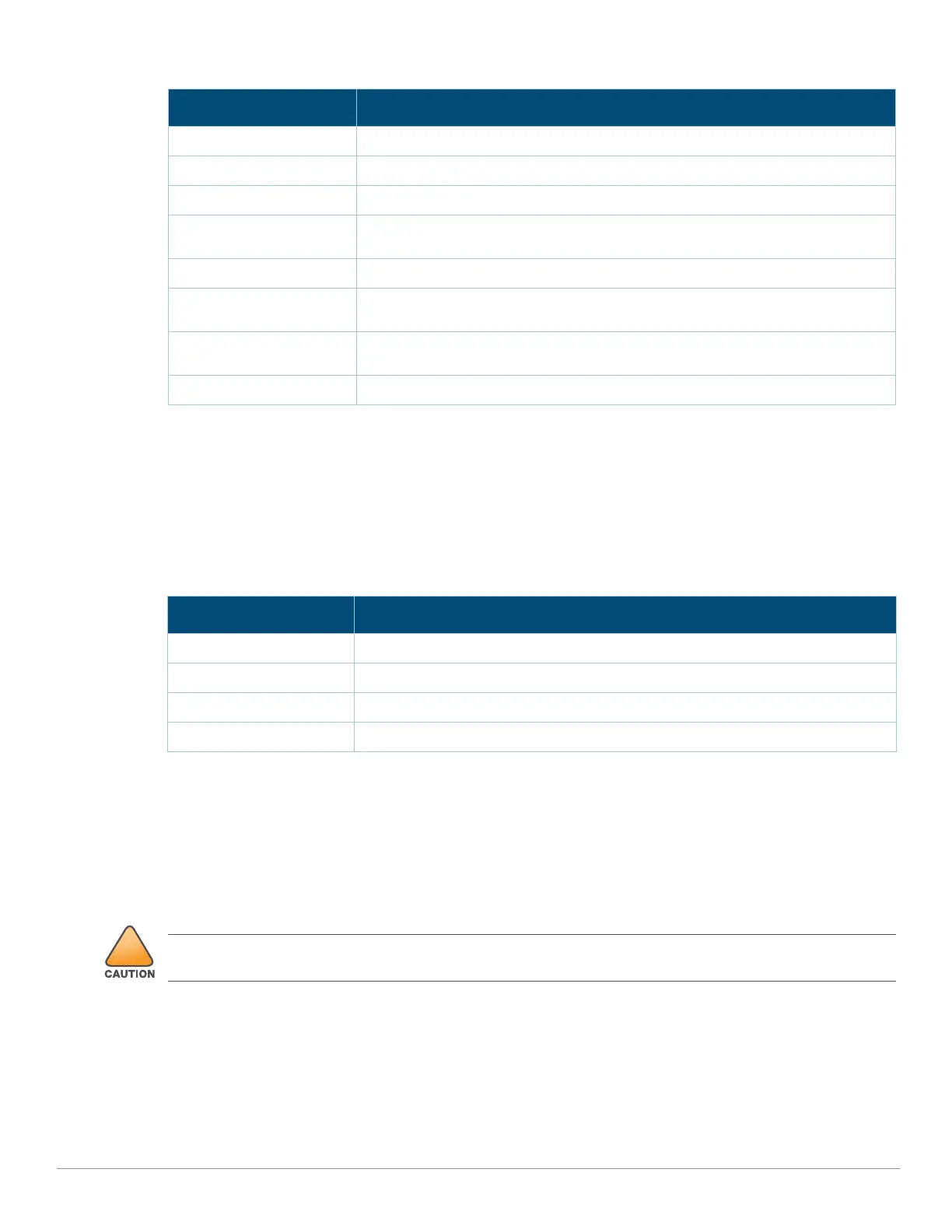
Table 1 System Status LED
2GHz/5GHz/6GHz Radio Status LEDs
The 2GHz/5GHz/6GHz Radio Status LEDs indicate the operating mode of the access point’s 2GHz/5GHz/6GHz
radios. See Table 2.
Table 2 2GHz/5GHz/6GHz Radio Status LEDs
LED Display Settings
The LEDs have three operating modes that can be selected in the system management software:
Default mode: refer to Table 1and Table 2
Off mode: all LEDs are off
Blink mode: all LEDs blink green (synchronized)
To force the LEDs into off mode or back to software defined mode, press the reset button for a short duration
(less than 10 seconds).
Color/State Meaning
Off Device Powered off
Green- solid Device ready, fully functional, no network restrictions
Green- blinking
1
1. Blinking: one second on, one second off, 2 seconds cycle.
Device booting, not ready
Green- flashing off
2
2. Flashing off: mostly on, fraction of a second off, 2 seconds cycle.
Device ready, fully functional, either uplink negotiated in sub-optimal speed
(<1Gbps)
Green- flashing on
3
3. Flashing on: mostly off, fraction of a second on, 2 seconds cycle.
Device in deep-sleep mode
Amber- solid Device ready, restricted power mode (limited PoE power available, or IPM
restrictions applied), no network restrictions
Amber- flashing off Device ready, restricted power mode (limited PoE power available, or IPM
restrictions applied), uplink negotiated in sub-optimal speed
Red System error condition - Immediate attention required
Color/State Meaning
Off Device powered off, or radio disabled
Green- solid Radio enabled in access mode
Green- flashing off Radio enabled in uplink or mesh mode
Amber- solid Radio enabled in monitor or spectrum analysis mode
Pressing the reset button for longer than 10 seconds may cause the AP to reset and return to factory default
state.



 To Next Page