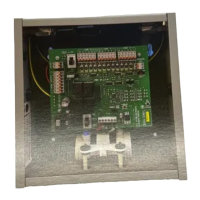
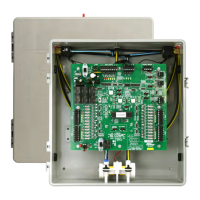
10 Pump LED LED [PMP (Red)] light is ON anytime the pump is running.
11 Compressor
Lock-out LED
Any time the zoning system turns the compressor off, it holds it off for four(4) minutes. This pre-
vents short cycling the compressor.
12 TDO
Time Delay
Override
This momentary contact, Time Delay Override switch (TDO), is provided on the PC board to
speed the checkout of the zoning system. Before using this TDO switch, you must disconnect
the HVAC “R” wire in order to avoid short cycling the equipment. AComp. Lockout LED light will
indicate 4 minute compressor lockout condition. [Comp Lockout(Red)]
13 System Status
LEDs
The Display Switch controls what information is displayed on the Service LEDs.
By default the LEDs indicate the HVAC Output Signal. It will illuminate the “Out” LED and the ap-
propriate service LEDs to indicate the call to the equipment.
14 Display Button
Function
Push the button once, and the system illuminates the Zone 1 (Z1) LED and shows what the Zone
1 Thermostat is calling for.
Push it again and The Zone 2 (Z2) LED illuminates and the Display LEDs show what Zone 2 is
calling for.
Push the button a third time and Zone 3 is displayed.
Pushing it a fourth time will return it to the Output display.
The system will revert to displaying the Output signal anytime the button is idle for 1 minute.
15 Furnace/Heat
Pump Switch
Switch sets the operational mode for the zoning system. Set the switch for the type of equip-
ment that the zoning system is controlling.
16 Solenoid
Terminals and
Pump Termi-
nals
Factory connection for the Zone Solenoids (24VDC) . Solenoids are energized to provide pres-
sure to close the dampers and de-energized to provide vacuum to open the dampers.
Factory connections for the pressure/vacuum pump.(24VAC) The pump operates only when a
thermostat calls for a Heat/Cool or Fan operation or when the MPS switch is in the ON position.
17 MPS Switch MPS™ switch starts pump and opens all zone dampers when Power Switch is OFF.
6
Emer. HT.
Switch
Emergency Heat Changeover switch, is used to manually bypass the heat pump and energize the
auxiliary heat on a call for service (heat pump application only.)
7 Fan-on-Heat
Switch
This switch in the “ON” position will provide automatic fan operation on a call for heating, for elec-
tric furnaces, hot water coils, steam coils, etc.
8 S1,S2,S3 So-
lenoid LEDs
These LEDs indicate which zones are being served and are opening their dampers.
[S1,S2,S3(Red)]
9 Fault Code
LEDs
F1,F2,F3
The 3 Fault Code LEDs illuminate when a themostat sends an illegal call. A call is illegal if it
is improper for the type of HVAC equipment installed. LED will stay lit until the power switch is
cycled.
F1 = illegal call on zone 1.
F2 = illegal call on zone 2.
F3 = illegal call on zone 3.
Illegal calls are ignored. The system will continue to operate normally, serving any legal calls. Il-
legal calls may indicate a thermostat or wiring fault in the affected zone.
8


 To Next Page
 Loading...