FAN CHECK-OUT
1. Set all thermostats to the OFF position and all fan switches to AUTO.
2. Turn the HVAC system and the Arzel
®
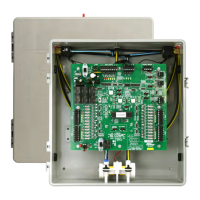
system PWR switches to ON. The LED light next to the switch will
illuminate.
3. Turn the Zone 1 thermostat fan switch ON. The S1 indicator, the Fan output (G) and Pump LED lights will
illuminate. The fan in the HVAC system will turn on. The pressure and vacuum pump will position all the
dampers. Check the air ow at all register outlets to determine that only Zone 1 dampers are open and all
other dampers are closed.
4. Follow the above procedure for all other zones
HEATING & COOLING CHECK-OUT
1. Set all thermostats to the OFF position and all fan switches to AUTO before starting heating system check
out.
2. Set Zone 1 thermostat to the HEAT position and turn thermostat up so that the thermostat is calling for
heat. The S1 indicator, the W output, and the pump LED lights will illuminate. The pressure/vacuum pump
will position all the dampers. Check to see that the heating circuit is energized. If heat pump is installed,
check operation of Emergency Back-up heating. Turn the thermostat down until the thermostat is satised.
The LED lights will go out and the pump will stop. Dampers will remain open in the last zone that called.
For heat pump, LED indication will be Y & G.
3. Set thermostat for Zone 1 to the COOL position. Turn thermostat down so that the thermostat is calling
for cooling. The S1 indicator, the Y and G output and the pump LED will illuminate. The pressure/vacuum
pump will position all the dampers. Check to see that the compressor contactor is energized. For heat
pump, LED indication will be Y, G & O.
4. Place Zone 1 thermostat in the OFF position.
5. Follow the above procedure for all other zones.
System Commissioning
9


 To Next Page