B-SOCIAL - USER MANUAL B-SOCIAL - USER MANUAL
CONNECTING YOUR DEVICES:
B-SOCIAL - USER GUIDE
Connecting your devices
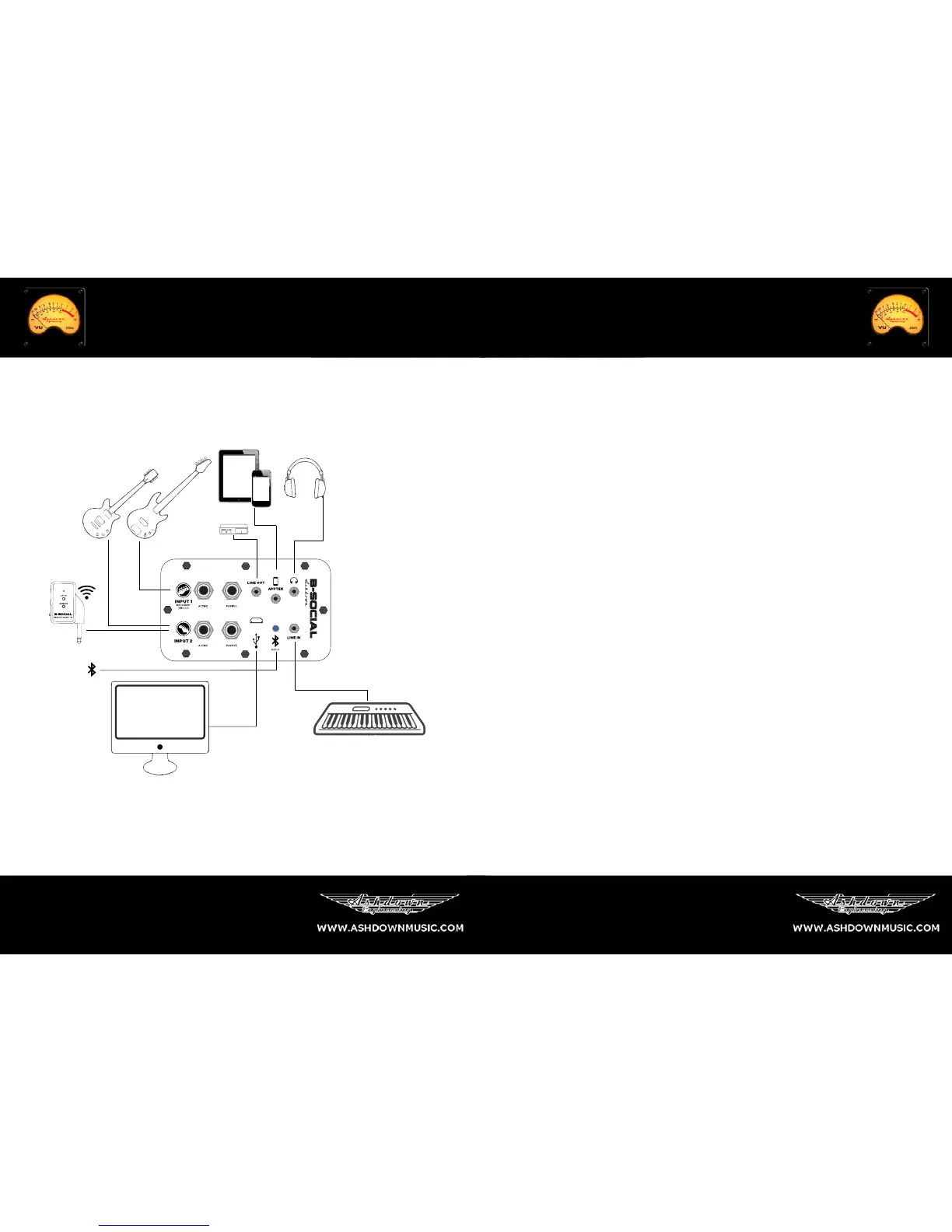
There are a huge amount of options when plugging in your B-Social. It is effectively
an audio interface with built in speakers, you can connect two instruments at the
same time and record the two instrument inputs simultaneously.
Input 1 is able to utilize the AppTek socket for use with iPad or iPhone devices
(with the supplied 4 pole mini jack cable) in conjunction with AmpKit from Agile
partners, an amp and FX simulation app to expand on the available tones through
you B-Social and also recording.
Connect your device via the provided USB 2.0 cable to your computer and acti-
vate the ‘USB CODEC’ as your sound card in your operating system, no drivers or
external software is required.
A headphone out is provided for monitoring, with a speaker mute switch located on
the rear of the amp for silent monitoring. There is a line input provided for line level
instruments a mono line out is also available for slaving to a tuner or other devices.
The wireless transmitter utilizes Input 1 when engaged, the transmitter will latch to
your B-Social when turned on, there is a ‘CATCH’ button located on the rear of the
product if you are having difficulty pairing your transmitter, simply click ‘CATCH’ on
the back and the transmitter will pair with your B-Social.
Bluetooth audio streaming is also available and able to pair with any Bluetooth de-
vice for playing your music wirelessly around your home, you will hear the on tone
this means the B-Social is ready to pair with your device, simply go to the
Bluetooth settings on your device and select the Ashdown Bluetooth module, The
LED on the side panel will light blue to indicate that it is paired with your device.
Please enjoy the B-Social around the house and remember to let your other half
listen to their music once and a while if only to ensure a happy living environment.
Instrument 1




 To Next Page