Operating Manual - NE Multi Channel Power Amplier
8
4. REMOTE AMPLIFIER CONTROL
ON/OFF/Remote Standby
The NE multichannel ampliers have three possible states, OFF, ON, and STANDBY, each with a status LED on the front panel.
Control for these three states is managed by the following:
1) Power Switch - When the power switch is turned off the amplier is completely off, UNLESS the power switch has been
disabled from software, in which case the power switch on the amplier has no effect at all. If the power switch has been dis-
abled, the front panel DISABLE LED will be lit. Even if the AC power is removed, the amplier’s internal memory will retain
the <power switch disabled> status until changed again from software. Performing a factory reset will clear and restore all
internal amplier memory to original factory settings.
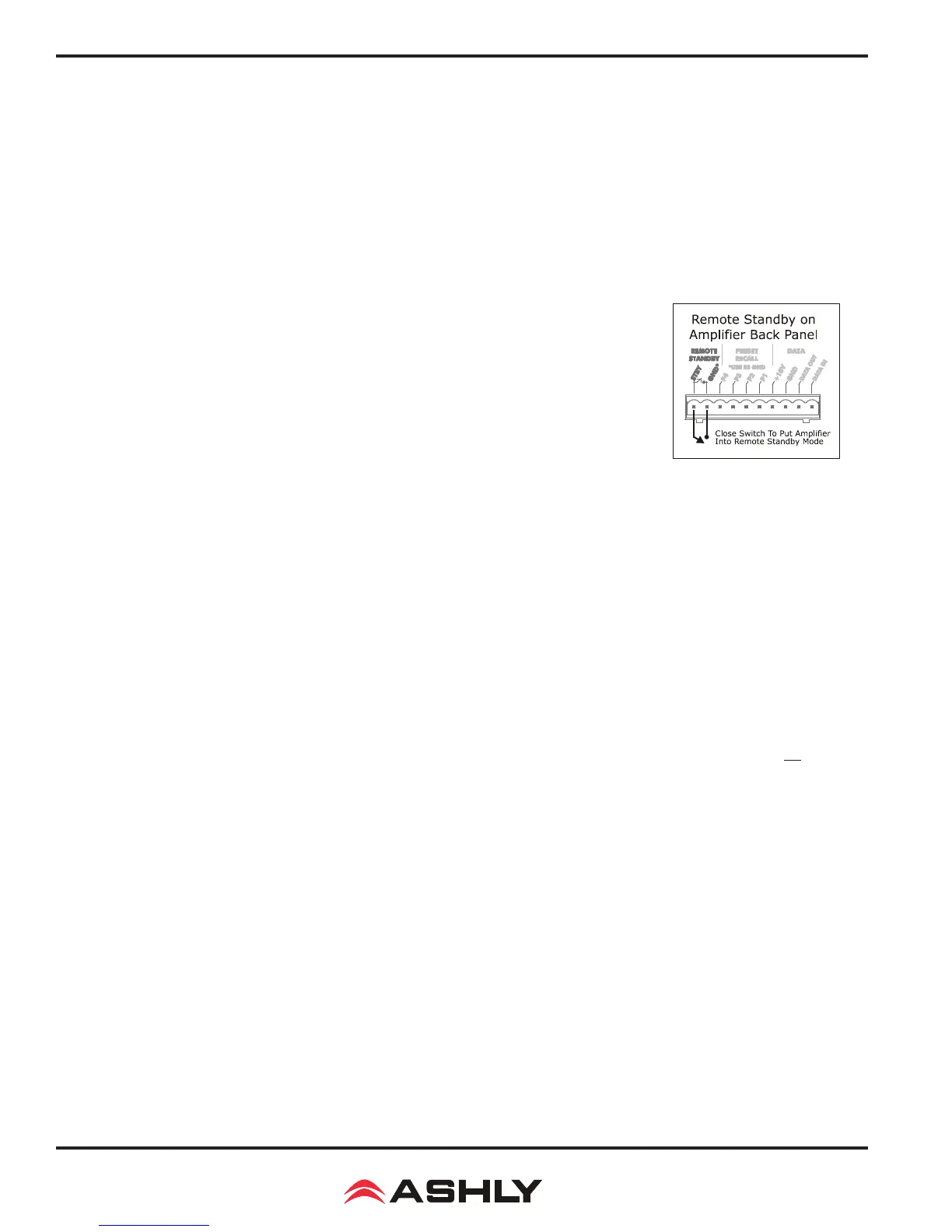
2) Remote Standby Contact Closure - When these two pins are wired to a switch and connected
closed, the amp will go into standby mode, whereby the amp is active but in a reduced power state.
For remote standby to work, the power switch must be turned on or on but disabled in software.
3) Software On/Standby - On/standby in software functions the same as the remote standby
contact closure on the back panel. Clicking on STANDBY places the amp into standby mode.
Software on/standby does not override the hardware Remote Standby, they both remain active.
4) Software Power Switch Enable/Disable - This feature disables the front panel power switch. If the power switch is disabled
from software, the front panel DISABLE LED is lit. The power switch remains disabled until enabled again from software, even
after the amp is unplugged from AC.
Preset Recall
The preset recall connections on the back panel allow different presets to be loaded from amplier memory when one of the
contacts is closed to the provided ground pin. Device presets are congured from software and can include gain settings, mute
status, polarity, and DSP functions if the amp has DSP installed.
The NE amplier stores up to 35 internal device presets. A device preset stores the most commonly used control data for that
amplier. A device preset (saved to amplier) differs from a computer preset le in that a computer preset le stores all infor-
mation associated with the amplier and its software settings, while the device preset only stores the most commonly used and
relevant audio settings. Changes to an individual preset can be saved to the amplier in software using <Preset Options/Save
Preset To Device>, or saved to a PC using <Preset Options/Save Preset To File>. Sub Presets (collections of DSP parameters
individually selected from software) are saved in a similar fashion. Individual preset les use the extension (*.pne).
Loading a preset can be done using software, using preset recall contact closure connections on the back panel, using an Ashly
programmable remote button controller, or using the Ashly Remote iPad
®
app. Contact closure pins P1 through P4 load device
presets 1-4 from the amplier memory.
Caution: A new preset may have dramatically different settings capable of damaging sound system components. Be careful not
to recall the wrong preset while the system is on.
Data Control
The data euroblock on the back of the amplier is used for connecting an Ashly WR-5 programmable zone controller or RD-8C
remote level controller. The data interface provides data and phantom power for these devices using four conductor bell wire.







 To Next Page