Using the dishwasher
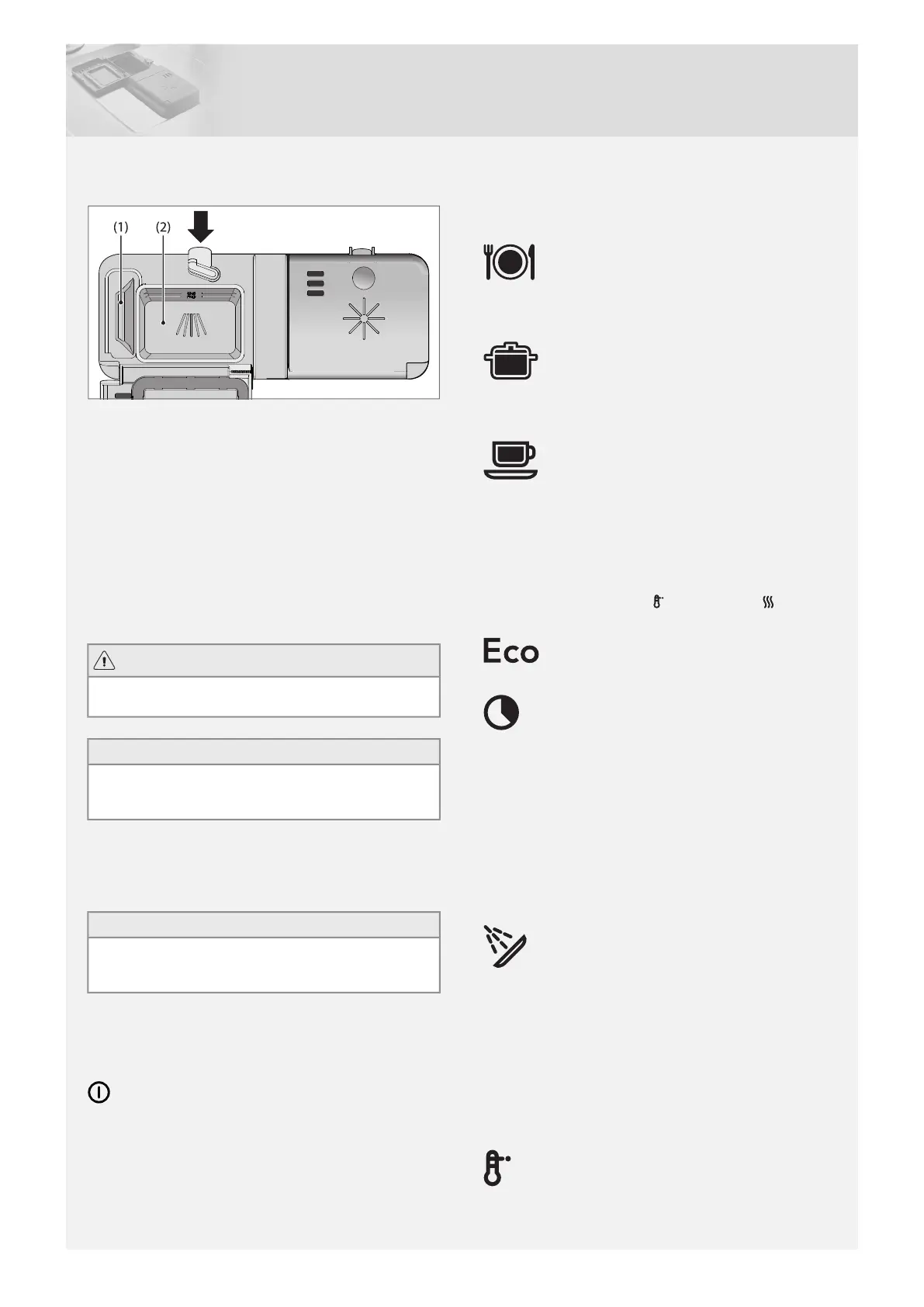
Add detergent
1 Prewash detergent compartment
2 Main wash detergent compartment
Detergent is added according to water hardness.
Follow the instructions on the detergent packaging.
Too much detergent can result in less effective dishwashing and
also entails greater environmental impact.
Add the detergent to the detergent compartment. There is a
compartment for the prewash and one for the main wash. If
powder and liquid dishwasher detergents are used, add a small
amount of the detergent to the prewash compartment. Contact
the detergent manufacturer if you have any questions about the
detergent.
WARNING!
Children must be supervised – dishwasher detergent is corro-
sive!
NOTE!
Use only dishwasher detergent! Washing up liquid must not
be used as the foam that forms prevents the dishwasher from
operating effectively.
Dishwasher tablets
Halve the tablet if it is difficult to close the dispenser lid. There is
a risk that the detergent will not be released properly if the lid is
tight and will not open correctly.
NOTE!
Dishwasher tablets are not recommended for short programs
(less than 75 minutes). Use powder or liquid dishwasher deter-
gent instead.
3–in–1/All-in-one detergent
Read through the directions for these products carefully. If any-
thing is unclear, contact the detergent manufacturer.
Main power switch
Press the main power switch and close the door.
Program selection
Press the Program selector one or more times until the desired
program symbol lights.
Daily wash
A program suitable for day-to-day dishwashing. This program
can also clean dried leftovers, but is not intended for burnt food,
such as on oven dishes.
Heavy wash
Program for very dirty dishes, such as pans, casserole dishes
and oven dishes. If these dishes do not completely fill the dish-
washer, you can add plates and the like.
Normal program
Use to wash normally soiled load, such as plates, serving dishes,
cups, glasses and so on.
For washing normally soiled mixed loads, with the best energy
and water performance, use the Normal program; low tempera-
ture, short drying (no options).
If you want to improve the dishwashing and drying result activate
the options high temperature and long drying . This
causes a slight increase in energy consumption.
Eco wash
Use when you want to save water. For normally dirty dishes.
Time program
The program adapts to the specified running time or finish time.
With this program it is important to choose a time suited to how
dirty the dishes are.
Slightly dirty dishes0:30-1:15
Normally dirty dishes1:30-2:00
Very dirty dishes2:15-3:00
To set the program time, see the section Selecting Options.
Rinse & Hold
Used to rinse dishes while you wait for the dishwasher to become
fully loaded.
Selecting Options
To select an option, press one of the option buttons. The indicator
lamp for a button lights when the option is activated. The available
options depend on the selected program. Once you have started
the program, the options you selected are saved for the next time
you use the same program. An exception is the Delayed start
option.
High temperature
Activate this option for improved dishwashing results. The ma-
chine then uses a higher temperature for the main wash. This
option cannot be activated if the Time saver option is selected.
7


 To Next Page