MPS-Series – Installation Guide
U-0664-0174.doc – Issue: 07 complete, approved
Page 14 of 24
Note that if fixing the microphone to a flat desk or console, it is suggested that the alternative drilling
centres shown in Figure 11 (page 14), and that the wall bracket (and R/H bracket if used) be rotated
by 180 degrees in order to impart an aesthetically pleasing slant to the mounted unit.
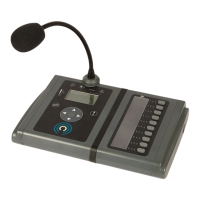
Figure 11 Desk/Console-mounting: mounting hole and Right-Hand Side Bracket position
DESK/CONSOLE-MOUNTING
M0664_80 WALL-MOUNT BRACKET
DRILLING CENTRES
ADDITIONAL PAIR OF HOLES REQUIRED
WHEN MOUNTING MICROPHONES WITH
MPX10 10-BUTTON EXPANSION MODULE(S)
USING A M0664_81 RIGHT-HAND BRACKET
140.00 mm
M0664_80
WALL BRACKET
M0664_81
R/H BRACKET
102.80 mm 132.50 mm
THIS DISTANCE IS CORRECT
FOR MOUNTING A MPS10 UNIT.
INCREASE THIS DISTANCE BY A FURTHER 110 mm FOR EACH
ADDITIONAL MPX10 10-BUTTON EXPANSION MODULE (e.g. FOR
A MPS20 THIS DISTANCE WOULD BE 242.50 mm)
DIAMETER=5.50 mm
!
!
Mount the MPS microphone
at eye height for best viewing
angle of the LCD display.


 To Next Page