Asoka® User’s Guide
PlugLink 9650 Ethernet Adapter PL9650-E TH
Page 5 of 26
Chapter 3
Learning about your PlugLink 9650 Ethernet Adapter
Package Contents
PlugLink 9650 Ethernet Adapter (PL9650-ETH)
6 feet Ethernet cable
Quick Installation Guide
Installation Resource CD
Warranty and Support Information Card
If any of the parts are incorrect, missing, or damaged, contact the retailer where you made your
purchase. Keep the carton, including the original packing materials, in case you need to return
the unit for repair.
The Front Panel
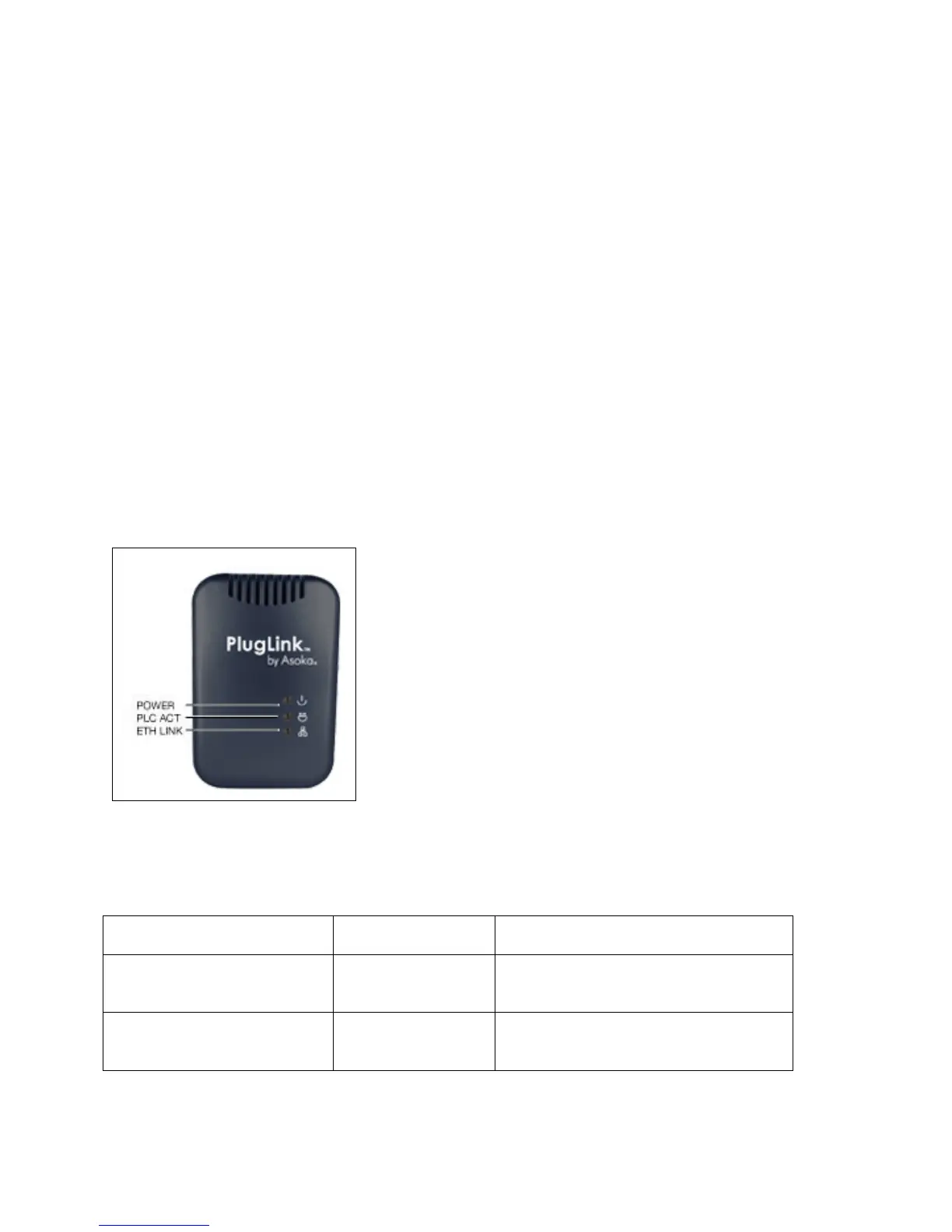
The front panel of the PL9650-ETH Adapter contains the status lights described below.
Figure 3-1: PL9650-ETH Front Panel
You can use the status lights to verify connections. Viewed from top to bottom, left to right, the
table describes the lights on the front panel of the unit.
Table 3-1: Status Light Descriptions
Power On
Off
Indicates Device Powered On
Indicates No Power
PLC Activity
Blinking
Off
Indicates Activity on Powerline
Indicates No Activity on Powerline
(Should blink Intermittently)
ETH Link On
Blinking
Off
Indicates Ethernet Connectivity
Indicates Ethernet Traffic
Indicates No Ethernet Activity



 To Next Page