Asoka® User’s Guide
PlugLink 9650 Ethernet Adapter PL9650-E TH
Page 9 of 26
Chapter 5
Installing the PlugLink 9650 Ethernet Adapter
Note: Do not connect the PlugLink 9650 Ethernet Adapter into a power strip, extension cord,
uninterruptible power supply (UPS), or surge protector. This may prevent the unit from working
properly or degrade the network performance.
1. Connect each of your PlugLink 9650 Ethernet Adapters.
a) Connect the unit into a nearby wall outlet
b) Connect the enclosed Ethernet cable to the Ethernet port of the unit
c) Connect the other end of the cable to the Ethernet port of the PC
2. Insert the enclosed Installation Resource CD into your CD-ROM drive. The PlugLink 9650
Ethernet Adapter Installation Utility should appear automatically. If it does not appear within
30 seconds, select your CD-ROM drive and double-click on the icon named “Setup.exe” to
initiate the Installation Utility.
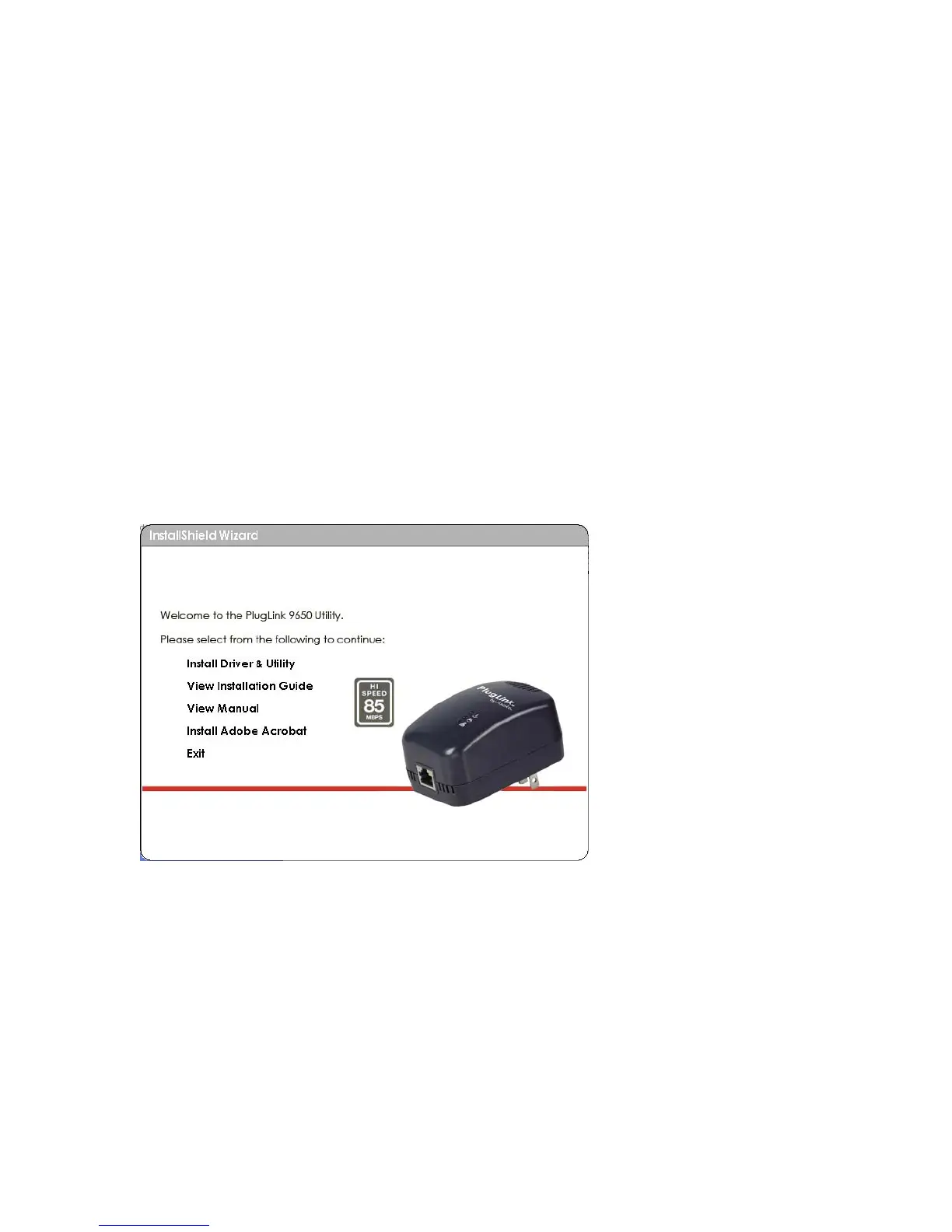
3. The Welcome screen should appear. Click on “Install Driver and Utility” to proceed to
installation.
Figure: 5-1: Welcome screen.
4. Click “Next” to begin the installation process.



 To Next Page