Asoka® User’s Guide
PlugLink 9650 Ethernet Adapter PL9650-E TH
Page 7 of 26
Chapter 4
Preparing to Install the PlugLink 9650 Ethernet Adapter
The PlugLink 9650 Ethernet Adapter lets you set up a home or an office network using your
existing electrical outlets. It can also easily compliment your existing network by connecting to
any device with a 10BaseT/ 100BaseT Ethernet-capable device.
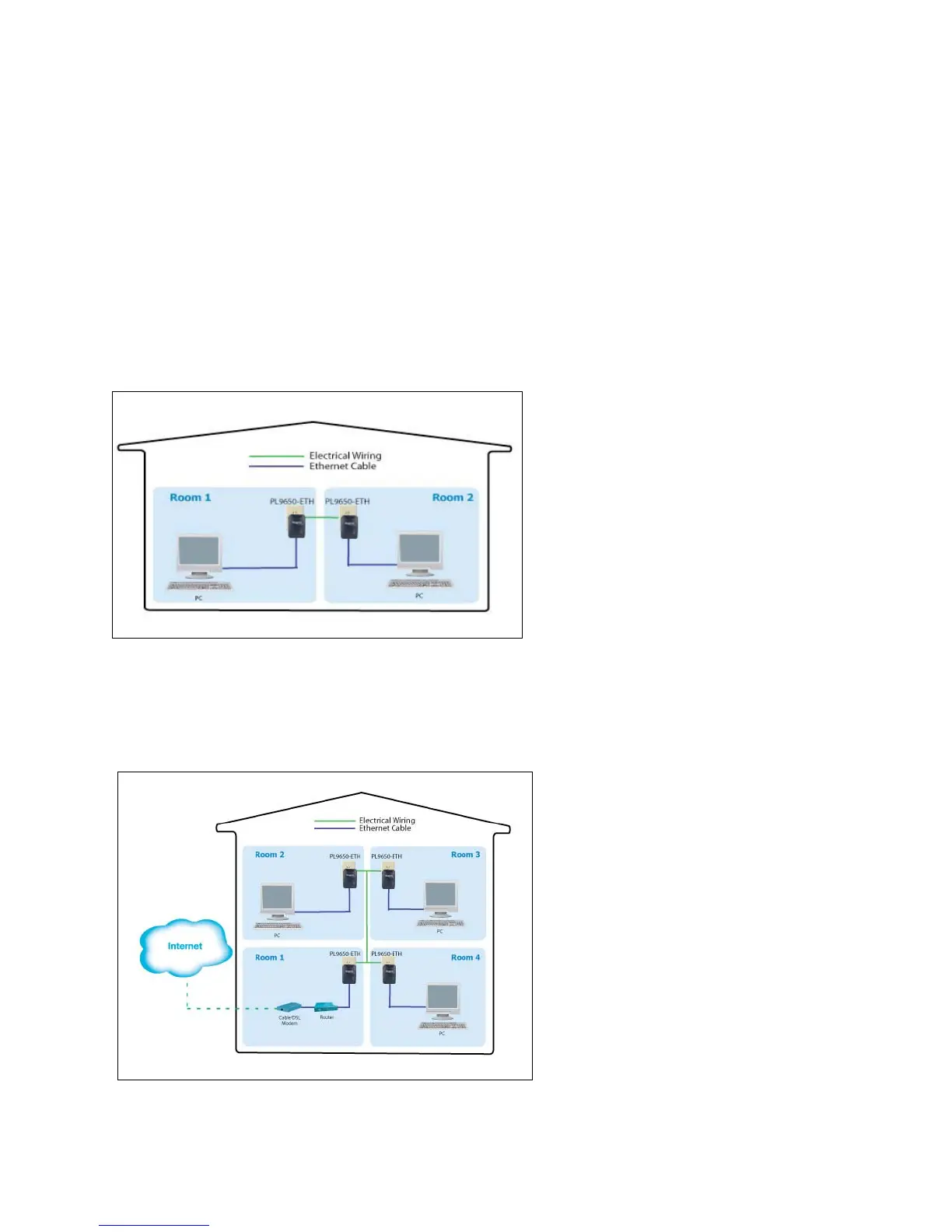
In order to share a peer-to-peer connection between computers, all you will need is:
One (1) PL9650-ETH device attached to each computer.
Figure 4-1: Peer-to-peer network diagram.
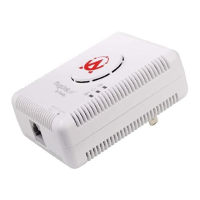
In order to share a Broadband connection between computers, all you will need is:
One (1) PL9650-ETH device attached to each computer
Standard Cable/DSL Modem
Standard Cable/DSL Router or Wireless Router
[
Figure 4-2: Sharing broadband connection network diagram.



 To Next Page