NETWORK VIDEO RECORDER QUICK START GUIDE
WHAT’S IN THE BOX
NVR
USB Mouse
Remote Control DC 48V PSU (4ch/ 8ch)
HDD Mounting Screws Rack Mount Ears (32ch/ 64ch)
UK Kettle Lead Quick Start Guide
QR Code
1. INSTALLATION
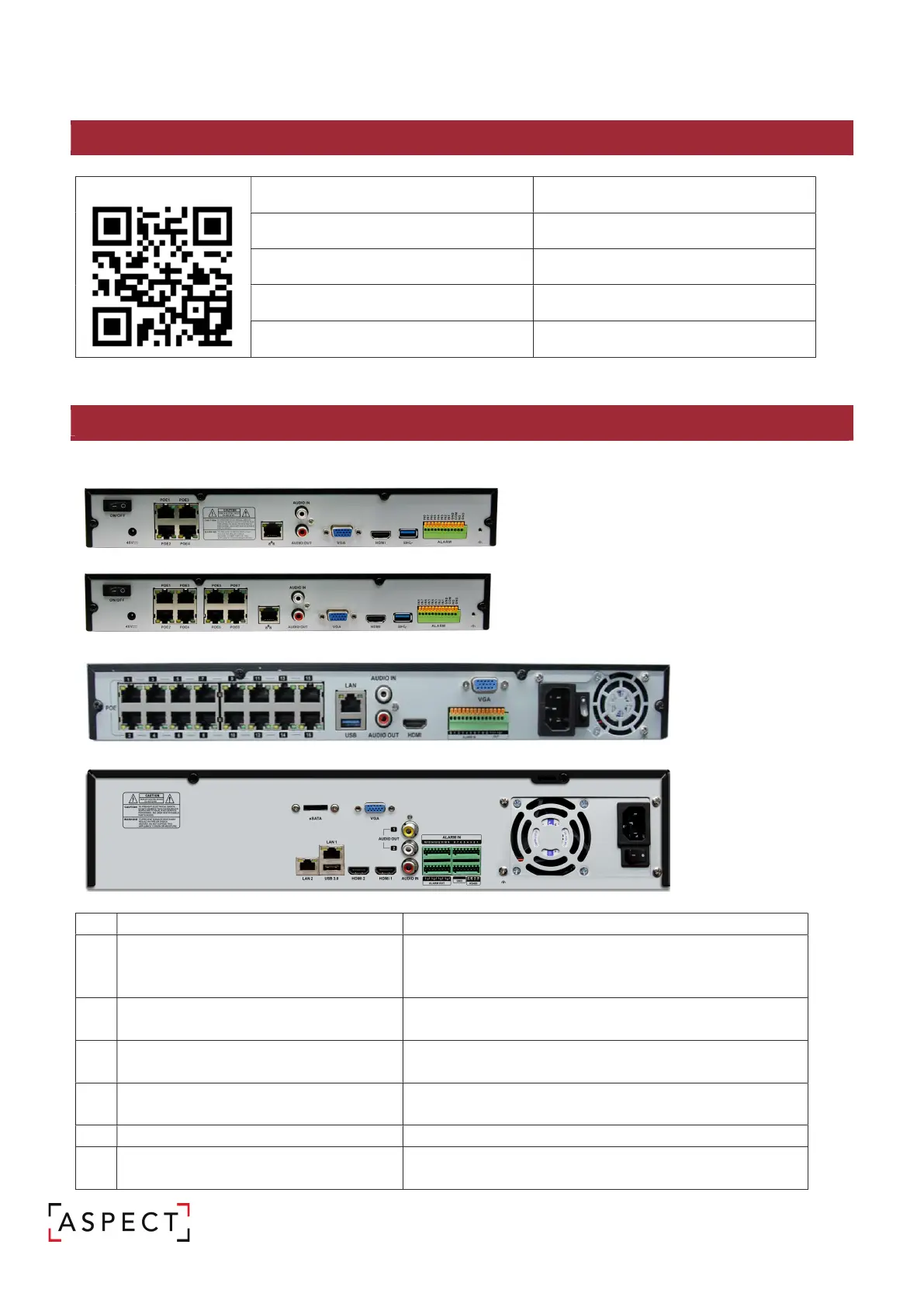
Rear Panel
1 – NVR-8MPOE-4
2 - NVR-8MPOE-8
3 - NVR-12MPOE-16, NVR-12MPOE-32
4 - NVR-12M-64
1
CAM1 – CAM8 (NVR-12MPOE-8)
CAM1 – CAM16 (NVR-12MPOE-16/32)
Ethernet ports used for connecting and providing
power to cameras.
2 ETHERNET/WAN
Network port for connection to the Internet, router, or
network switch (no POE from this port).
3 VGA
VGA display output for connection to a main display
monitor (Max. 1920x1080 display resolution).
4 HDMI
HDMI display output for connection a main display
monitor (Max. 3840x2160 display resolution).
Alarm input terminals (AI1~A16
6 RS-485 (NVR-12M-64)
Communications port for connecting
RS-485 support.


 To Next Page