3333
3333
33
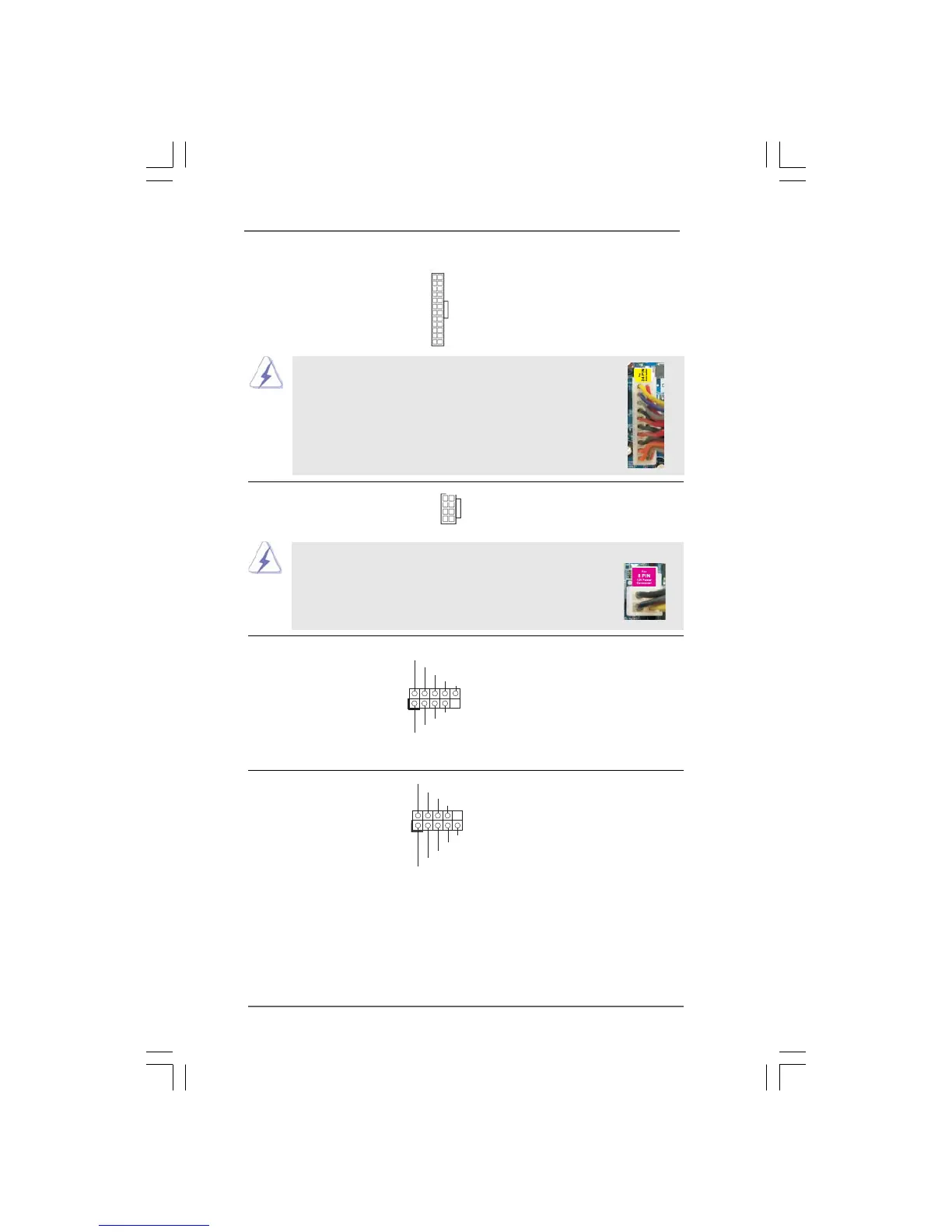
ATX Power Connector Please connect an ATX power
(24-pin ATXPWR1) supply to this connector.
(see p.11/12, No. 8)
a
20-Pin ATX Power Supply Installation
Though this motherboard provides 24-pin ATX power connector,
it can still work if you adopt a traditional 20-pin ATX power supply.
To use the 20-pin ATX power supply, please plug your power
supply along with Pin 1 and Pin 13.
12
1
24
13
12
1
24
13
ATX 12V Power Connector Please connect an ATX 12V
(8-pin ATX12V1) power supply to this connector.
(see p.11, No. 38 or p.12 No. 37)
4 8
1 6
4-Pin ATX 12V Power Supply Installation
Though this motherboard provides 8-pin ATX 12V power
connector, it can still work if you adopt a traditional 4-pin ATX
12V power supply. To use the 4-pin ATX power supply, please
plug your power supply along with Pin 1 and Pin 5.
4 8
1 6
IEEE 1394 Header Besides one default IEEE 1394
(9-pin FRONT_1394) port on the I/O panel, there is one
(see p.11 No. 11) IEEE 1394 header
(FRONT_1394) on this
motherboard. This IEEE 1394
header can support one IEEE
1394 port.
+12V
GND
+12V
1
RXTPB M_0
GND
RXTPAM_0
RXTPB P_0
GND
RXTPAP_0
Serial port Header This COM1 header
(9-pin COM1) supports a serial port module.
(see p.11 No.27 or p.12 No. 26)
CCTS#1
DDSR#1
DDTR#1
RRXD1
DDCD#1
TTXD1
GND
RRTS#1
RRI#1
1



 To Next Page