English
22
5.3 OSD Keys
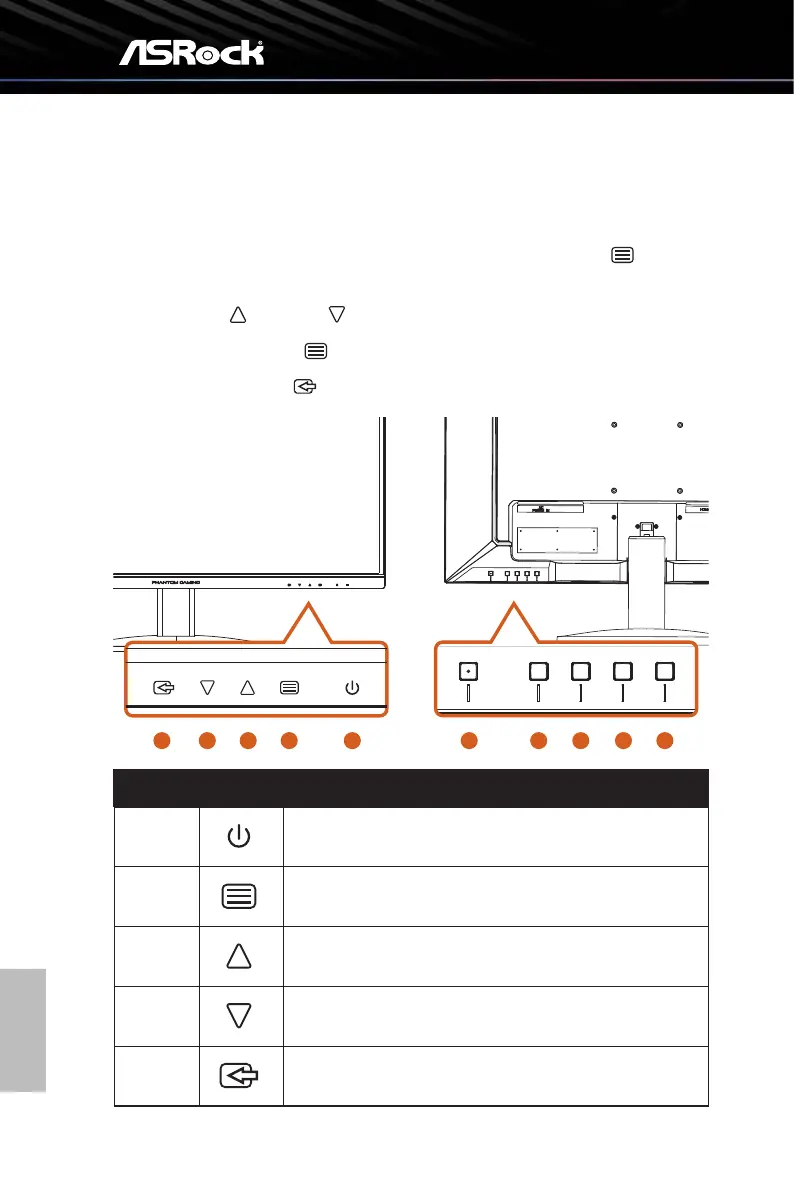
WhentheOSDscreenison,pressthecontrolbuonsontherearsideofthemonitorto
navigatetheOSDmenuandadjustthesengs.
1. ToaccesstheOSD(On-ScreenDisplay)menu,presstheMenubuon to access
the OSD main menu.
2. Use the Up and Down buonstonavigatethroughOSDmenusanditems.
3. PresstheEnterbuon toconrmtheselecon.
4. PresstheExitbuon to exit the current menu.
1
5
3
4
2 1 2 3
4 5
No. Icon OSD Key (When OSD is ON)
1
POWER
Press the power button to turn on/off the monitor.
2
ENTER
Confirm the selection.
3
INCREASE (+)
Move the option upwards or increase the option value.
4
DECREASE (-)
Move the option downwards or decrease the option value.
5
EXIT
Exit the current menu.


 To Next Page