
 Need help?
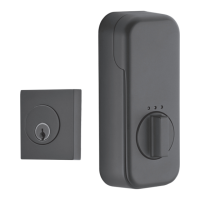
Do you have a question about the Assa Abloy EMTEK EMPowered Motorized Smart Lock Upgrade Deadbolt and is the answer not in the manual?
Guides users through the initial setup process for their August smart home device.
Provides instructions for connecting an Emtek lock that is compatible with the August system.
Details the steps required to configure and install the Emtek smart lock using the August Home app.
 General
| Brand | Assa Abloy EMTEK |
|---|---|
| Model | EMPowered Motorized Smart Lock Upgrade Deadbolt |
| Category | Locks |
| Power Source | Battery |
| Battery Type | 4 AA batteries |
| Connectivity | Bluetooth |
| Key Override | Yes |
| Backset | 2-3/8" or 2-3/4" |
| Compatibility | Compatible with most standard doors |
| Finish Options | Satin Nickel, Oil Rubbed Bronze, Polished Chrome |
| Security Grade | Grade 2 |
| Door Thickness | 1-3/8" to 2-1/4" |
| Locking Mechanism | Deadbolt |



 To Next Page