
 To Next Page
J
Jeffery RodriguezAug 14, 2025
How to fix 'Low Battery' message on Assa Abloy Door lock?
- JJulie GallagherAug 14, 2025
If your Assa Abloy door lock displays a 'Low Battery' message, replace all four batteries with new AA Alkaline batteries.

How to fix 'Low Battery' message on Assa Abloy Door lock?
If your Assa Abloy door lock displays a 'Low Battery' message, replace all four batteries with new AA Alkaline batteries.
How to troubleshoot an Assa Abloy Door lock that doesn't respond when the door is open?
If your Assa Abloy door lock doesn't respond while the door is open and accessible: * Ensure the touchscreen is activated by pressing with your whole hand, covering at least 3 areas. * Verify the touchscreen numbers respond when pressed. * Check that the batteries are correctly installed (polarity) and in good condition; replace if discharged. * Confirm the touchscreen harness is fully connected and not pinched.
What to do if my Assa Abloy Door lock does not respond and the door is locked?
If your Assa Abloy door lock is unresponsive and you're locked out, the batteries may be completely discharged. To regain access, apply a 9V battery to the terminals located below the touchscreen. This will provide backup power.
Why does my Assa Abloy Door lock unit show no reaction and lights dim?
If your Assa Abloy door lock unit shows no reaction and the lights dim, it means the batteries do not have enough power. You should replace the batteries.
What to do if Assa Abloy Door lock says 'Wrong number of digits'?
If your Assa Abloy door lock responds with 'Wrong number of digits' after entering your PIN, it means the digits entered were either incorrect or incomplete. Re-enter the correct code, making sure to follow it with the check key.
Why won't my PIN codes register on Assa Abloy Yale Assure Door locks?
If PIN codes won't register on your Assa Abloy door lock, ensure the following: * PIN codes must be 4 to 8 digits long. * The same PIN code cannot be used for multiple users. * Registration/management of PIN codes is controlled by the Master Code, which must be set first. Contact the Master user. * User codes must be entered within 5 seconds while the touchscreen is active. * Check or gear symbols cannot be part of the PIN code.
What to do if Assa Abloy Door lock chimes but doesn't open?
If your Assa Abloy door lock chimes to indicate code acceptance but the door won't open, check the door gaps for any foreign objects between the door and frame. Also, ensure that the wire harness is firmly connected to the PCB.
What does it mean if my Assa Abloy Door lock displays 'invalid code' or times out?
If your Assa Abloy door lock displays an 'invalid code' error or times out after entering a PIN, it could mean that Lockout Mode is enabled. Only the Master user can enable or disable Lockout Mode, so contact the Master user.
What does the red padlock icon on my Assa Abloy Door lock mean?
If a red padlock icon appears with different tones on your Assa Abloy door lock after entering a PIN, it indicates that the lock may be set to Lockout Mode. Setting and managing Lockout Mode is done through the Master Code only, so you should contact the Master user.
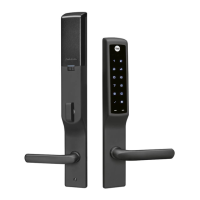
Introduces the Yale Assure Lock for Andersen doors and notes compatibility.
Lists necessary tools and outlines initial steps before installation.
Lists all components and necessary tools for installation.
Steps for preparing the door and removing existing hardware.
Guides on preparing the inside lock and selecting the correct spacer.
Instructions for installing the touchscreen and related parts.
Steps for installing the inside mounting plate and securing the lock.
Instructions for installing the optional Door Position Sensor.
Guides for installing the handle spindle and exterior/interior handles.
Guide to installing an optional Yale Smart Module.
Instructions for inserting batteries, covering the lock, and initial activation.
Identifies key components and their functions on both lock sides.
Essential steps to set up the master PIN for programming.
How to add, delete, and manage user PIN codes.
Instructions for enabling features like Door Position Sensor and resetting.
Detailed walkthrough of the programming menu options.
Solutions for common programming errors and lock malfunctions.
Guidance for resolving physical installation and hardware-related issues.
Statements regarding regulatory compliance and certifications.
 General
| Power | 4 AA Batteries |
|---|---|
| Keyless Entry | Yes |
| Connectivity | Bluetooth |
| Keypad | Yes |
| Mobile App | Yes, Yale Access App |
| Voice Assistant Compatibility | Amazon Alexa, Google Assistant |
| Battery Life | Up to 12 months |
| Finish | Satin Nickel, Polished Brass, Oil Rubbed Bronze |
| Operating Temperature | -4°F to 150°F (-20°C to 66°C) |
| Auto-Lock | Yes |
| Weather Resistance | Yes |