EasyManua.ls Logo

Astralpool 78542 - Page 23

Astralpool 78542
35 pages
Print Icon
To Next Page IconTo Next Page
To Previous Page IconTo Previous Page
Loading...
Operation and use
20
2.4.2
Timing silent function setting
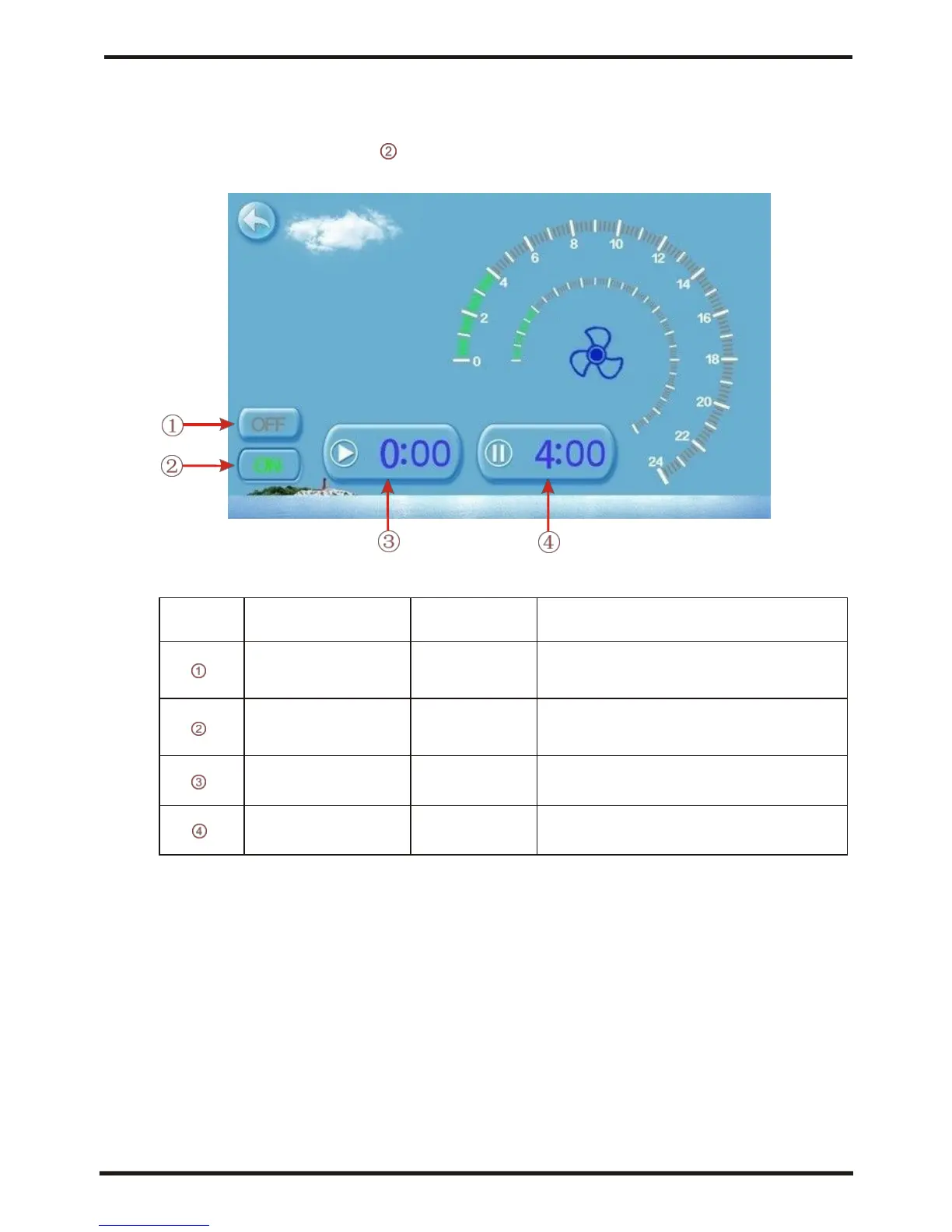
Click timing silent button , and interface displays as follows:
NO.
Name
Colur
Function
Timing silent off
Used: red
Unused:gray
Click to use or unuse timing
off function
Timing silent on
Use:green
Unused:gray
Click to use or unuse timing
on function
Timing silent start t
ime
Click this button to set the timing
silent start time
Timing silent end
time
Click this button to set the timing
silent end time
Start time and end time setting value must be among the range of
0:00-23:00,
and setting value can be precise to hour digit.
For example above, click "ON"to use timing silent,
the unit will start the silent at 0:00 points and end at 4:00;
click "OFF" to unuse the timing silent, but if the unit
is in timing silent mode, it will exit silent timing immediately.


Related product manuals