ASUS WL-167g USB wireless LAN adapter
3-23
3.4 Site Monitor
The Site Monitor utility measures the signal-to-noise (SNR) values of all
available wireless networks. Use this utility to determine the best
placement of access points in a wireless network.
3.4.1 Launching Site Monitor
To launch the Site Monitor:
• Click the Windows
®
Start button,
then select Programs > ASUS
Utility > WLAN Card > Site
Monitor, or
• Right-click the Control Center
icon on the Windows taskbar, then select Site Monitor.
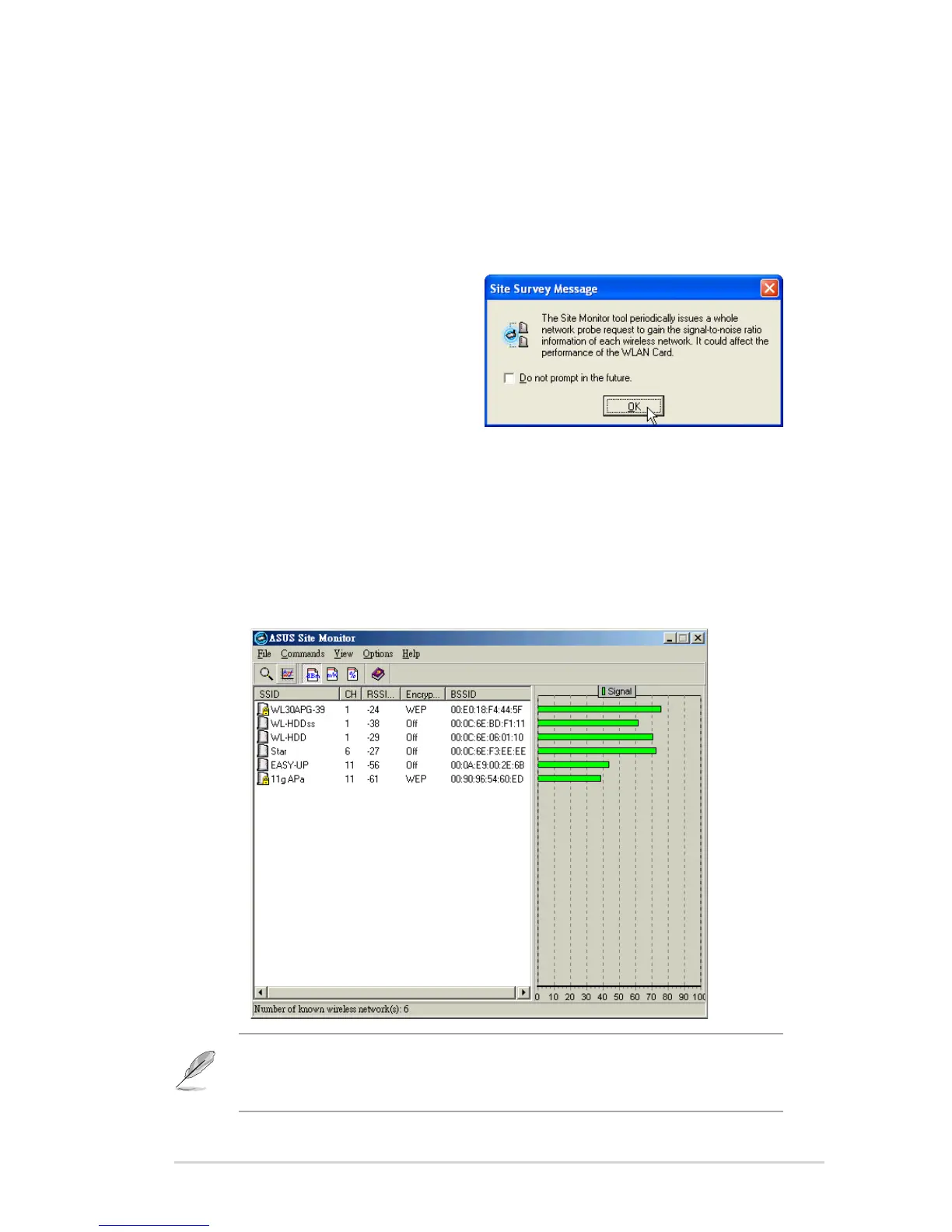
The Site Monitor survey message appears. Click OK.
3.4.2 Site Monitor main window
The Site Monitor main window displays the available wireless connections
and the signal-to-noise (SNR) value of a selected connection.
Some Access Points disable their SSID broadcasting to hide themselves
from “Site Survey” or “Site Monitor”. You may join these APs if you know
their SSID.



 To Next Page