Need help?
Do you have a question about the Asus 54Mbps and is the answer not in the manual?
Information on product usage, modifications, and manufacturer liability.
Guidelines for maintaining compliance with FCC RF exposure.
Statement about the device's low power transmitter and RF signal.
Evaluation under FCC Bulletin OET 65C and compliance with RF exposure limits.
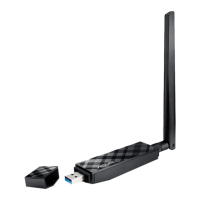
Introduction to the ASUS USB Wireless LAN Adapter.
List of items included in the product package.
Overview of the adapter's technical specifications and capabilities.
Explanation of the Power and Activity LED indicators on the device.
Description of Ad-hoc and Infrastructure network types.
How devices connect directly in an Ad-hoc network.
How devices connect via an access point in Infrastructure mode.
Minimum hardware and software requirements for installation.
Step-by-step guide to install drivers and the device.
Detailed steps to install software from the support CD.
Steps to connect the USB adapter to the computer after driver installation.
Management software for network settings and status monitoring.
Overview of options available via the Control Center icon's right-click menu.
Utility for managing network settings and monitoring.
Explains the meaning of different icons for link quality and connection status.
Details the options found in the Control Center's right-click menu.
Main interface for controlling the adapter and viewing status.
Provides general information like connection status, SSID, MAC address, channel, and data rate.
Shows current TCP/IP configuration details.
Utility to verify network connection by sending ping packets.
Basic tab settings for network type, SSID, channel, and data rate.
Configuration for WEP encryption settings and key assignment.
Displays available wireless networks and their settings.
Shows current connection status with icons for quality.
Tool for setting up and managing network location settings.
Steps to launch the wizard for creating new network configurations.
Option to activate the newly created network configuration.
Steps to modify existing network configurations.
Utility to measure signal-to-noise values for optimal placement.
Steps to monitor connection parameters like SNR and throughput.
Guide for common installation and usage problems.
Steps to verify driver installation and resolve recognition issues.
Instructions to uninstall and reinstall drivers for recognition problems.
Checks for network type, SSID, and encryption settings.
Checks network parameters and proxy settings.
Checks network type, SSID, and encryption for Ad-hoc connections.
Checks encryption, TCP/IP settings, and file sharing.
Tips to improve link quality and signal strength.
Explains the warning for USB 1.1 ports and OS updates.
Notes a limitation with specific USB controllers and drivers.


 To Next Page
 General