2-26
Chapter 2: Hardware information
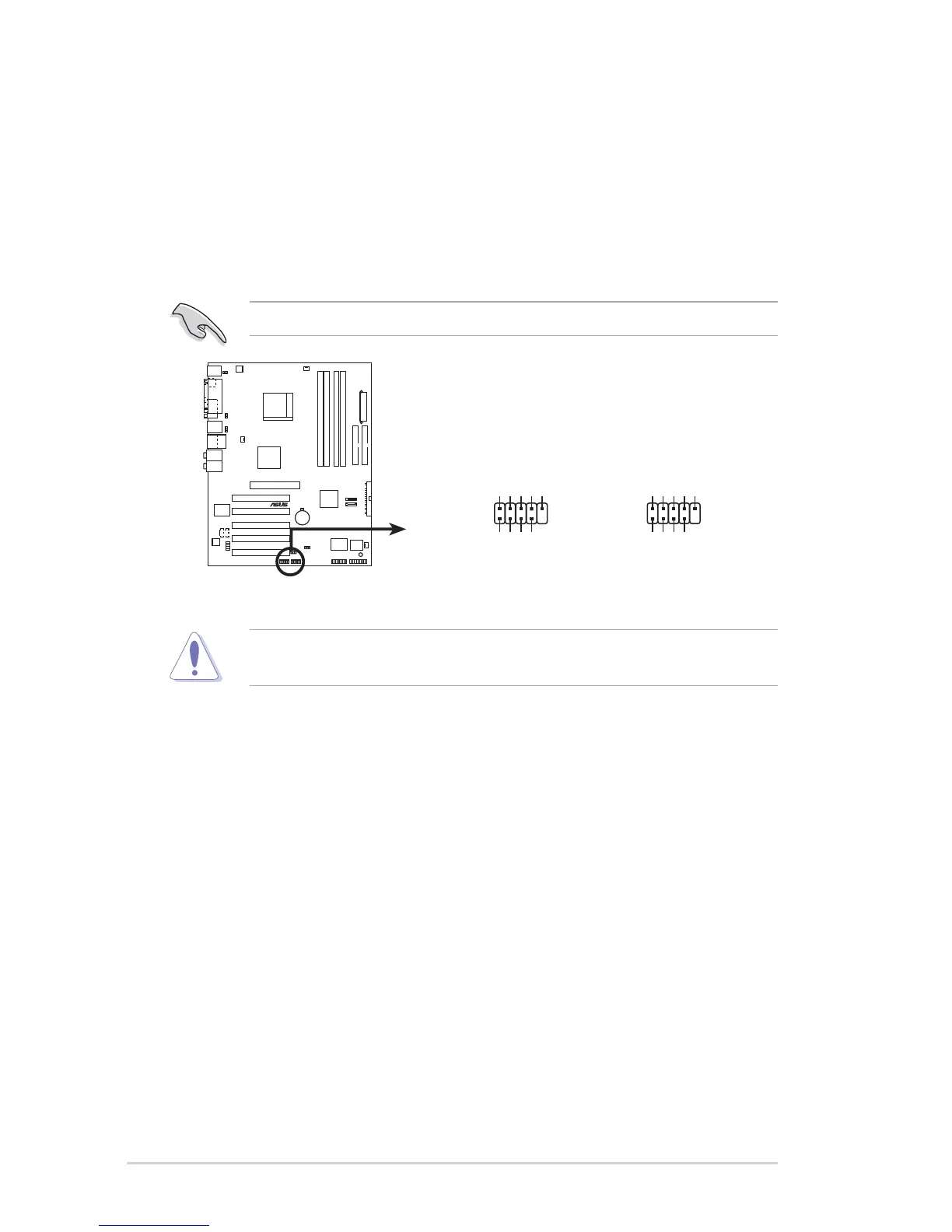
7. USB headers (10-1 pin USB56, USB78)
If the USB ports on the rear panel are inadequate, a USB header is
available for additional USB ports. The USB header complies with USB
2.0 specification that supports up to 480 Mbps connection speed. This
speed advantage over the conventional 12 Mbps on USB 1.1 allows
faster Internet connection, interactive gaming, and simultaneous
running of high-speed peripherals.
You must install the driver before you can use the USB 2.0 capability.
NEVER connect a 1394 cable to any of the USB (blue) connectors.
Doing so will damage the motherboard!
A8V
®
A8V USB 2.0 connectors
USB56
USB+5V
USB_P6-
USB_P6+
GND
NC
USB+5V
USB_P5-
USB_P5+
GND
1
USB78
USB+5V
USB_P8-
USB_P8+
GND
NC
USB+5V
USB_P7-
USB_P7+
GND
1


 To Next Page