ASUS ASMB2ASUS ASMB2
ASUS ASMB2ASUS ASMB2
ASUS ASMB2
3-113-11
3-113-11
3-11
3.1.53.1.5
3.1.53.1.5
3.1.5
Displaying system event logsDisplaying system event logs
Displaying system event logsDisplaying system event logs
Displaying system event logs
The System Event Log (SEL) is a non-volatile storage area where all remote
server system events are stored for real-time tracking or later retrieval.
The ARC application can display system events for efficient remote server
monitoring and troubleshooting.
To display the sytem events:
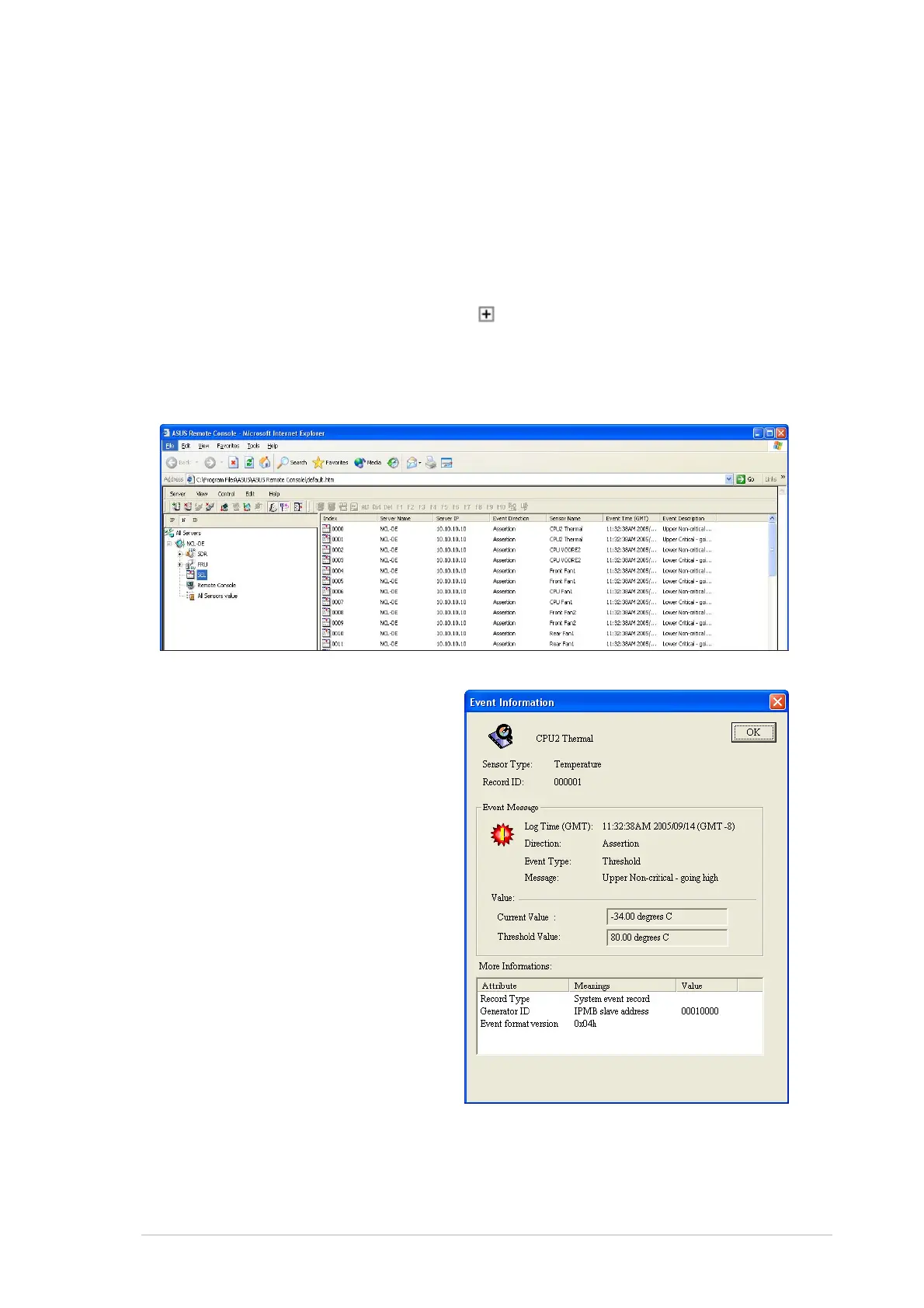
1. From the navigation window, click
before the server connection,
then click
SELSEL
SELSEL
S E L. The status bar displays the progress of the SEL
download. When finished, the Detail/SEL window displays the system
events in chronological order.
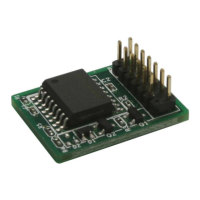
2. Double-click an event to
display an
EventEvent
EventEvent
Event
Information Information
Information Information
Information window.
This window displays the
sensor type and record ID,
event message, current and
threshold values, and other
system event information.
3. Click
OK OK
OK OK
O K to close the window.


 To Next Page