SM.SD.MS-PRO
SM.SD.MS-PRO
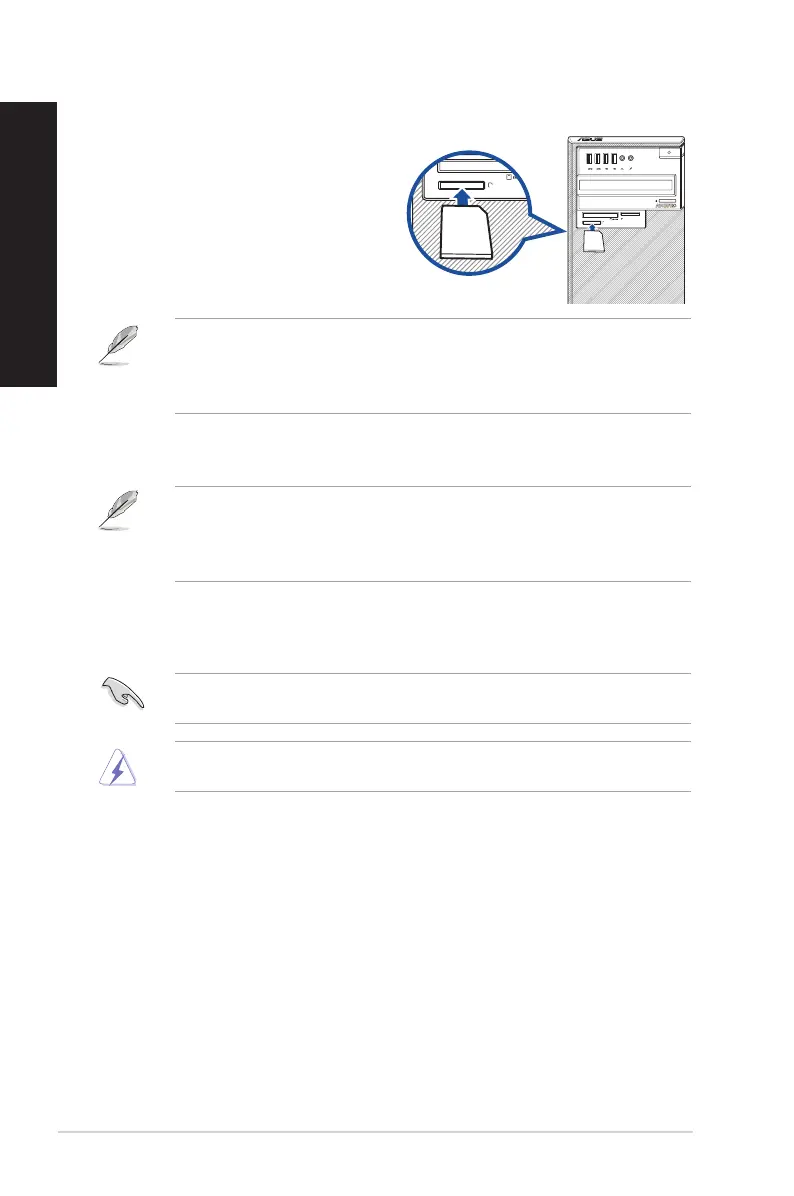
Using the memory card reader
Digital cameras and other digital imaging
devices use memory cards to store digital
picture or media les. The built-in memory card
reader on the front panel of your system allows
you to read from and write to different memory
card drives.
To use the memory card:
1. Insert the memory card into the card slot.
• A memory card is keyed so that it ts in only one direction. DO NOT force a card into a
slot to avoid damaging the card.
• You can place media in one or more of the card slots and use each media
independently. Place only one memory card in a slot at one time.
2. Select a program from the AutoPlay window to access your les.
• On Windows® 10, if AutoPlay is NOT enabled in your computer, click File Explorer
from the Start menu, and then double-click the memory card icon to access the data on
it.
• Each card slot has its own drive icon which is displayed on the File Explorer screen.
3. When nished, right-click the memory card drive icon on the Computer screen, click
Eject, and then remove the card.
Never remove cards while or immediately after reading, copying, formatting, or deleting
data on the card or else data loss may occur.
To prevent data loss, use “Safely Remove Hardware and Eject Media” in the Windows®
notication area before removing the memory card.
40 Chapter 3: Using your computer
ENGLISH
ENGLISH



 To Next Page