18
Mac 10.5.8
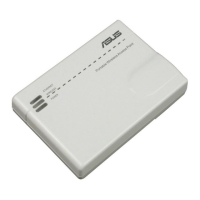
A. Disable the proxy server, if enabled.
1. From the menu bar, click Safari >
Preferences... > Advanced tab.
2. Click Change Settings... in the Proxies eld.
3. From the list of protocols, deselect FTP Proxy
and Web Proxy (HTTP).
4. Click OK when done.
B. Set the TCP/IP settings to automatically
obtain an IP address.
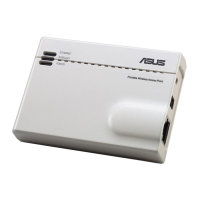
1. Click the Apple icon
> System Preferenc-
es > Network.
2. Select Ethernet and select Using DHCP in
the Congure eld.
3. Click Apply when done.
B. Set the TCP/IP settings to automatically obtain an
IP address.
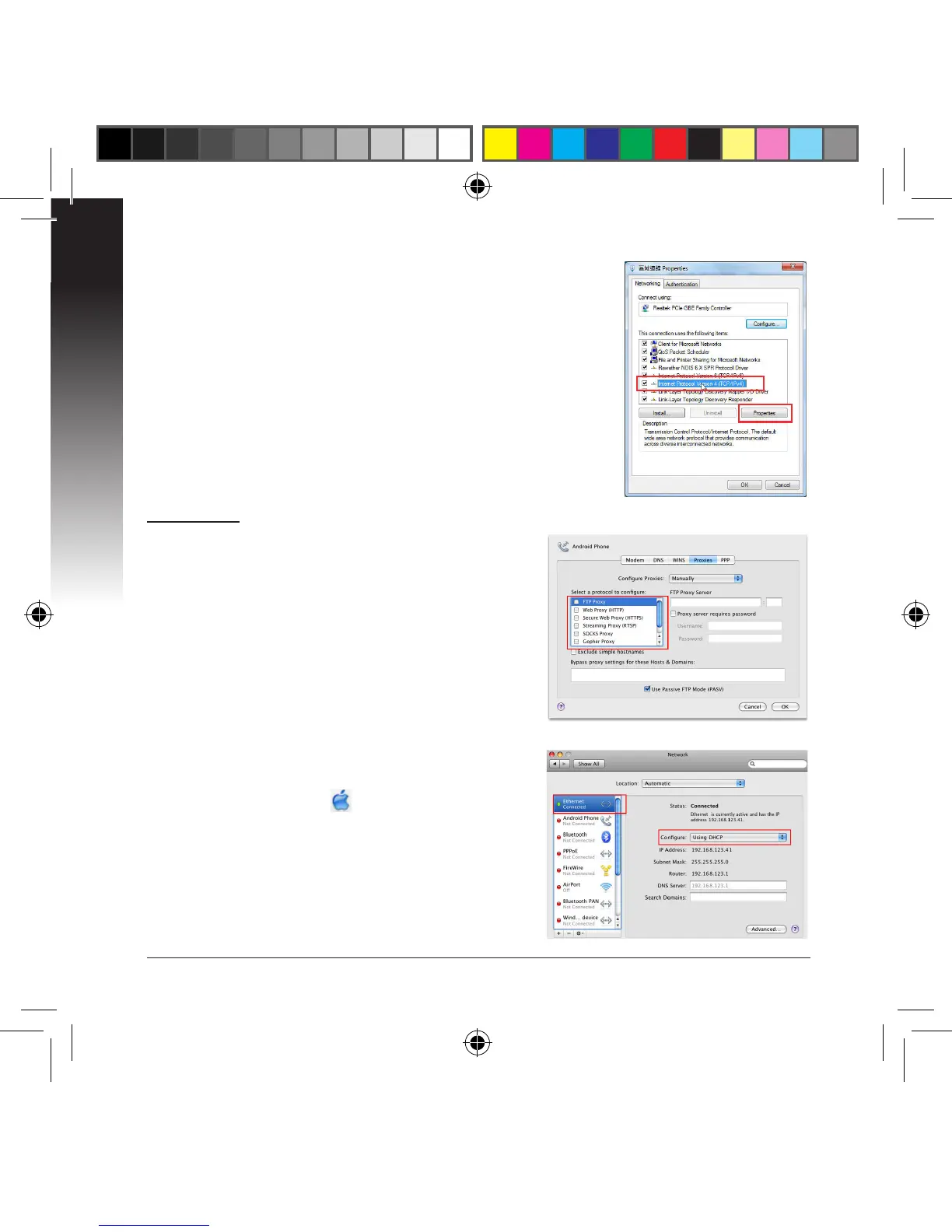
1. Click Start > Control Panel > Network and Internet
> Network and Sharing Center > Manage network
connections.
2. Select Internet Protocol Version 4 (TCP/IPv4), then
click Properties.
3. Tick Obtain an IP address automatically.
4. Click OK when done.


 To Next Page