ASUS H97-PLUS
1-9
• ThedefaultmemoryoperationfrequencyisdependentonitsSerialPresenceDetect
(SPD),whichisthestandardwayofaccessinginformationfromamemorymodule.
Refertosection2.5 Ai Tweaker menuformanualmemoryfrequencyadjustment.
• DuetoIntel
®
chipsetlimitation,DDR31600MHzandhighermemorymodulesonXMP
modewillrunatthemaximumtransferrateofDDR31600MHz.
• Forsystemstability,useamoreefcientmemorycoolingsystemtosupportafull
memoryload(4DIMMs).
• VisittheASUSwebsiteat:www.asus.comforthelatestQVL.
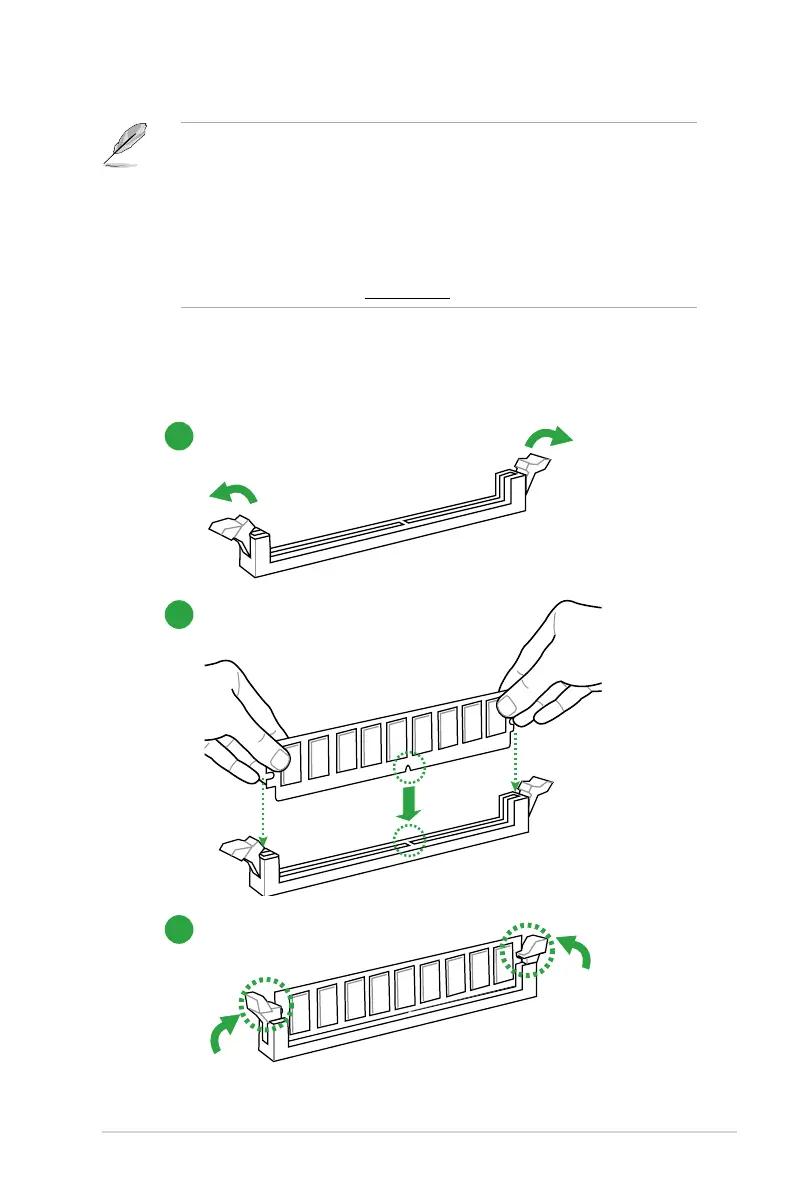
1.4.3 Installing a DIMM
To install a DIMM
1
2
3



 To Next Page