A-4
Notebook PC User Manual
System BIOS Settings
Boot Device
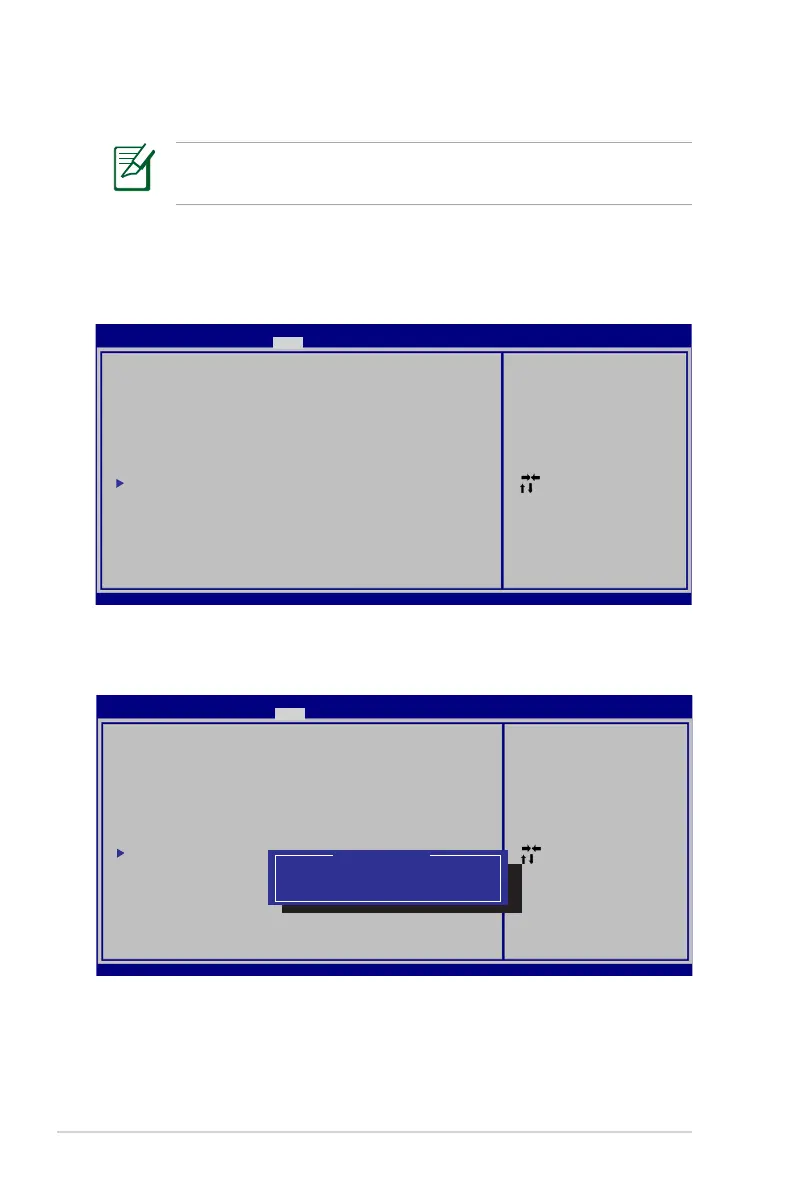
1. On the Boot screen, select Boot Option #1.
: Select Scree n
: Select Item
Enter: Select
+/—: C h ange Opt.
F1: General Help
F9: Optimized Defa u l t s
F10: S a v e ESC: Exit
Version 2.01.12 0 4 . C o pyright (C) 2010 American Megatre n d s , I nc.
Aptio Setup Utility - C o p y r i g ht (C) 2010 American Megatrends, I n c .
Main A d v a n c e d Chipset Boot Security S a v e & Exit
Boot Configu r a t i o n
UEFI Boot [Disabled]
PXE ROM [Disabled]
Boot Option P r i o r i ties
Boot Option # 1 [P0: Hitachi H T S 5 4 5 . ..]
Boot Option # 2 [P0: Hitachi H T S 5 4 5 . ..]
Hard Drive B B S P r iorities
CD/DVD ROM D r i v e B BS Priorities
Delete Boot Op t i o n
Enables/Disable s U E F I boot
from disks.
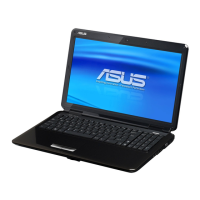
2. Press [Enter] and select a device as the Boot Option #1.
: Select Scree n
: Select Item
Enter: Select
+/—: C h ange Opt.
F1: General Help
F9: Optimized Defa u l t s
F10: S a v e ESC: Exit
Version 2.01.12 0 4 . C o pyright (C) 2010 American Megatre n d s , I nc.
Aptio Setup Utility - C o p y r i g ht (C) 2010 American Megatrends, I n c .
Main A d v a n c e d Chipset Boot Security S a v e & Exit
Boot Configu r a t i o n
UEFI Boot [Disabled]
PXE ROM [Disabled]
Boot Option P r i o r i ties
Boot Option # 1 [P0: Hitachi H T S 5 4 5 . ..]
Boot Option # 2 [P0: Hitachi H T S 5 4 5 . ..]
Hard Drive B B S P r iorities
CD/DVD ROM D r i v e B BS Priorities
Delete Boot Op t i o n
Enables/Disable s Q u i e t Boot
option.
Boot Option #1
P0: Hitachi HT S 5 4 5 0 50B9A300
P1: Hitachi HT S 5 4 5 0 50B9A400
Disabled
The BIOS screens in this section are for reference only. The actual
screens may differ by models and territories.


 To Next Page