Notebook PC User Manual
57
The touchpad responds to movement not to force. There is no need
to tap the surface too hard. Tapping too hard does not increase
the responsiveness of the touchpad. The touchpad responds best
to light pressure.
Caring for the Touchpad
The touchpad is pressure sensitive. If not properly cared for, it can be
easily damaged. Take note of the following precautions.
• Ensurethetouchpaddoesnotcomeintocontactwithdirt,liquidsor
grease.
• Donottouchthetouchpadifyourngersaredirtyorwet.
• Donotrestheavyobjectsonthetouchpadorthetouchpad
buttons.
• Donotscratchthetouchpadwithyourngernailsoranyhard
objects.
Automatic Touchpad Disabling
Windows can automatically disable the Notebook PC’s touchpad
when an external USB mouse is attached.
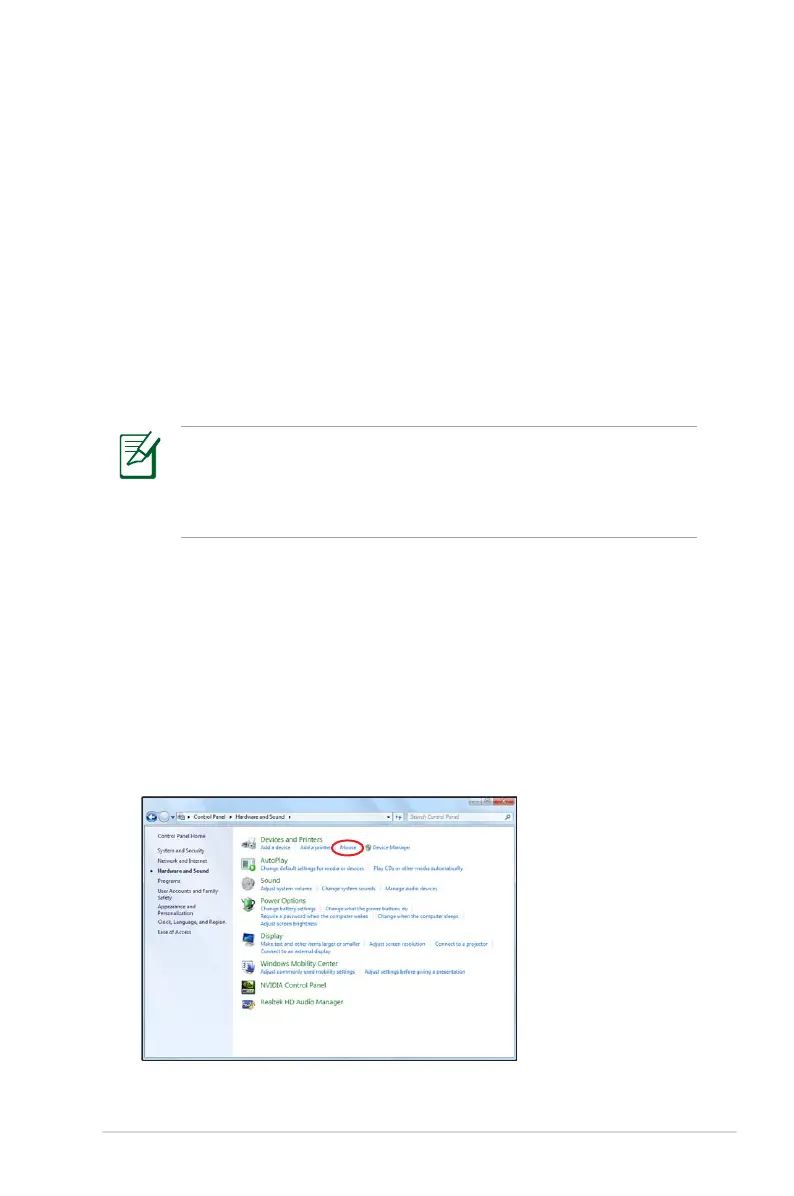
This feature is normally OFF, to turn ON this feature:
1. Select the option in Windows Control Panel > Hardware and
Sound > Mouse.


 To Next Page