Notebook PC User Manual
A-5
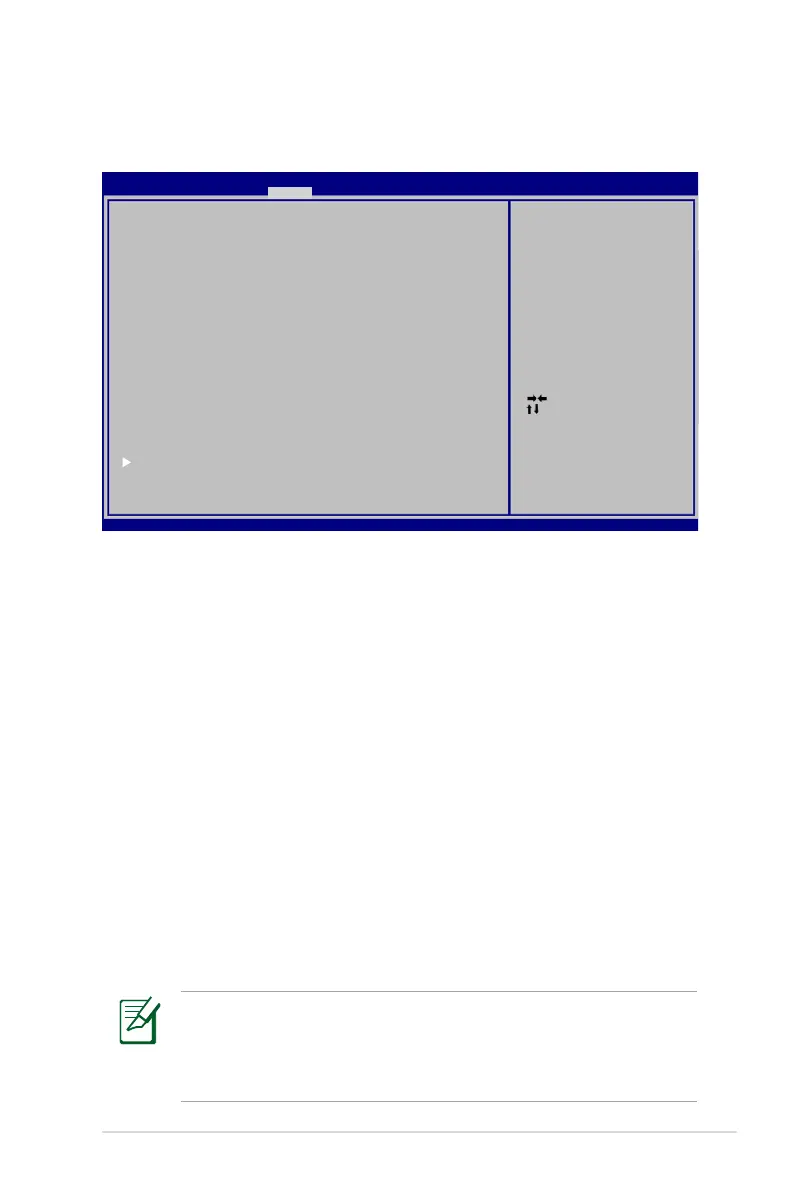
Security Setting
To set the password:
1. On the Security screen, select Setup Administrator Password
or User Password.
2. Type in a password and press [Enter].
3. Re-type to confirm the password and press [Enter].
4. Password is then set.
To clear the password:
1. On the Security screen, select Setup Administrator Password
or User Password.
2. Enter the current password and press [Enter].
3. Leave the Create New Password field blank and press [Enter].
4. Leave the Confirm New Password field blank and press [Enter].
5. Password is then cleared.
: Select Scree n
: Select Item
Enter: Select
+/—: C h ange Opt.
F1: General Help
F2: Previous Values
F9: Optimized Defa u l t s
F10: S a v e ESC: Exit
Version 2.01.12 0 4 . C o pyright (C) 2010 American Megatre n d s , I nc.
Aptio Setup Utility - C o p y r i g ht (C) 2010 American Megatrends, I n c .
Main A d v a n c e d Boot Security Save & E x i t
Password Des c r i p t i on
If ONLY the A d m i n i strator’s password is set,
then this on l y l i m its access to Setup and is
only asked f o r w h e n entering Setup.
If ONLY the u s e r ’ s password is set, then this
is a power o n p a s s word and must be entered to
boot or ente r S e t u p. In Setup, the User will
have Adminis t r a t o r rights.
Administrat o r P a s sword NOT INSTALLED
User Passwo r d S t a tus NOT INSTALLED
Setup admin i s t r a t or password
User Passwo r d
HDD Passwor d S t a t us : NOT INSTALLED
Set Master P a s s w o rd
Set User Pa s s w o r d
I/O Interface S e c u r i ty
Set the system b o o t o rder.
You will be asked to enter the User Password whenever
you power on the Notebook PC (enter BIOS or OS). The
Administrator Password is only asked when you would like to
enter and configure the BIOS settings.



 To Next Page