A-6
Notebook PC User Manual
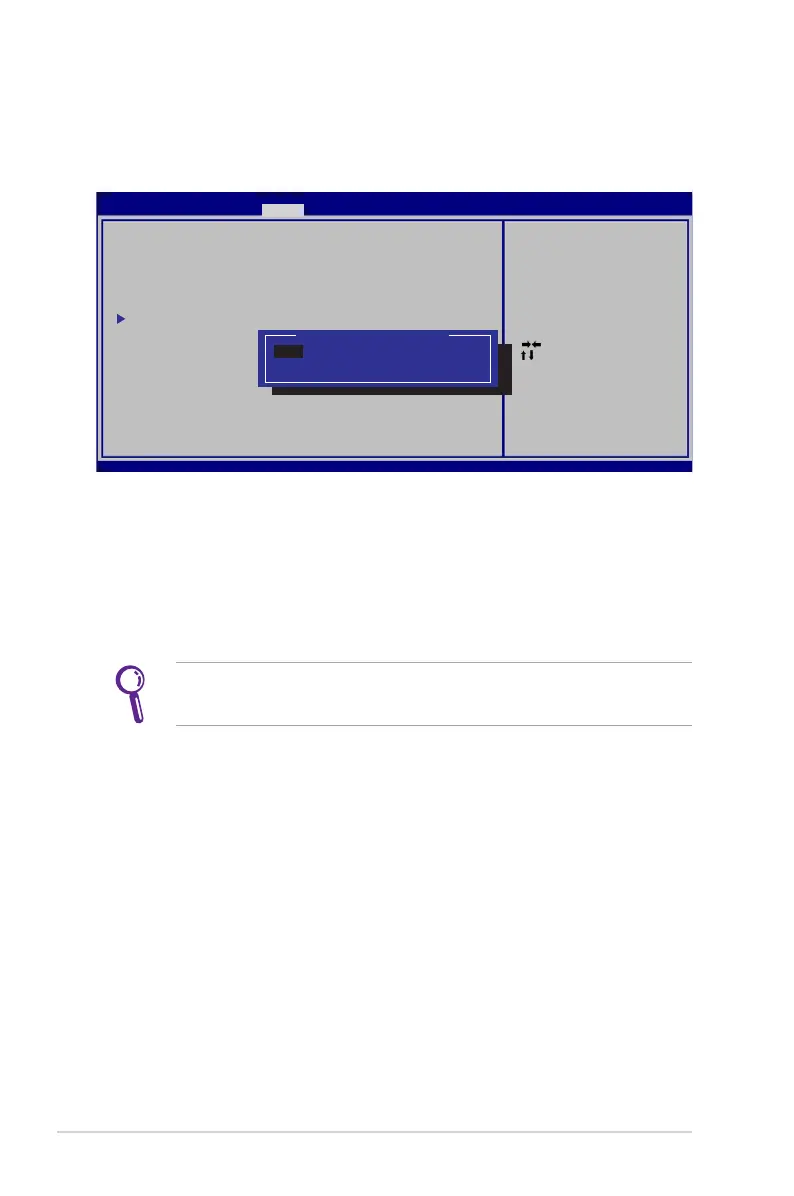
I/O Interface Security
To lock the I/O interface:
1. On the Security screen, select I/O Interface Security.
2. Select an interface you would like to lock and click Lock.
The I/O Interface Security settings can only be altered when
you log in with Administrator privilege.
: Select Scree n
: Select Item
Enter: Select
+/—: C h ange Opt.
F1: General Help
F9: Optimized Defa u l t s
F10: S a v e ESC: Exit
Version 2.01.12 0 4 . C o pyright (C) 2010 American Megatre n d s , I nc.
Aptio Setup Utility - C o p y r i g ht (C) 2010 American Megatrends, I n c .
Security
I/O Interfa c e S e c urity
LAN Network I n t e r face [Unlock]
Wireless Ne t w o r k Interface [Unlock]
HD AUDIO In t e r f a c e [Unlock]
SATA 2nd HD D I n t e rface [Unlock]
SATA ODD In t e r f a c e [Unlock]
USB Interface S e c u r i ty
If Locked, 2nd S A T A H DD will be
disabled.
SATA 2nd HDD In t e r f a c e
Lock
Unlcok



 To Next Page