Notebook PC User Manual
A-7
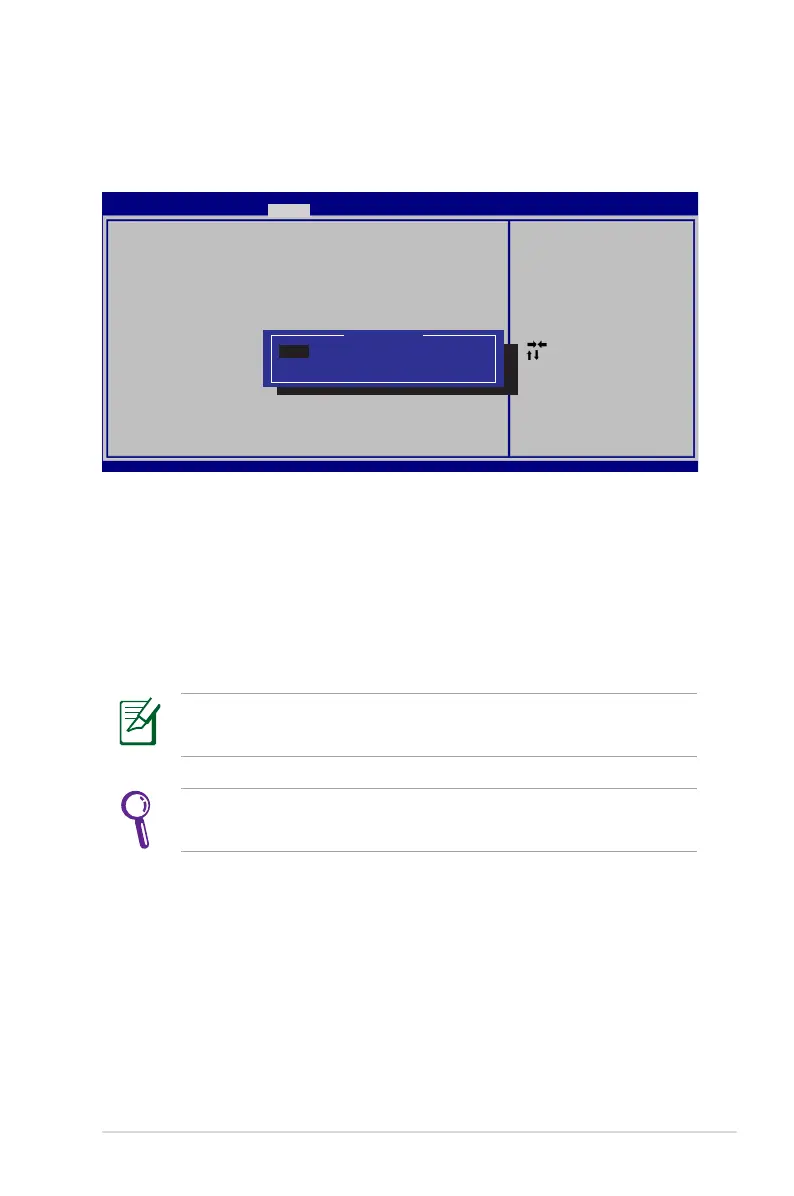
USB Interface Security
To lock the USB interface:
1. On the Security screen, select I/O Interface Security > USB
Interface Security.
2. Select an interface you would like to lock and click Lock.
The USB Interface Security settings can only be altered when
you log in with Administrator privilege.
If you set USB Interface to [Lock], External Ports and CMOS
Camera will be locked and hidden simultaneously.
: Select Scree n
: Select Item
Enter: Select
+/—: C h ange Opt.
F1: General Help
F9: Optimized Defa u l t s
F10: S a v e ESC: Exit
Version 2.01.12 0 4 . C o pyright (C) 2010 American Megatre n d s , I nc.
Aptio Setup Utility - C o p y r i g ht (C) 2010 American Megatrends, I n c .
Security
USB Interfa c e S e c urity
USB Interfa c e [Unlock]
External Po r t s [Unlock]
CMOS Camera [Unlock]
If Locked, all U S B d e vice will
be disabled.
USB Interface
Lock
Unlcok


 To Next Page