26
Getting your device ready
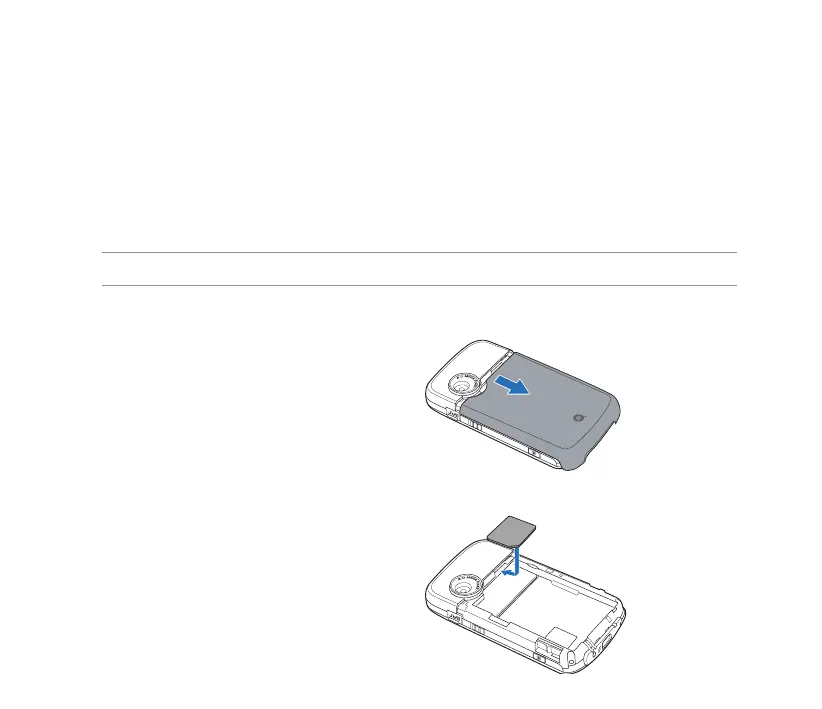
Installing the SIM card and battery
Before you can make a phone call using your device, you need to install a Subscriber Identity Module
(SIM) card. A SIM card contains your phone number, subscriber details, phonebook, and additional phone
memory.
Your device comes with a rechargeable Lithium Ion (Li-Ion) battery.
New batteries come partially discharged and should be fully charged before using them.
1. Remove the battery compartment cover.
CAUTION: Use only an ASUS qualied battery.
To install a SIM card and battery:
2. Insert the SIM card with its gold contacts
facing down and the notched corner oriented
to the lower left corner of the slot.



 To Next Page