91
Managing the Reject list
The Reject list allows you to select telephone numbers you want to reject. Incoming calls that are
in the Reject list will be rejected.
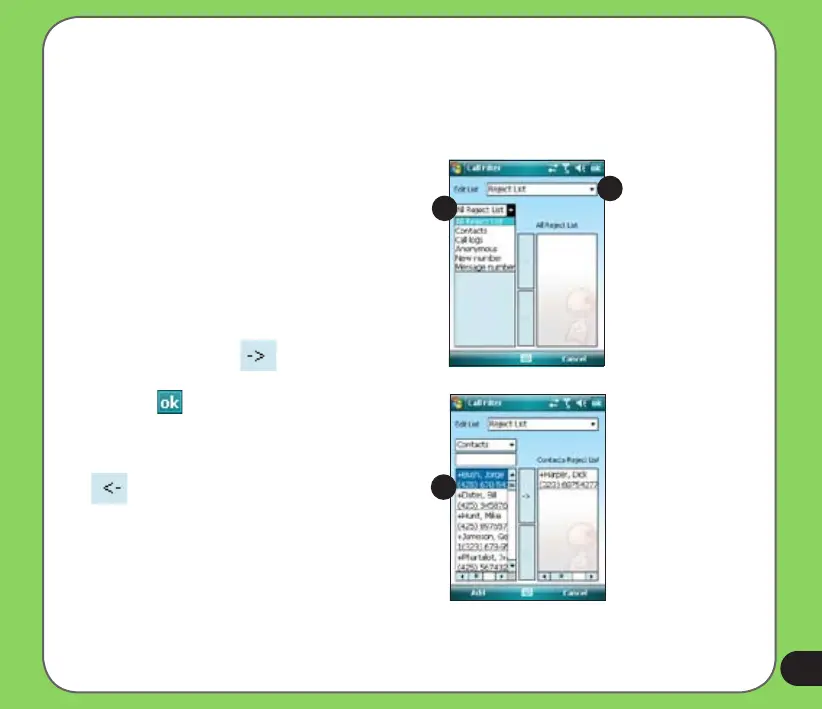
To add items in the Reject list:
1. From the ASUS CallFilter shortcut
menu, select Edit.
2. Select Reject List from Edit List box.
3. Select source of data. You can get data
from your Contacts, Call log, Message
log, or you can key in any anonymous
number.
4. From the list (e.g. Contacts), select an
item then tap Add.
You can also tap to add a new
Reject list item.
5. Click
to exit.
To remove items from the Reject list, select a
contact from the Reject list then tap Remove
or .
3
4
2


 To Next Page