155
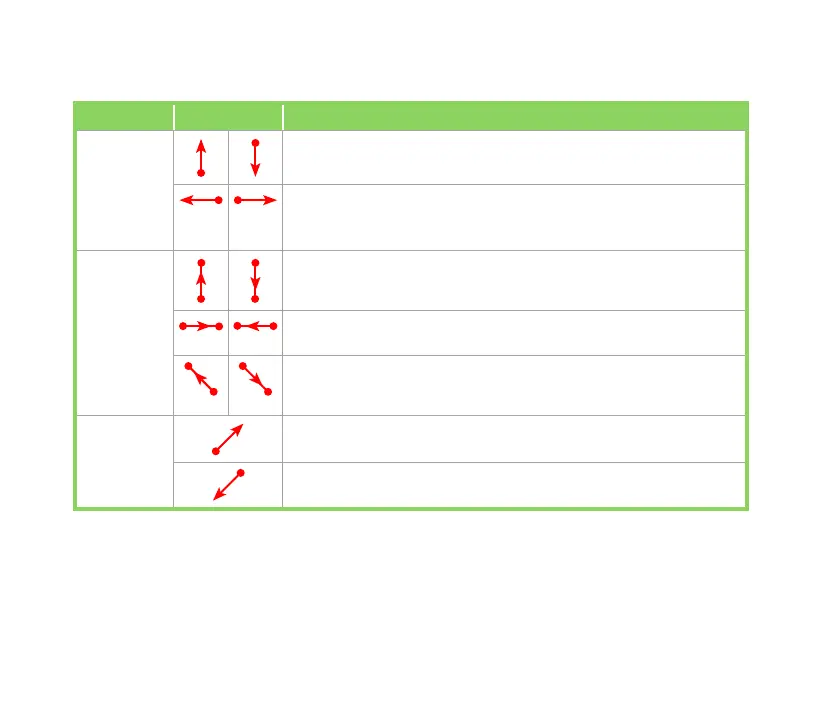
Action Gesture Description
Scroll Scroll up/down: Slide your nger upward/downward on the screen.
NOTE: To stop scrolling, touch the screen with your nger.
View previous page/next page in Internet Explorer and
EziPhoto:
Slide your nger leftward/rightward on the screen.
Pan Pan up/down: Slide your nger upward/downward on the screen
and then stop at your destination.
Pan left/right: Slide your nger leftward/rightward on the screen and
then stop at your destination.
Pan top-left/bottom-right: Slide your nger in a left-slanted upward/
right-slanted bottom direction on the screen and then stop at your
destination.
Zoom Zoom in in Internet Explorer and EziPhoto: Slide your nger in a
right-slanted upward direction on the screen.
Zoom out in Internet Explorer and EziPhoto: Slide your nger in a
left-slanted downward direction on the screen.
Using Gester gestures



 To Next Page