ASUS P5AD2-E PremiumASUS P5AD2-E Premium
ASUS P5AD2-E PremiumASUS P5AD2-E Premium
ASUS P5AD2-E Premium
5-295-29
5-295-29
5-29
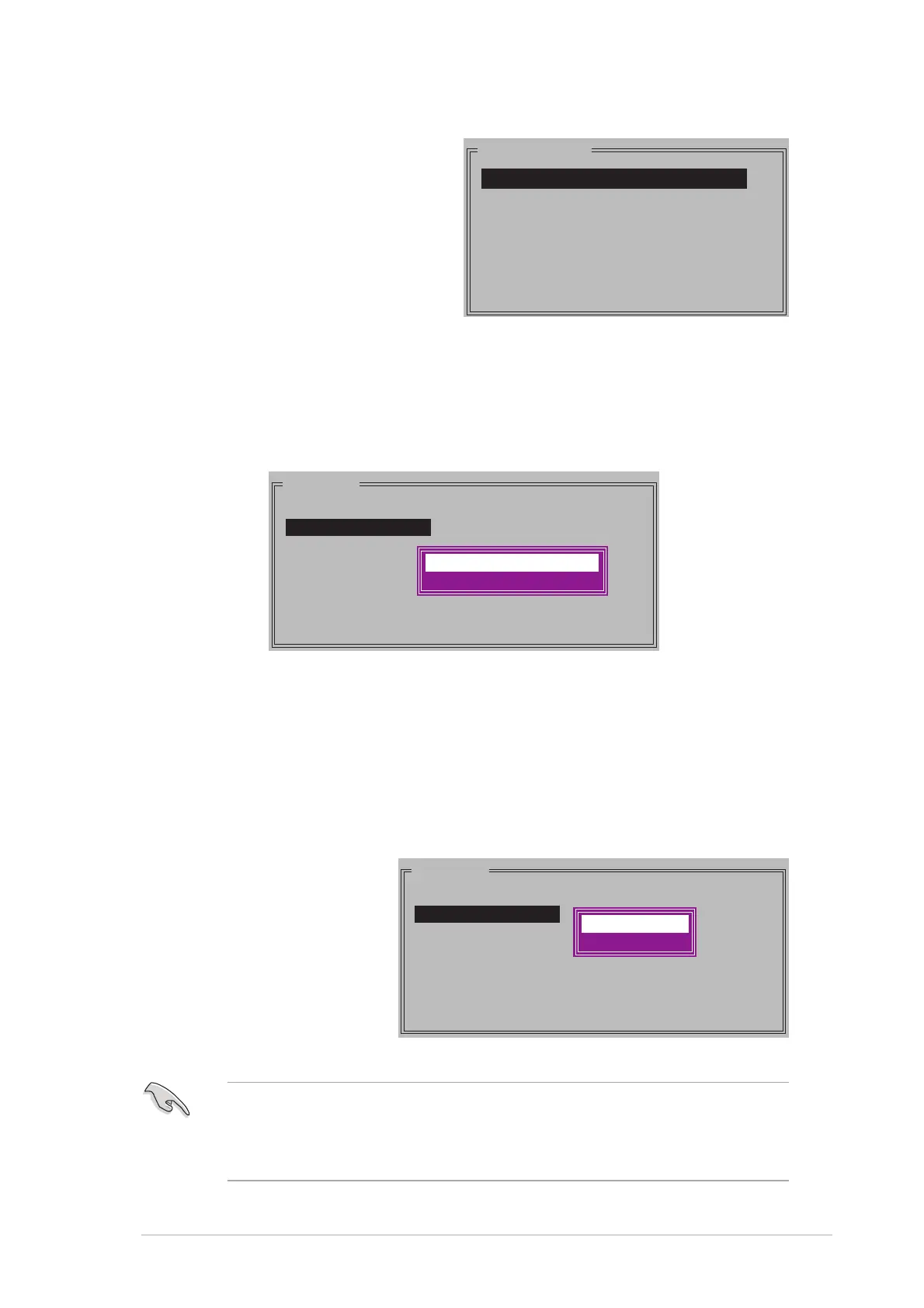
b. When the selection bar
moves to the
PhysicalPhysical
PhysicalPhysical
Physical
Drive Drive
Drive Drive
Drive section, use the up
or down arrow keys to
select the first drive of the
RAID set, then press
<Enter>.
PHYSICAL DRIVE
0 XXXXXXXXXXX XXXXXXMB
1 XXXXXXXXXXX XXXXXXMB
2 XXXXXXXXXXX XXXXXXMB
3 XXXXXXXXXXX XXXXXXMB
c. Repeat step b to set the second, third, and fourth drive. The
number of available drives depends on the installed and enabled
physical drives in the system.
d. After selecting the drives, a pop-up menu appears. Select an
option, then press <Enter>. Refer to the options description below.
MAIN MENU
Auto configuration
Manual configuration
Create with data copy
Create without data copy
Create with data copyCreate with data copy
Create with data copyCreate with data copy
Create with data copy option allows you to copy the current data
from the source drive to the mirror drive. If you select this option, the
RAID 1 set must be repartitioned and reformatted to guarantee the
consistency of its contents. Select this option if you have important
data in your source hard disk drive.
Create without data copy Create without data copy
Create without data copy Create without data copy
Create without data copy option disables the disk copy function
of the mirrored set.
e. If you selected
Create withCreate with
Create withCreate with
Create with
data copydata copy
data copydata copy
data copy, a
pop-up menu
appears. Use the
up or down arrow
keys to select a
copy method, then
press <Enter>.
MAIN MENU
Auto configuration
Manual configuration
online copy
offline copy
The
online copyonline copy
online copyonline copy
online copy option automatically copies the data to the target
drives on the background while writing to the source drives. The
offlineoffline
offlineoffline
offline
copycopy
copycopy
copy option allows you to copy the contents of the source drive to the
target drives immediately.



 To Next Page