ASUS P5N-E SLI 1-31
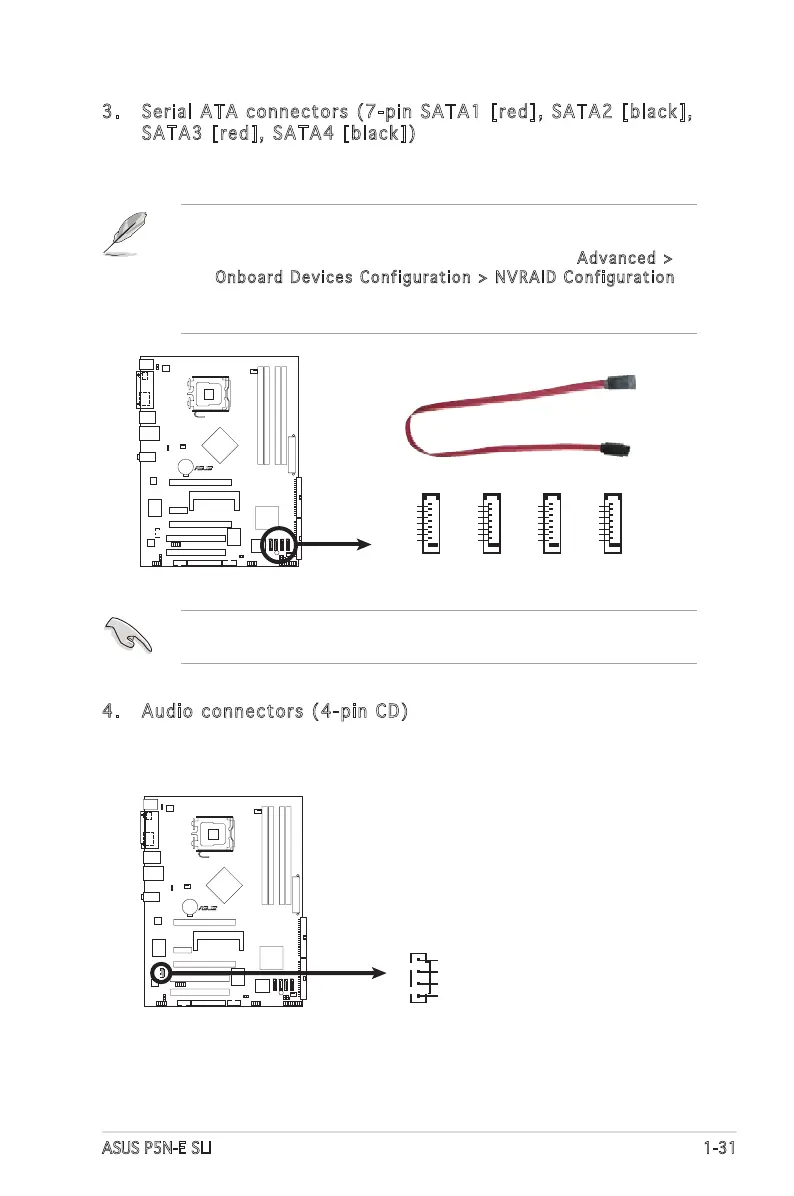
3. Serial ATA connectors (7-pin SATA1 [red], SATA2 [black],
SATA3 [red], SATA4 [black])
These connectors are for the Serial ATA signal cables for Serial ATA
hard disk and optical disk drives.
• These connectors are Disabled by default. If you intend to create
a Serial ATA RAID set using these connectors, enable the First,
Second, Third or Fourth SATA Master RAID items in Advanced >
Onboard Devices Configuration > NVRAID Configuration
of the BIOS. See section “2.4.6 Onboard Devices Conguration” on
page 2-30 for details.
These connectors support Native Command Queuing (NCQ), Power
Management (PM) Implementation Algorithm, Hot Swap and smart setup.
4. Audio connectors (4-pin CD)
These connectors allow you to receive stereo audio input from sound
sources such as a CD-ROM, TV-tuner, or MPEG card.








 To Next Page