ASUS P5N-E SLI 2-31
F1:Help
↑↓
: Select Item -/+: Change Value F5: Setup Defaults
ESC: Exit
→←
: Select Menu Enter: Select Sub-menu F10: Save and Exit
Select Menu
Item Specic Help
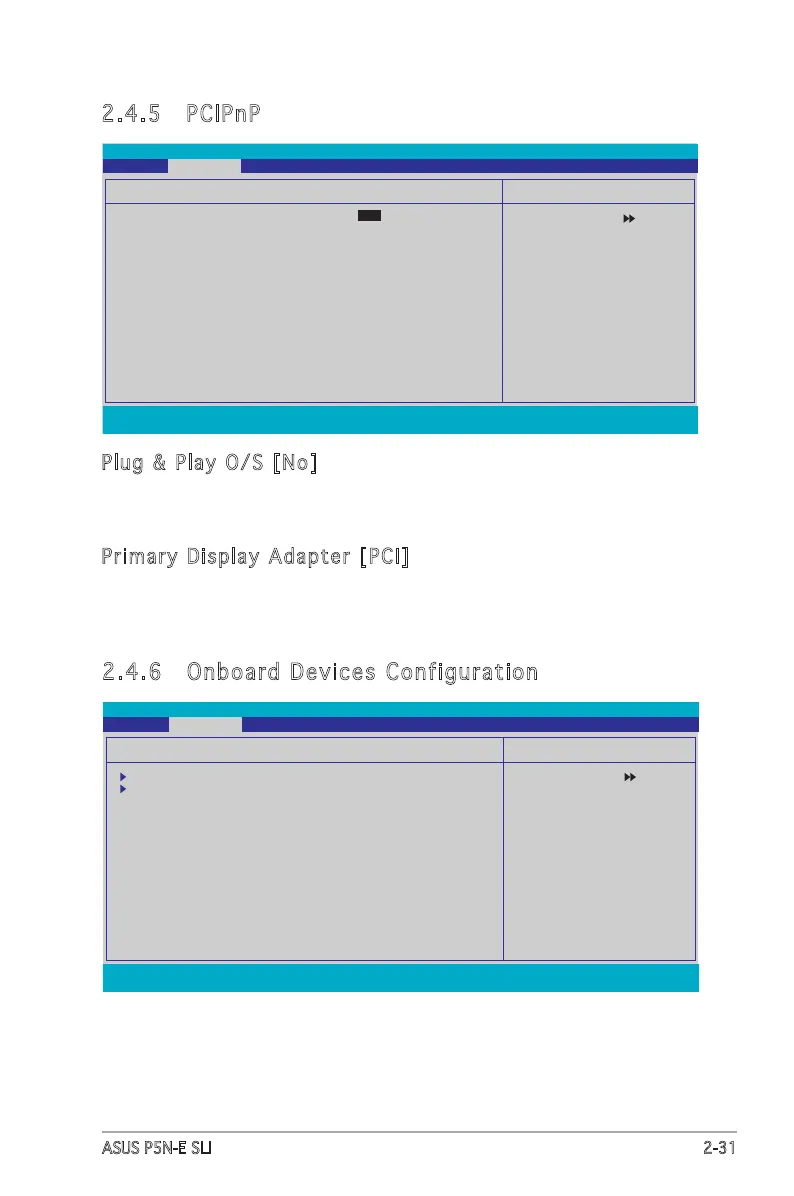
PCIPnP
Plug & Play O/S [No
Primary Display Adapter [PCI]
Phoenix-Award BIOS CMOS Setup Utility
Advanced
2.4.5 PCIPnP
Plug & Play O/S [No]
Selects the plug and play O/S to operate system.
Conguration options: [No] [Yes]
Primary Display Adapter [PCI]
Allows you to set which graphics controller to use as primary boot device.
Conguration options: [PCI] [PCI-E]
F1:Help
↑↓
: Select Item -/+: Change Value F5: Setup Defaults
ESC: Exit
→←
: Select Menu Enter: Select Sub-menu F10: Save and Exit
Select Menu
Item Specic Help
Onboard Device Conguration
IDE Function Setup
NVRAID Conguration
HD Audio [Enabled]
Front Panel Support Type [AC97]
Onboard nVidia LAN [Enabled]
Onboard LAN Boot ROM [Disabled]
Onboard 1394 [Enabled]
JMicron SATA controller [Enabled]
Serial Port1 Address [3F8/IRQ4]
Parallel Port Address [378/IRQ7]
Parallel Port Mode [EPP]
x ECP Mode Use DMA [3]
Phoenix-Award BIOS CMOS Setup Utility
Advanced
2.4.6 Onboard Devices Configuration








 To Next Page