ASUS P5N-E SLI 2-45
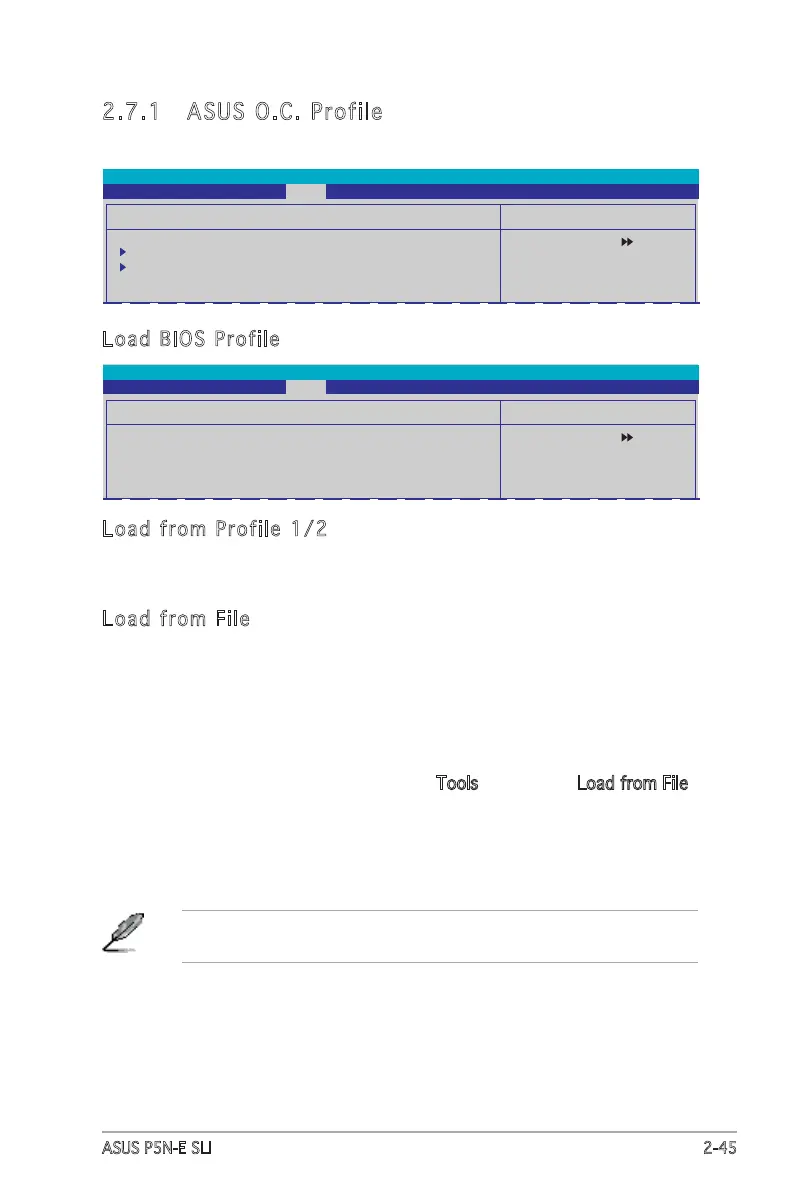
2.7.1 ASUS O.C. Profile
This item allows you to store or load multiple BIOS settings.
Select Menu
Item Specic Help
Press [Enter] to select.
ASUS O.C. Prole
Load BIOS Prole
Save BIOS Prole
Phoenix-Award BIOS CMOS Setup Utility
Tools
Select Menu
Item Specic Help
Load BIOS Prole from
Prole 1.
Load BIOS Prole
Load from Prole 1
Load from Prole 2
Load from File
Phoenix-Award BIOS CMOS Setup Utility
Tools
Load BIOS Profile
Load from Profile 1/2
Allows you to load the previous BIOS settings saved in the BIOS Flash.
Press <Enter> to load the le.
Load from File
Allows you to load the previous BIOS le saved in the hard disk, oppy disk,
or USB ash disk with a FAT32/16/12 format.
To load the BIOS le:
1. Insert the storage device that contains the “xxx.CMO” BIOS prole.
2. Turn on the system.
3. Enter BIOS setup program. Go to Tools then select Load from File
and press <Enter>.
4. Press <Tab> to select the drive with the BIOS prole then press
<Enter>to load le.
5. Follow message screen when loading is nished.
Update only a BIOS le coming from the same memory/CPU
conguration and BIOS version.








 To Next Page