ASUS P5N-E SLI 2-27
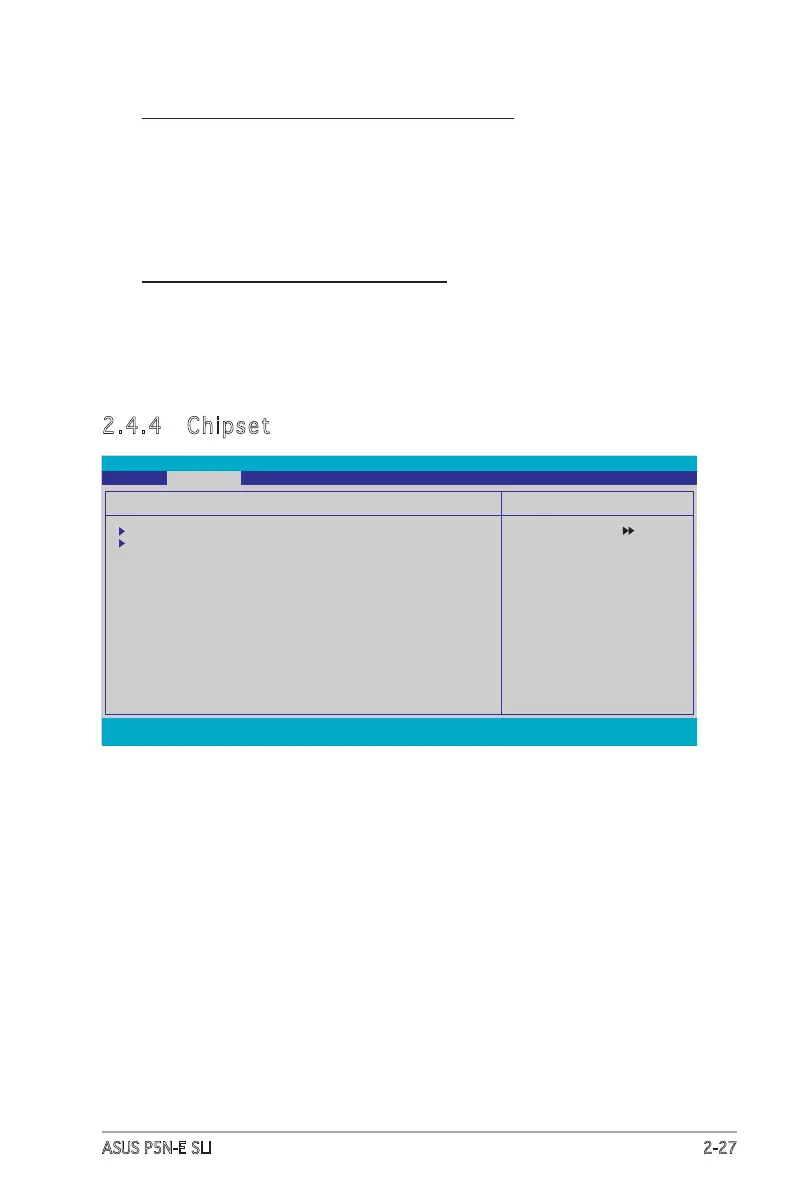
2.4.4 Chipset
F1:Help
↑↓
: Select Item -/+: Change Value F5: Setup Defaults
ESC: Exit
→←
: Select Menu Enter: Select Sub-menu F10: Save and Exit
Select Menu
Item Specic Help
Press [Enter] to set.
Chipset
Memory Timing Setting
Spread Spectrum Control
SLI Broadcast Aperture [Disabled]
LDT Frequency [5x]
Phoenix-Award BIOS CMOS Setup Utility
Advanced
Enhanced Intel SpeedStep(tm) Tech. [Disabled]
Allows you to use the Enhanced Intel SpeedStep
®
Technology. When
set to [Auto], you can adjust the system power settings in the
operation system to use the EIST feature. Set this item to [Disabled]
if you do not want to use the EIST.
Conguration options: [Disabled] [Enabled]
Hyper-Threading Technology [Enabled]
Enables or disables the Intel
®
Hyper-Threading Technology feature.
This item appears only when you install a Hyper-Treading CPU.
Conguration options: [Disabled] [Enabled]








 To Next Page